Finding reliable ways to connect legacy gaming consoles, DVD players, and other analog devices to modern displays can be challenging. This guide highlights five high-quality component-to-HDMI and RCA-to-HDMI solutions that convert YPbPr, RCA, and composite signals to HDMI without compromising sound or video clarity. Each option supports common HD resolutions and serves different needs—from simple passthrough to integrated scaling.
style=”font-weight:bold;”>Summary of Selected Products
| Product | Brand | Key Benefit | Resolution Support | Includes Cables |
|---|---|---|---|---|
| Portta Component to HDMI Converter with HDMI Cable | Portta | Solid analog-to-HDMI conversion with included HDMI cable | 480i–1080p | Yes |
| Portta Component to HDMI Converter | Portta | Compact, affordable YPbPr to HDMI adapter | 480i–1080p | No (cables may be separate) |
| HD Retrovision Premium YPbPr Component Video Cable | HD Retrovision | Premium, shielded PS2/PS3 component cable for best image quality | Up to 1080p | Yes (cable included in some packs) |
| ABLEWE RCA to HDMI, AV to HDMI Converter | ABLEWE | Plug-and-play RCA to HDMI with wide format compatibility | 720p/1080p | Yes |
| Tengchi RCA to HDMI Converter | Tengchi | Easy RCA-to-HDMI for legacy devices | 1080p maximum | No (power via USB included separately) |
Below, each product is explored with practical details to help you decide which adapter best fits your setup, whether you’re connecting a PS2, PS3, or an older Blu-ray player to a modern TV.
Portta Component to HDMI Converter With HDMI Cable

The Portta device converts analog YPbPr video and R/L audio into a single HDMI output. It supports a wide range of resolutions from 480i up to 1080p and adheres to HDMI 1.3. It is important to note that the unit is designed for forward conversion only, meaning it cannot convert HDMI input to component output. This option emphasizes straightforward, reliable performance with 2-channel LPCM audio and minimal signal distortion due to its 165MHz/1.65Gbps per channel bandwidth.
Portta Component to HDMI Converter, YPbPr to HDMI

This converter also handles analog YPbPr to HDMI but emphasizes compatibility with various HDMI and Component sources. While it lacks an internal scaler, it supports standard high-definition formats and ensures clean audio/video transmission. The device is intended for users who want a simple, cost-effective way to connect older consoles to modern displays without built-in upscaling features.
HD Retrovision Premium YPbPr Component Cable for PS2/PS3

HD Retrovision offers premium component cables designed for PlayStation 2 and PlayStation 3, focusing on shielding and high-quality connectors to minimize interference. These cables are engineered to preserve color accuracy and detail, delivering reliable analog video for older systems. They’re a strong choice when a dedicated component cable is preferred over an adapter alone, particularly for gamers who seek authentic image fidelity with classic hardware.
ABLEWE RCA to HDMI, AV to HDMI Converter

ABLEWE’s RCA to HDMI converter provides a plug-and-play solution for composite input (yellow, white, red) to HDMI output. It supports 720p and 1080p, and is compatible with PAL, NTSC, SECAM formats. A USB power connection is required during operation. This option is ideal for users who want a simple, universally compatible adapter that can be used with TVs, PCs, Blu-ray players, and legacy consoles.
Tengchi RCA to HDMI Converter, 1080P
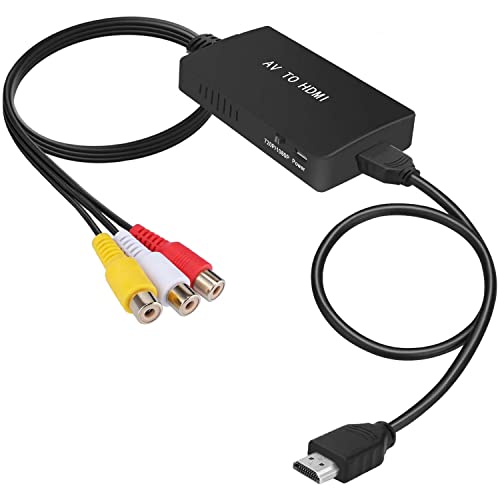
Tengchi’s RCA-to-HDMI converter offers a straightforward approach to converting composite inputs to HDMI 1080p. It highlights easy plug-and-play use and a USB-powered design. This option suits setups where a compact and simple converter is preferred, especially when upgrading older AV gear to modern displays that still rely on RCA outputs.
Buying Guide: Key Considerations for Component and RCA to HDMI Upgrades
- Signal direction: Check whether the device is a true one-way converter (analog to HDMI) or a bi-directional scaler. Most component/RCA-to-HDMI adapters are one-way, so plan accordingly.
- Resolution and scaling: Some adapters support 720p and 1080p without scaling, while others include built-in scalers. If your display requires a specific resolution, choose a model with appropriate capabilities or accept native pass-through.
- Audio handling: Ensure the unit supports LPCM or other compatible audio formats. If your setup uses stereo audio, confirm that R/L channels are preserved during conversion.
- Cable completeness: Some packages include HDMI and component cables, while others require you to supply those separately. Consider the total cost of ownership and clutter in your setup.
- Power requirements: Many adapters use USB power. Confirm you have a convenient power source and USB cable length to avoid power issues during operation.
- Device compatibility: Verify compatibility with your legacy devices (PS2/PS3, Blu-ray players, STBs, VCRs) and your modern TV. Some devices perform better with higher-quality component cables rather than a simple adapter.
- Build quality and shielding: Premium cables (like HD Retrovision) can reduce interference and provide crisper color, particularly on long runs or in environments with electrical noise.
- Future-proofing: If you anticipate upgrading your display or adding more legacy gear, consider models with robust support and reliable third-party reviews.
- Warranty and support: Look for sellers offering return policies and clear customer support to resolve setup issues quickly.
When choosing among these options, align the product capabilities with your equipment and viewing preferences. For PS2/PS3 users seeking the best possible analog image, a high-quality component cable combined with a reliable converter can yield a noticeably crisper picture and accurate color reproduction. For casual setups, plug-and-play RCA adapters provide a simple bridge between old gear and new TVs, without requiring complex configurations.