When solid-state drives and hard disk drives push data quickly, heat can become a bottleneck. A purpose-built hard drive enclosure with an integrated cooling fan helps maintain performance and reliability by dissipating heat during long transfers or heavy workloads. This guide highlights five top-rated fan-equipped enclosures, showing how each model handles cooling, compatibility, setup, and expandability for American users.
Summary of chosen products
| Product | Brand | Drive Type Support | Key Cooling Feature |
|---|---|---|---|
| SABRENT USB 3.0 to SATA External Hard Drive Docking Station with Built-in Cooling Fan | SABRENT | 2.5″ / 3.5″ SATA HDD/SSD | Built-in cooling fan |
| FIDECO Hard Drive Enclosure with Cooling Fan | FIDECO | 2.5″ / 3.5″ SATA HDD/SSD | Active cooling fan |
| CENMATE 3 Bay Hard Drive Enclosure with Cooling Fan | cenmate | 2.5″ / 3.5″ HDD/SSD | 2.0 inch cooling fan |
| Vantec NexStar HX 3.5″ Enclosure with Fan | Vantec | 3.5″ SATA HDD | Cooling fan with vented design |
| CENMATE Aluminum Dual Bay 10Gbps Enclosure with Cooling Fan | cenmate | 2.5″ / 3.5″ HDD/SSD | Aluminum chassis + cooling fan |
SABRENT USB 3.0 To SATA External Docking Station With Built-In Cooling Fan
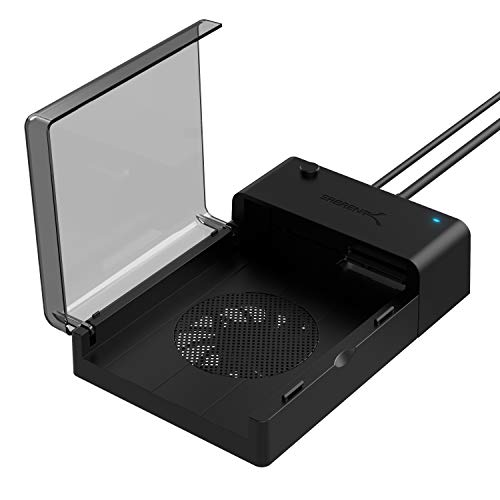
The SABRENT EC-DFFN docking station supports standard desktop 2.5″ and 3.5″ SATA drives, enabling easy plug-and-play use. A built-in cooling fan helps keep drives cool during extended transfers, reducing thermal throttling. The design supports hot-swapping and requires no drivers, making it a straightforward option for expanding external storage or performing data backups.
FIDECO Hard Drive Enclosure With Cooling Fan For 2.5″/3.5″ SATA HDD/SSD

The FIDECO enclosure accommodates both 2.5″ and 3.5″ SATA drives and includes an integrated cooling fan for thermal management. It uses a USB 3.0 interface (up to 5 Gbps) and is backward compatible with USB 2.0. The enclosure supports UASP for faster data transfer, benefiting transfer-heavy workloads and large file operations without added software.
CENMATE 3 Bay Hard Drive Enclosure With Cooling Fan

This 3-bay enclosure supports 2.5″ and 3.5″ HDDs and SSDs with a capacity ceiling up to 20TB per drive. It includes a 2″ cooling fan housed in an aluminum-alloy chassis to reduce heat buildup. USB 3.0 connectivity with a GL3510+ASM1153E controller enables transfer speeds up to 5 Gbps, delivering quick backups and large file transfers while maintaining cooler operation.
Vantec NexStar HX 3.5″ SATA III Enclosure With Fan

The Vantec NexStar HX series focuses on large-capacity drives with a built-in cooling fan and venting to exhaust hot air. It supports SATA III up to 6 Gbps and is compatible with Windows, macOS, and Linux environments. The enclosure is designed for easy setup, with plug-and-play operation and no separate drivers required, making it suitable for desktop storage expansion and media libraries.
Inateck RGB 3.5-Inch Hard Drive Enclosure With USB 3.0

The Inateck FE3003 enclosure offers broad compatibility with 2.5″ and 3.5″ SATA HDDs and SSDs, up to 20TB. It features a USB 3.0 interface and a visually dynamic RGB lighting effect for an engaging workstation aesthetic. While primarily marketed for style, its enclosure design includes adequate cooling considerations for steady operation during extended use and large transfers.
Buying Guide: Key Purchase Considerations And Comparisons
When selecting a fan-equipped hard drive enclosure, consider these factors to match your needs:
- Drive compatibility: Check supported drive sizes (2.5″ vs 3.5″) and total capacity per drive. Some models also support hot-swapping for quick replacement.
- Cooling performance: Look for a dedicated cooling fan (size, airflow rating, and noise level). Aluminum chassis helps passive heat dissipation; active fans provide more consistent cooling under load.
- Interface and speed: USB 3.0 (5 Gbps) or higher (3.1/3.2 Gen 2) improves data transfer rates. UASP support can further enhance throughput on compatible systems.
- Power requirements: Enclosures may include external power adapters (critical for 3.5″ drives) or rely on USB power for smaller drives. Check compatibility with your setup.
- Noise and comfort: Fan noise varies; if you work in quiet environments, consider decibel ratings and fan placement within the enclosure.
- Expansion and daisy-chaining: Some models support multiple bays with daisy-chain capability, which enables more complex storage configurations but may add heat and power considerations.
- RAID support: For multi-bay units, RAID 0/1 or JBOD options affect data redundancy and performance. Note any limitations or risk disclosures from the manufacturer.
- Build quality and materials: Aluminum or metal enclosures generally offer better heat dissipation than plastic, contributing to sustained performance under load.
- Operating system compatibility: Most enclosures work across Windows, macOS, and Linux, but check any OS-specific caveats or required drivers.
Overall, for users prioritizing heat mitigation during long transfers or heavy I/O, a model with a robust cooling fan and solid construction offers the best balance of reliability and performance. Consider whether you need a simple single-drive enclosure or a multi-bay, RAID-capable solution for more demanding storage needs.