The Cyber Monday season is a prime time to upgrade digital drawing gear. This article highlights five top graphics tablets from trusted brands, showing what to look for—pressure sensitivity, active area, shortcuts, and compatibility—so you can choose a model that fits your workflow. Each product section includes key specs and practical considerations to help you compare options quickly.
| Product | Brand | Active Area | Stylus | Key Features |
|---|---|---|---|---|
| Deco 01 V3 | XP-Pen | 10×6 in | Battery-free, tilt support | 16,384 pressure levels, 8 hotkeys, Android compatibility |
| M10K | GAOMON | 10×6 in | Battery-free, AP31 | 8192 pressure levels, 10 express keys, large drawing area |
| StarG640 | XP-Pen | 6×4 in | Battery-free | Compact, ideal for education and mobility |
| Intuos Small | Wacom | Small (varies by model) | Battery-free EMR | Works with all software, proven workflow, 4 express keys |
| Inspiroy H640P | HUION | 6×4 in | Battery-free PW100 | 8192 levels, 6 express keys, compact and portable |
style=”max-width: 700px; margin: 16px auto;”>
Note: This guide focuses on models that are well-suited for students, hobbyists, and professionals seeking reliable performance during Cyber Monday sales. Each product link opens in a new tab for quick comparison.
XP-Pen Deco 01 V3 Drawing Tablet

The Deco 01 V3 offers a large 10×6 inch working area with a battery-free stylus and 16,384 levels of pressure sensitivity, plus tilt support up to 60 degrees for natural shading. Eight customizable shortcuts help streamline common tasks for both left- and right-handed users. It is designed to map well with Android devices (Android 10.0 and above) using the XPPen Tools app, and it connects to Chrome, Mac, and Windows setups. Ideal for beginners who want an ergonomic, intuitive drawing experience without worrying about battery management.
GAOMON M10K Drawing Tablet

The GAOMON M10K provides a roomy 10×6 inch drawing surface with a large papery texture surface for a pen-on-paper feel. It uses an 8192-level pressure-sensitive AP31 stylus and includes 10 express keys plus two pen side buttons for quick tool switching. This tablet is designed to work smoothly on Mac, Windows, and Android, making it versatile for design, writing, editing, and coursework. The combination of a sizable active area and customizable shortcuts supports efficient workflows for digital art and education tasks.
XP-Pen StarG640 Drawing Tablet
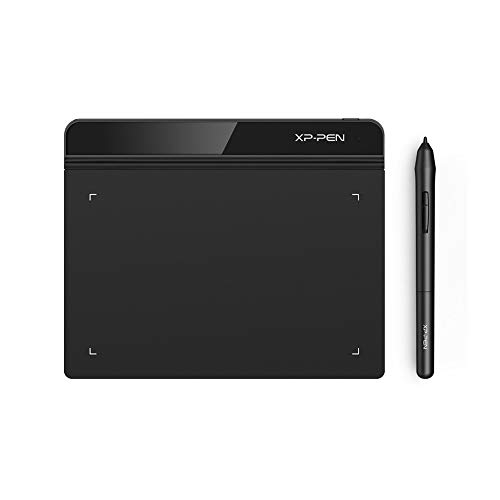
The StarG640 focuses on portability with a compact 6×4 inch active area and a battery-free stylus that eliminates charging needs. It’s well-suited for online education, remote work, and quick digital signatures, working with a wide range of software including Microsoft Office apps and Zoom. The slim profile and lightweight design make it easy to carry and set up for on-the-go drawing or note-taking, offering reliable performance for students and professionals alike.
Wacom Intuos Small Graphics Tablet
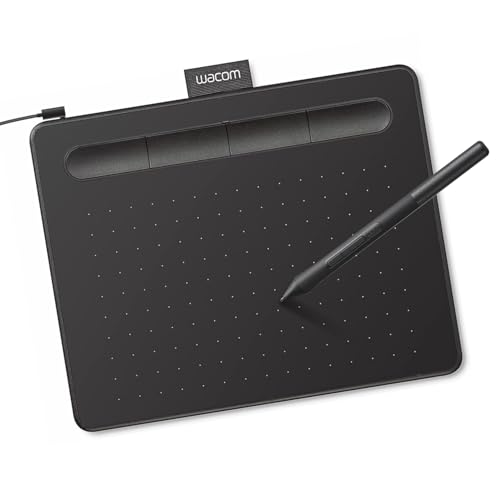
The Wacom Intuos Small provides industry-leading pen performance with EMR battery-free technology, delivering a pen-on-paper feel. It is compatible with a wide range of software and operating systems, including Chromebook, Mac, Windows, and Android. The tablet features four customizable ExpressKeys to streamline workflows and is known for consistent performance in professional graphics, photo editing, design, and document markup. Its proven reliability makes it a staple option for creatives and students evaluating long-term value.
HUION Inspiroy H640P Drawing Tablet

The HUION Inspiroy H640P pairs a compact 6×4 inch active area with a battery-free PW100 stylus offering 8192 levels of pressure sensitivity. Six express keys and driver-customizable shortcuts help tailor workflows for painting, writing, and classroom demonstrations. Its slim 0.3 inch thickness and light weight facilitate easy transport between home, classroom, or studio, making it a practical option for students and hobbyists who value portability without sacrificing performance.
Buying Guide: Key Purchase Considerations
- Pressure sensitivity and tilt: Look for at least 8192 levels and tilt support for natural line variation, which matters for shading and calligraphy styles.
- Active area and aspect ratio: Choose a size that fits your desk space and matches your usual canvas size. Larger areas are ideal for detailed work, while compact sizes excel in portability.
- Stylus type: Battery-free styluses reduce maintenance and improve reliability. Consider whether you need eraser functionality or extra buttons on the pen.
- Express keys and customization: Keys speed up common actions. Driver software can map shortcuts per app, boosting productivity across design, office work, and education tasks.
- Compatibility: Ensure the tablet supports your preferred OS and software, including Chromebook, Android devices, or Windows/macOS. Android compatibility can be a bonus for mobile use.
- Portability vs. desktop use: Gridded and slim designs work well for travel, while larger tablets provide a better drawing surface for studio work.
- Build quality and brand support: Reputable brands (XP-Pen, GAOMON, Wacom, HUION) tend to offer stable drivers, regular updates, and reliable customer service.