For productivity, trading desks, digital signage, and multimedia centers, a graphics card that supports three or more displays can dramatically expand your workspace. This guide highlights five capable options that enable triple-monitor setups without breaking the bank. Each card is evaluated for multi-display capabilities, power needs, and compatibility with common operating systems to help you choose the right fit for office, home theater, or compact builds.
| Product | Ports | Target Use | Notes |
|---|---|---|---|
| Glorto GeForce GT 730 4G | 2x HDMI, VGA, DP | Entry-level multi-monitor | Low profile, Windows 11 ready |
| Xynsviu RX560 4G | 4x HDMI | Ultra-wide display walls | PCIe X16, low power |
| ARDIYES GT 740 4GB | 4x HDMI | Quad-monitor setups | Silent cooling, compact |
| NVIDIA NVS 510 | DisplayPort outputs | Professional multi-display | Business-grade, scalable |
| VisionTek Radeon HD 7750 2GB | Mini DisplayPort outputs | 4K and multi-monitor | Legacy support, Eyefinity |
Below are five selected options that are well-suited for driving at least three displays, spanning budget-friendly to professional-grade features. Each entry includes a quick look at what makes it capable for multi-monitor work and a link to the product page for more details.
Glorto GeForce GT 730 4G Low Profile

The Glorto GT 730 4G is an entry-level card built on the NVIDIA GeForce GT 730 GPU. It features 4GB of DDR3 memory and a 64-bit memory bus, suitable for light multitasking and basic multimedia. It supports NVIDIA Surround technology to drive multiple displays, including two HDMI outputs and VGA/DP options, enabling a triple-monitor configuration in many setups. The board’s low-profile design makes it compatible with small form factor cases and HTPC builds. Core frequency and memory bandwidth keep power consumption modest, which helps in quiet office environments.
Xynsviu RX560 4G with 4 HDMI Outputs

The RX560 4G by Xynsviu emphasizes multi-monitor capacity with four HDMI outputs. Suitable for office or trading floor tasks, this card is designed to support up to four displays without additional power connectors, relying on PCIe power. It uses a 14nm Polaris 12 core and is a solid choice when you need three or more screens for monitoring, spreadsheets, and live data feeds. The card’s low power consumption and straightforward installation are advantages for non-gaming environments seeking stable, continuous output across multiple monitors.
ARDIYES GT 740 4GB GDDR5
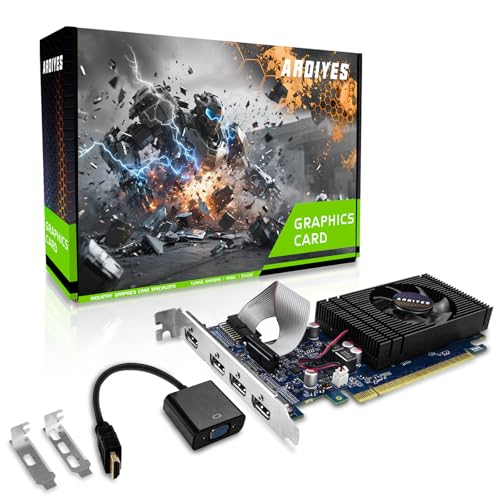
ARDIYES GT 740 offers a robust 4GB GDDR5 memory and four HDMI outputs, ready for quad-monitor setups. Its PCIe 3.0 x16 interface provides broad compatibility with modern desktops, and the design emphasizes quiet operation with an efficient cooling system. This card suits office environments, digital signage, and multitasking dashboards where users benefit from expansive screen real estate. The inclusion of half-height and full-height brackets aids flexible installation in compact or larger cases. It supports stable driver updates for Windows and Linux ecosystems.
NVIDIA NVS 510
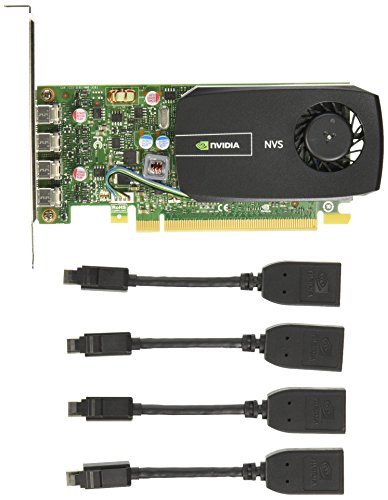
The NVIDIA NVS 510 is a professional-grade graphics adaptor designed for multi-display deployments. It focuses on reliable, high-availability output with multiple DisplayPort connections and features like H.264 encoding and Intelligent Power Management. This card is well-suited for business environments requiring stable, long-term performance across several screens. Its drivers and support are oriented toward workstation use, with broad compatibility across Windows and Linux. If you need a scalable, enterprise-ready solution for three or more monitors, the NVS 510 is a strong candidate.
VisionTek Radeon HD 7750 2GB
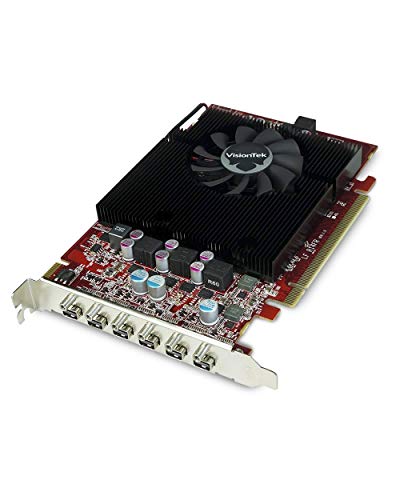
The VisionTek Radeon HD 7750 2GB model supports up to six monitors via Mini DisplayPort and AMD Eyefinity 2.0 technology, making it a strong option for extended multi-display installations. While it targets older systems, its 4K content capability and wide display support make it versatile for various professional and entertainment setups. The card’s reliance on DisplayPort-based connections provides stable, high-bandwidth output across multiple screens. It’s a practical choice if you’re upgrading an existing system that already employs multi-monitor workflows.
Buying Guide: Key Considerations For Multi-Display Purchases
- Monitor count and output types: Ensure the card provides at least three outputs you can use simultaneously (HDMI, DisplayPort, or VGA). Some cards offer four or more ports to future-proof for additional displays.
- Resolution and performance: If you plan 4K or high-refresh-rate setups, verify the maximum supported resolutions per port and the GPU’s capability beyond basic office tasks. Lower-end cards are suitable for productivity but may struggle with demanding applications.
- Power and form factor: Check whether the card requires external power connectors. Low-profile and half-height designs are ideal for compact cases, HTPCs, and small-form-factor builds.
- Driver support and OS compatibility: Look for cards with drivers that actively support Windows 10/11 and, if needed, Linux compatibility. Stable drivers reduce display issues across multiple monitors.
- Cooling and noise: For long work sessions, prioritize cards with efficient cooling and quiet operation, especially in shared or open-office environments.
- Expansion potential: If you anticipate expanding to more than three displays, consider GPUs offering four or six outputs and scalable software support (Eyefinity, Surround, NVS features).
- Budget vs. needs: Entry-level cards are often sufficient for productivity and basic streaming; higher-end options provide stronger performance for graphics-intensive tasks and advanced multi-monitor configurations.
When choosing, align the card’s outputs with your monitor inputs and plan for future growth in screen count and resolution. Proper cable management and, if required, a powered USB hub or docking station can enhance a three-monitor setup. Always verify current compatibility with your motherboard’s PCIe slot and your system’s overall power supply before purchase.