Choosing a full ATX cube case can dramatically impact airflow, aesthetics, and accessibility for high-end builds. This guide highlights five standout options backed by robust cooling, expansive space, and stylish tempered glass design. Each entry includes a concise feature snapshot and a direct Amazon link for quick comparison.
| Product | Brand | Key Strength | Max GPU | Radiator Support |
|---|---|---|---|---|
| MUSETEX Y6 | MUSETEX | 270° dual tempered glass; tool-less panel | 400mm | 360mm |
| MUSETEX K2 | MUSETEX | 7 PWM ARGB fans; panoramic glass | ATX family | Top 360mm |
| DARKROCK Classico | DARKROCK | Massive storage with 13 drives | Large GPUs | 360mm |
| MUSETEX NN8 | MUSETEX | 6 PWM ARGB fans; side door access | Standard ATX | — |
| darkFlash DY460 | darkFlash | 330° full-view panels; high airflow | 400mm | 360mm |
The products below are organized to help compare core attributes quickly, including cooling potential, glass visibility, and drive/space flexibility. Each section provides a concise overview, mounting capabilities, and notable design elements to support informed purchasing decisions.
MUSETEX Y6 Full ATX Gaming Case

The MUSETEX Y6 emphasizes a bold black matte finish with 270° fully transparent dual tempered glass panels for an expansive viewing angle. It supports GPU cards up to 400mm and CPU coolers up to 176mm, with top mounting for a 360mm liquid cooler. The interior uses a snap-on panel design for tool-free installation, aligning well with DIY enthusiasts seeking both aesthetics and practicality. It also includes a Type-C USB port and enhanced IO options for modern peripherals.
MUSETEX K2 ATX Case With 7 PWM ARGB Fans

The K2 model ships with seven PWM ARGB fans pre-installed and is expandable to ten fans for robust cooling. Its 270° panoramic glass design creates a wide view of internal components, ideal for showcasing high-end builds and RGB lighting. The interior layout supports ATX, Micro-ATX, and Mini-ITX motherboards with a clean cable management flow. An up-to-date IO panel includes Type-C, USB 3.0 ports, and standard audio jacks for quick device connections.
DARKROCK Classico Max Storage ATX Case

Classico focuses on maximum storage with capacity for up to 13 drives (10x 3.5″ HDDs and 3x 2.5″ SSDs). It supports vertical GPU mounting and E-ATX compatibility, requiring some configuration to accommodate larger motherboards. The design emphasizes practical expansion for data-heavy builds while maintaining a clean, scalable layout. A versatile front intake and multiple GPU mounting options help optimize airflow for dense hardware configurations.
MUSETEX NN8 Pre-Installed 6 PWM ARGB Fans

NN8 comes with six pre-installed PWM ARGB fans and a side-opening tempered glass panel for easy maintenance. The fans offer 16.8 million lighting colors controlled via ARGB software, enabling synchronized or dynamic lighting across the system. The side access design reduces the need for tools during cleaning and component swaps, while the sturdy frame supports complex builds with straightforward installation.
darkFlash DY460 ATX Full-Tower Case
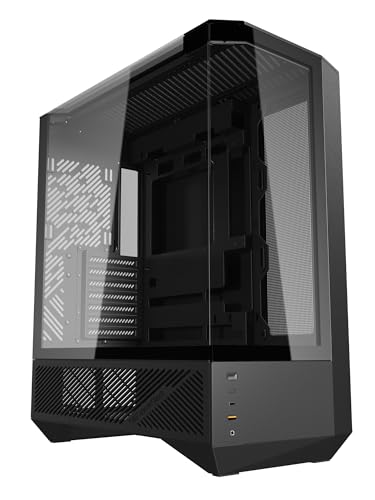
DY460 features 330° full-view tempered glass panels on a full-tower chassis with strong airflow support. It accommodates GPUs up to 400mm and CPU coolers up to 185mm, with options for a 360mm radiator. The design emphasizes expansive interior space and flexible mounting configurations for air or liquid cooling. The case is suitable for high-end builds requiring advanced RGB setups and modular drive arrangements.
Buying Guide
Key considerations when selecting a full ATX cube case include size and internal layout, cooling capacity, and glass design. Larger cases (full-tower) usually offer more wiggle room for GPUs, radiators, and storage, but verify clearance with your motherboard and power supply. A panoramic or multi-panel tempered glass design enhances visibility but may add weight and require careful placement to avoid glare. Cooling options matter greatly for high-performance builds; look for cases with multiple fan mounts and radiator support across the top, front, and rear. IO connectivity (USB-C, USB 3.0) should be aligned with your peripherals. If storage is a priority, models with abundant drive bays or removable drive cages help future-proof the system. Finally, assess tool-less design features and panel access as they improve assembly and maintenance workflow.
For aesthetics, consider how ARGB lighting integrates with your motherboard software. If you plan frequent upgrades or component swaps, a case with a side-panel door or easy-access panels can save time and reduce risk of damaging delicate components. Compare total fan count and expansion potential to match your cooling goals—air cooling is simpler and often quieter, while liquid cooling enables higher performance for overclocking. Reading customer reviews and checking compatibility with your GPU length and PSU depth will help ensure a smooth build experience.