For digital note-taking, drawing, or quick navigation on tablets, a fine tip stylus can deliver the precision you need without the hassles of Bluetooth pairing or lag. This guide highlights five highly capable styluses designed for accuracy, comfort, and broad compatibility across iPad, Android, and other touchscreen devices. Each option emphasizes a smooth disc or fine-tip experience to mimic real pen-on-paper control, making it easier to write, sketch, or annotate with confidence on your tablet.
| Product | Brand | Key Benefit |
|---|---|---|
| Bopomofo Stylus (5 Pcs) | Bopomofo | 2-in-1 tips, high sensitivity, versatile colors |
| ChaoQ Stylus Pen (3pcs) | ChaoQ | Dual rubber tips for precision, ergonomic |
| MEKO 3 in 1 Stylus Pens (2 Pack) | MEKO | 3-in-1 with disc tip, dual rubber tips, durable |
| OOCLCURFUL Stylus Pen | OOCLCURFUL | 1.5mm tip, magnetic cap, long battery life |
| Isvo 3-Pack Tablets Stylus | Isvo | Disc-tip precision, universal compatibility |
The following sections break down each option, highlighting why it stands out for tablet use and how it compares across common picking criteria like tip type, ergonomics, compatibility, and maintenance.
Bopomofo 2-in-1 Stylus With Dual Tips

The Bopomofo stylus set includes five pencils in multiple colors, designed to replace finger use on touch surfaces. It features a 2-in-1 system that blends its lightweight alloy body with a disc tip for precise input and a rubber tip for coarser, palm-supported actions. The dual-tip approach helps users switch between exact drawing or writing and simpler page navigation without lag. No charging or Bluetooth pairing is required, ensuring immediate usability straight from the package. The discs offer high sensitivity and clear on-screen feedback for more accurate handwriting and sketching.
Key considerations: The 2-in-1 construction reduces fatigue during long sessions, and the disc tip visibility aids accuracy. It works across iPhone, iPad, and Android devices, making it a versatile choice for mixed-device households or classrooms. Slight differences in disc tip wear may affect long-term precision, but the set provides a cost-efficient, multi-color bundle for frequent note-takers and artists.
ChaoQ Stylus Pen For Touchscreen

The ChaoQ stylus emphasizes high sensitivity with dual rubber tips that provide precise control for writing, drawing, or gaming. Its aluminum body is lightweight yet durable and does not require Bluetooth pairing or charging. The two tip sizes (0.20″ and 0.26″) let you switch between fine detail and broader strokes, which is especially helpful for artists, students, and professionals working on tablets, phones, or laptops. The design reduces finger fatigue and minimizes smudges on screens, keeping work clean and precise.
Considerations include the necessity of gentle handling to preserve tip integrity and ensuring tip switches align with the current app or screen curvature. The bright metal finish adds a touch of personality without compromising performance. If you frequently alternate between note-taking and sketching, the dual tips are a practical feature.
MEKO 3 in 1 Stylus Pens (2 Pack)
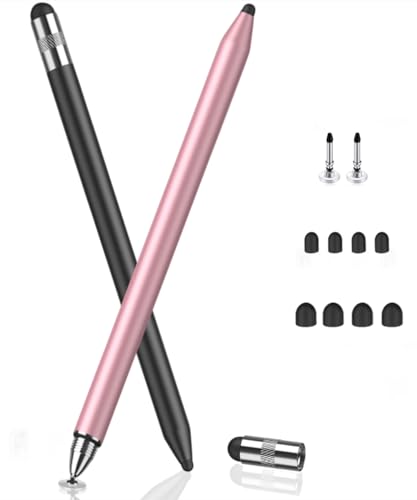
MEKO’s 3-in-1 stylus builds on a dual-tip concept with an enhanced disc tip for precise input and two rubber tips for smooth, resistance-free navigation. The disc tip is transparent to reveal the contact point, improving accuracy during writing and drawing. A 180-degree flexible writing angle helps users maintain a natural grip, reducing wrist strain during longer sessions. The two rubber tips—0.18″ and 0.27″—provide options for different tasks, from fine detail to broad strokes. The recommended approach is to pair the protective cap with regular use to keep tips clean and extend life.
Strengths include detailed control with low risk of screen scratching, portability, and a reasonable upgrade path from standard rubber-tipped styluses. Potential downsides are the need to manage multiple tips and ensuring compatibility with all devices, as some models may experience surface resistance or sensitivity variations across screens.
OOCLCURFUL 1.5mm Ultra-Fine Tip Stylus

This stylus emphasizes a precise 1.5mm copper tip designed for pro-level control on iPad Pro, iPad Air, and other touch screens. It requires no Bluetooth pairing, apps, or complex setup—just one-click to begin sketching or writing. A magnetic cap protects the tip and device port during travel, while USB charging provides up to 12 hours of use after a full charge. Palm rejection is not included, so users should avoid resting their hands directly on the screen for best results. The design aims to balance accuracy with simple daily usability for on-the-go workflows.
Users who value immediate responsiveness and predictable feedback will appreciate the fine probing of the copper tip. The absence of palm rejection means it’s best for right-handed note-takers or those who rest the pen away from the palm. For extended sessions, the long battery life is a notable advantage.
Isvo 3-Pack Tablets Stylus With Precision Disc Tip

Isvo’s 3-pack stylus features a precision disc tip designed for universal compatibility across Android, iOS, and other touch devices. The disc tip provides a clear view of the contact point, enabling accurate writing and drawing without lag. The lack of a need for charging or pairing makes it a convenient plug-and-play option for students, teachers, or professionals who switch between devices. Its ergonomic, lightweight form factor supports longer handwriting sessions with comfortable grip and reduced fatigue.
Considerations include ensuring the disc tip remains clean to maintain visibility and precision and recognizing that performance can vary slightly by screen texture or device model. The 3-pack format offers good value for families or classrooms where multiple styluses are needed.*
Buying Guide: Key Purchase Considerations
- Tip Type and Precision: Fine-tip or disc-tip styluses provide higher accuracy for writing and drawing. Disc tips offer visibility of contact points, which helps with precision but can wear over time with heavy use.
- Ergonomics and Weight: Look for a balanced, comfortable grip, especially for long sessions. Lightweight metal bodies with cushioned grips reduce strain and improve control.
- Compatibility: Confirm device compatibility (iPad, Android tablets, smartphones, or laptops). Some styluses work universally, while others are optimized for specific ecosystems.
- Power and Connectivity: Bluetooth-free models are ready to use immediately. If a stylus has a battery, consider charging time, battery life, and standby behavior.
- Durability and Maintenance: Assess tip replacement options, protective caps, and build quality. A stylus with replaceable tips offers longer life and better value.
- Usage Scenarios: For note-taking, a pencil-like feel is advantageous; for art or design, a precise disc tip with minimal latency is preferable.
- Cost vs. Coverage: A multi-pack might offer better value if you frequently share devices or need backups.
In selecting a fine-tip stylus for tablet use, consider your primary activities—note-taking, illustration, or navigation—and how often you switch devices. A versatile 3-in-1 or dual-tip design can deliver broad utility, while single-tip, high-precision models may excel in detailed artwork. Always verify current device compatibility and warranty coverage before purchase to ensure a smooth, long-term experience.