In the race to find the fastest external DVD writer, you want reliable data transfer speeds, broad compatibility, and practical design features that fit into a portable setup. This guide highlights five top options that balance speed, reliability, and ease of use for American users. Each product is evaluated on drive speed, interface options, and user-friendly features like USB-C compatibility and built-in cables. Whether you need quick backups, media playback, or disc burning on the go, these drives cover a range of needs while avoiding price distractions.
Summary of selected products:
- ASUS ZenDrive V1M External DVD Drive and Writer — USB-C, built-in cable storage, M-DISC support
- LG GP65NB60 — Ultra-slim, USB 2.0, M-DISC support
- JKNJX External CD/DVD Drive — USB 3.0/Type-C, broad compatibility, fast read/write
- ROOFULL External CD/DVD +/-RW Drive — USB 3.0 & USB-C, dual connectors, durable case
- Alphami External Blu-ray Drive — 6X BD, 8X DVD, 24X CD, USB 3.0 & Type-C
ASUS ZenDrive V1M External DVD Drive With Built-In Cable Storage

The ASUS ZenDrive V1M emphasizes convenience and compatibility for modern laptops. It includes a built-in 24 cm cable storage system, reducing clutter when you travel or shift between workspaces. The USB-C interface pairs well with ultrabook and newer Windows/macOS devices, letting you connect with a single cable for data and power where possible. M-DISC support adds long-term data reliability, enabling archival storage of photos, videos, and critical documents for up to a millennium under the right conditions. This drive is designed for users who value clean desk setups and modern device compatibility.
Features in focus include the integrated cable storage, USB-C versatility, and M-DISC durability. While not the smallest option on the market, the V1M delivers dependable performance for everyday disc tasks—reading, writing, and archiving—without requiring extra adapters or power bricks. For users prioritizing a tidy workspace and Mac/Windows compatibility, this model offers a balanced mix of speed, durability, and practical design.
LG GP65NB60 Ultra-Slim External DVD Writer
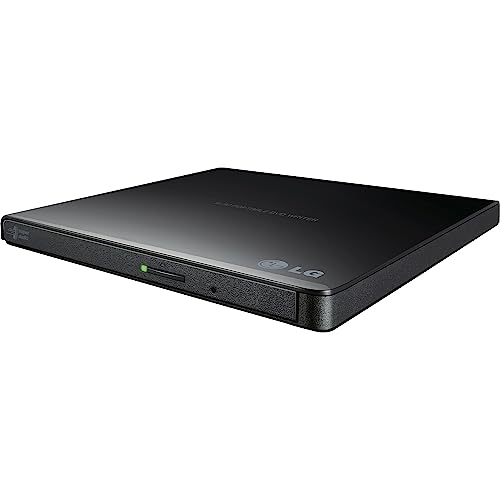
The LG GP65NB60 offers a slim, travel-friendly external drive with an 8x DVD write speed and M-DISC support for durable data storage. Its ultra-slim 14 mm height makes it easy to slip into a bag, while its USB 2.0 interface delivers solid compatibility with a broad range of computers, including Windows and macOS systems. While USB 2.0 is not as fast as USB 3.0 in theory, the drive is well-suited for routine burning, backups, and media playback on the go. The combination of portability and M-DISC support makes it a practical choice for users prioritizing speed in a compact footprint.
Key considerations include the balance between high-speed data transfer and portability. The GP65NB60 is ideal for users who value a lightweight, easy-to-carry solution and want reliable DVD burning without needing the latest USB-C hardware. It remains a solid option for students, travelers, and remote workers who need a straightforward external optical drive.
JKNJX USB-C / USB-A External CD/DVD Drive

The JKNJX external drive focuses on broad compatibility and straightforward plug-and-play operation. It supports USB Type-A and Type-C connections, eliminating the need for extra power adapters in many setups. The drive uses USB 3.0 for high-speed data transfers and supports common Windows and macOS environments, including Windows 11 and macOS 10.x. Its read/write speeds reach up to 8x for DVDs and 24x for CDs, with practical performance for general media tasks and software installations. A good option for users who want a versatile, no-nonsense external optical drive that works across a wide array of devices.
Pros include immediate recognition on many systems, dual-interface flexibility, and broad compatibility. Potential drawbacks are if you exclusively need Blu-ray or high-end professional disc-burning features. For most home and small office uses, this model emphasizes ease of use and dependable disc compatibility over premium features.
ROOFULL External CD/DVD +/-RW Drive with Durable Case
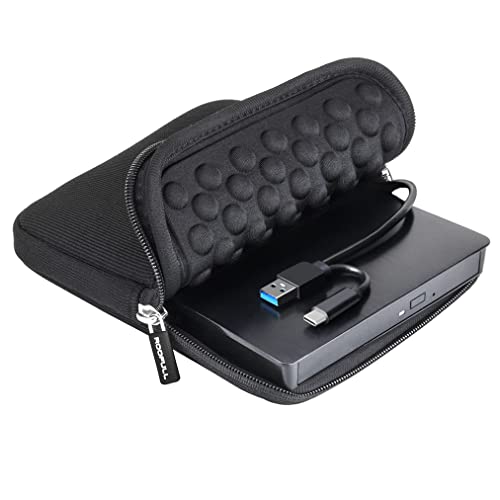
The ROOFULL external drive stands out with dual connectors (USB 3.0 and USB-C) and a built-in protective carrying case, designed for durability and versatile setup scenarios. It supports a wide range of CD/DVD formats and delivers read/write speeds up to 8x for DVDs and 24x for CDs, with solid error correction and low power consumption. The dual-connectivity setup ensures compatibility with newer laptops and older desktops alike, making it a flexible option for travelers and professionals who frequently switch devices. The included case helps protect the drive during transport, which aligns with portable-use considerations.
Considerations include the convenience of built-in dual connectors and the protective case versus potential size and weight compared to ultra-slim drives. If you travel often or need a rugged companion for varied environments, ROOFULL provides a practical blend of speed, durability, and cross-compatibility.
Alphami External Blu-ray Drive: High-Speed Blu-ray, DVD, and CD

The Alphami external Blu-ray drive delivers high-speed reading and burning with up to 6x on Blu-ray, 8x on DVD, and 24x on CD, powered through USB 3.0 and Type-C. This versatility suits users who require disc playback or archival storage across multiple formats. It presents broad OS compatibility, including Windows, macOS, and Linux, making it a fit for mixed-OS work environments. The combination of Blu-ray support and broad interface compatibility positions Alphami as a strong option for media enthusiasts and professionals handling large files or media libraries that benefit from Blu-ray capacity.
Consider the intended use: Blu-ray playback and archiving demand robust optical performance and heat management. While it offers strong speeds, it is heavier than slim drives and might not be ideal for ultra-compact travel. For users with a need for Blu-ray, high-capacity backups, and cross-platform compatibility, Alphami provides a capable all-around choice.
Buying Guide: Key Purchase Considerations For External DVD Writers
- Interface type: USB-C offers power and data on modern laptops; USB-A remains widely compatible. If you rely on USB-C-only devices, pick a drive with USB-C support or dual connectors.
- Read/write speeds: DVD speeds typically reach up to 8x, while Blu-ray drives can reach higher speeds. Consider how often you burn large files or watch discs to choose appropriate performance.
- M-DISC and archival durability: If long-term data preservation matters, M-DISC support adds a layer of reliability for important photos and documents.
- Portability vs. durability: Ultra-slim drives excel for travel, but protective cases and durable housings benefit frequent transport or rugged environments.
- Plug-and-play compatibility: Ensure the drive works with your operating system (Windows, macOS, Linux) and does not require extra software or drivers for basic tasks.
- Power supply considerations: Some drives are bus-powered, while others may benefit from a separate power source in desktop setups. Check your device’s USB port power requirements.
- Compatibility with disc types: If you work with Blu-ray content, ensure the drive supports BD-R/BD-RE and is capable of Blu-ray reading/writing. For CD/DVD tasks, confirm write speeds for your typical media.
- Included accessories: Cables, dual USB options, or carrying cases can influence convenience and setup quality in daily use or travel scenarios.
- Price-to-value balance: A slightly higher upfront investment may yield longer-term reliability and better multimedia capabilities for frequent users.
Across these options, the best choice depends on your priorities: portability, modern USB-C readiness, archival support, or Blu-ray capability. The ASUS and Alphami models lean toward modern interfaces and higher versatility, while LG and ROOFULL provide compact alternatives with strong compatibility. JKNJX offers broad compatibility with minimal fuss, making it suitable for mixed-device environments. Evaluate your primary use—backup, media playback, or software installation—and pick a drive that aligns with your devices and travel or workspace habits.