Upgrade your aging desktop with fast DDR3 memory that remains compatible with a wide range of Intel and AMD platforms. This guide highlights five dependable DDR3 RAM kits from trusted brands, focusing on modules that maximize capacity, speed, and reliability. Each option is described with its key features to help you compare suitability for gaming, content creation, or everyday tasks. All selections are 240-pin UDIMMs designed for desktop PCs and operate at 1.5V, meeting JEDEC standards for broad compatibility.
| Product | Capacity | Speed | Type |
|---|---|---|---|
| Motoeagle 16GB Kit (4 x 4GB) | 16 GB | 1333 MHz | 4 x 4 GB UDIMM |
| Motoeagle 16GB Kit (2 x 8GB) | 16 GB | 1600 MHz | 2 x 8 GB UDIMM |
| Crucial 8GB DDR3 | 8 GB | 1600 MHz | 1 x 8 GB DIMM |
| Motoeagle 32GB Kit (4 x 8GB) | 32 GB | 1600 MHz | 4 x 8 GB UDIMM |
| Crucial 16GB DDR3 | 16 GB | 1600 MHz | 2 x 8 GB DIMM |
Motoeagle 16GB Kit (4 x 4GB) DDR3 RAM

The Motoeagle kit consists of four 4GB DDR3 modules, delivering a total of 16GB of memory at 1333 MHz (PC3-10600U). The 1.5V, non-ECC, unbuffered configuration supports both single and dual rank setups (1Rx8 or 2Rx8). It aligns with JEDEC DDR3 DIMM standards and is designed for compatibility with select desktop PCs from Intel and AMD ecosystems. This kit emphasizes reliability with tested ICs and RoHS compliance, making it a solid option for expanding memory in older or budget-conscious builds.
Key considerations include determining your motherboard’s supported memory speed and rank configuration, as some older systems may require BIOS adjustments to recognize higher-capacity or mixed-rank modules. This 16GB kit is well-suited for users upgrading from 8GB or 4GB to improve multitasking and general responsiveness in everyday workloads.
Motoeagle 16GB Kit (2 x 8GB) DDR3-1600 UDIMM

This 16GB kit uses two 8GB modules at 1600 MHz (PC3-12800) with 1.5V operation. It is a non-ECC, unbuffered DDR3 memory kit intended for desktop PCs, offering compatibility in systems that support DDR3-1600 and 240-pin DIMMs. The dual-rank configuration (1Rx8 or 2Rx8) provides flexibility for boards with memory channel considerations and can improve bandwidth in multi-tasking scenarios. As with other DDR3 solutions, check the motherboard’s QVL and BIOS memory settings to ensure optimal stability at 1600 MHz.
Pros include higher memory speed potential and straightforward installation in compatible systems. Potential constraints involve older motherboards that cap memory speeds or firmware that requires manual tuning. This kit is a strong pick for users seeking a modest performance uplift without moving to newer platforms.
Crucial 8GB DDR3 240-Pin DIMM

The Crucial 8GB DDR3 DIMM (PC3-12800/1600) provides a single 8GB module for desktops, matching a common size for upgrades in systems with limited slots. The 240-pin design conforms to standard DDR3 configurations and 1.5V operation, with non-ECC capability suitable for most consumer desktops. This module is a practical upgrade for legacy machines that require modest memory improvements without changing other components. It is especially relevant for tasks like light gaming, web browsing, and office productivity on older systems that still utilize DDR3 memory.
Consider compatibility with your motherboard’s memory type and maximum supported speed. While 8GB is a standard upgrade, pairing with existing modules should be done with attention to speed and timing compatibility to avoid instability. This module is a straightforward, dependable choice for single-channel expansion or dual-channel pairing on supported boards.
Motoeagle 32GB DDR3 RAM Kit (4 x 8GB)

This kit offers a larger memory footprint with four 8GB modules, totaling 32GB of DDR3 RAM at 1600 MHz (PC3-12800) for 1.5V operation. The 240-pin UDIMM format supports single or double rank configurations (1Rx8 or 2Rx8), making it suitable for higher-demand desktops, content creation rigs, or systems that can benefit from substantial multitasking headroom. As a 32GB DDR3 option, it can significantly improve performance in workloads that exceed 16GB of active memory, such as virtualization or large-scale browser sessions.
When selecting this kit, ensure the motherboard and BIOS can support 32GB across the installed modules and that the total platform memory ceiling is not exceeded. Dual-channel operation is likely with matched kits, but mixed configurations should be avoided to prevent stability issues. This kit is ideal for users extending memory in capable DDR3-era desktops without moving to newer platforms.
Crucial 16GB DDR3 DIMM Kit (2 x 8GB)
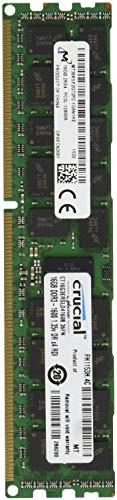
Crucial’s 16GB kit consists of two 8GB DIMMs, totaling 16GB of DDR3-1600 RAM. The 240-pin UDIMM modules operate at 1.5V and are non-ECC and unbuffered, designed for desktops. This pairing is well-suited for systems needing memory expansion beyond a single 8GB module while preserving balanced performance across channels. The DDR3-1600 speed supports a broad range of mid-to-high-end tasks on older platforms and can help reduce swapping in memory-constrained environments.
Consider mixing with existing RAM carefully, aiming for matched speed and timings to maintain stable operation. This kit is a common, dependable upgrade path for aging desktops that demand more responsive multitasking and smoother applications without a motherboard or CPU upgrade.
Buying Guide
Purchase considerations help ensure compatibility and performance gains from DDR3 memory upgrades:
- Motherboard compatibility: Check the motherboard’s QVL (qualified vendors list) and supported memory speeds. DDR3 memory often works best when installed in matched kits that align with the board’s supported speeds and ranks.
- Capacity planning: Determine total usable memory by considering operating system limits and current usage. For many systems, moving from 8GB to 16GB or 32GB yields the largest perceptible improvement in multitasking and memory-intensive workloads.
- Rank and configuration: Dual-rank (2Rx8) versus single-rank (1Rx8) affects compatibility and may influence stability on older boards. Use matched kits when possible to optimize dual-channel performance.
- Voltage and timing: DDR3 memory typically runs at 1.5V. Lower latency (CL) and higher speed can improve bandwidth, but stability depends on motherboard support and BIOS settings. BIOS updates may unlock higher speeds on some systems.
- ECC vs non-ECC: For most consumer desktops, non-ECC memory is standard and sufficient. ECC memory is primarily used in servers or workstations with specific motherboard support.
- Future-proofing: DDR3 has largely phased out in new builds. For longevity, consider whether a platform upgrade might be warranted to fully leverage newer memory standards (DDR4/DDR5).
When evaluating options, weigh the total memory capacity, speed compatibility, and the number of modules the motherboard can support. In many cases, two matching 8GB modules at 1600 MHz deliver a reliable balance of speed and capacity for mainstream tasks, while larger kits provide headroom for demanding workloads on capable DDR3 desktops.