Scanning fast multi-page documents is essential for modern workflows. This guide highlights five reliable scanners that deliver speedy duplex scanning, smart software, and cloud connectivity. Each option supports large document handling, mobile or desktop use, and easy setup. Read on to compare features, connectivity, and file management across leading brands to find the right fit for home offices, small businesses, or mobile professionals.
Summary of chosen products
| Product | Brand | Key Benefit | Connectivity |
|---|---|---|---|
| ScanSnap iX2500 Wireless or USB | ScanSnap | Large touchscreen; 45ppm duplex; 100-page feeder | Wi‑Fi 6; USB-C; cloud |
| Canon imageFORMULA R40 | Canon | Duplex scanning; wide document types | USB; cloud options |
| Epson WorkForce ES-580W | Epson | 4.3″ touchscreen; wireless; 100-page ADF | Wi‑Fi; cloud |
| Brother ADS-1300 | Brother | Compact; up to 30ppm; 20-page ADF | USB |
| ScanSnap iX1300 | ScanSnap | Compact; auto/ manual feeders; fast color | USB; optional wireless |
ScanSnap iX2500: Fast, Flexible, Cloud-Ready

The ScanSnap iX2500 is designed for high-speed, two-sided scans with a 100-page Auto Document Feeder. It features a large touchscreen for quick adjustments, plus built‑in Wi‑Fi 6 and USB-C for fast, stable connections to PCs, Macs, and mobile devices. Cloud services can be enabled for direct sending to preferred destinations, and QUICK MENU helps route scanned content to common applications. This model upgrades the previous iX1600 with customizable profiles, making it easy to personalize workflows directly from the device.
Canon imageFORMULA R40: Versatile Duplex Office Scanner

Canon’s imageFORMULA R40 handles a wide variety of documents with reliable duplex scanning. It supports grayscale and long documents, making it suitable for receipts, reports, contracts, and thick or thin media. It delivers up to 40 ppm in simplex and 80 ipm in duplex, with a 60‑sheet ADF. The R40 emphasizes fast, one‑touch operation and easy setup, ensuring productive, organized digital archives with cloud compatibility and flexible connectivity.
Epson WorkForce ES-580W: Wireless ADF Powerhouse

The Epson WorkForce ES-580W emphasizes effortless wireless scanning with a 4.3″ touchscreen and a 100‑page Auto Document Feeder. It supports direct sends to smartphones, tablets, computers, or cloud storage without a computer. Its range of connectivity options and reliability make it a strong choice for users who value convenience and multi-device integration, especially in shared workspaces or home offices where wireless access is essential.
Brother ADS-1300: Compact Desktop Workhorse

The Brother ADS-1300 is a compact desktop scanner designed for small spaces without sacrificing performance. It offers up to 30 pages per minute in duplex mode, a 20‑page ADF, and straightforward USB connectivity for quick setup. This model is ideal for users who need a portable solution that can handle frequent scanning tasks at work or home while staying unobtrusive on a crowded desk.
ScanSnap iX1300: Compact Color Scanner for Mac or PC

The iX1300 offers a compact design with duplex color scanning, making it suitable for photos, documents, and receipts. It includes an Auto Document Feeder and a manual feeder option, streamlining everyday scanning for both Mac and PC users. Its QUICK MENU accelerates workflow by routing scans to preferred applications directly from the device, while maintaining high image quality with minimal setup.
Canon imageFORMULA R10: Portable Scanner for Mobile Use
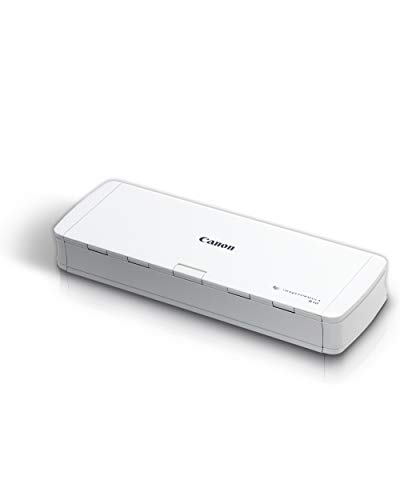
The Canon imageFORMULA R10 is designed for mobile professionals who need a USB-powered, compact scanner. It supports duplex scanning and a built-in document feeder, making it easy to digitize receipts, cards, and reports on the go. Lightweight and energy-efficient, it is ideal for travelers or remote workers who require reliable, portable document capture.
Epson WorkForce ES-50: Ultra-Portable Sheet-Fed Scanner

The Epson WorkForce ES-50 is a lightweight, single‑sheet scanner designed for ultra-portable scanning. It delivers fast scans in as little as 5.5 seconds per page and supports Windows and Mac with a TWAIN driver. It accommodates documents up to 8.5 x 72 inches, including ID cards and receipts, making it a practical option for mobile professionals and busy travelers who need on‑the‑go digitization.
Buying Guide: Key Considerations for Fast Multi-Page Scanners
- Duplex speed and capacity: Look for models with fast two‑sided scanning and high ADF page counts to handle large batches efficiently.
- Connectivity: Choose USB if you mostly work on a single desk; wireless or cloud-enabled models are ideal for multi-device ecosystems.
- Software and automation: Features like automatic de-skew, blank page removal, color optimization, and QUICK MENU can significantly streamline workflows.
- Document types and sizes: Ensure the device handles varying media, including thick documents, business cards, and long documents with long-document modes as needed.
- Portability vs. capacity: Portable scanners excel on the go, while larger ADF-equipped models suit a fixed work area with heavy daily use.
- Cloud integration: For teams and remote work, cloud destinations (Drive, Dropbox, OneDrive, etc.) simplify file sharing and backup.
- Maintenance and durability: Consider models with reliable feeders, easy cleaning, and reputable service support for long-term use.
- Security: If handling sensitive documents, check for secure cloud transmission and local data protection options.
In selecting a fast multi-page scanner, users should balance speed, document handling, and ecosystem compatibility. The options listed above provide varied strengths—from compact, portable devices to high‑volume, cloud-ready workhorses—so a choice can align with desk space, connectivity preferences, and daily document loads.