Upgrade your PC or laptop’s audio with reliable external sound cards designed for recording and playback. This guide highlights five well-rounded options, covering USB 2.0/USB-C, multi-channel capabilities, and live monitoring features. Each pick emphasizes ease of use, compatibility, and improved fidelity for gaming, streaming, podcasts, and music creation. Below is a quick summary table of the selected products to help you compare at a glance.
| Product | Brand | Key Benefit | Connectivity | Notes |
|---|---|---|---|---|
| SABRENT USB to 3.5mm Jack Audio Adapter | SABRENT | 24-bit/96kHz support for better sound | USB Type-C | Compact, plug-and-play |
| StarTech.com 7.1 USB Sound Card | StarTech.com | 7.1 channel surround, SPDIF option | USB | Great for multi-channel setups |
| UGREEN USB to Audio Jack Adapter | UGREEN | High-resolution DAC, clear output | USB | No drivers required |
| YEY USB 7.1 USB Sound Card | YEY | 8-channel DAC/2-channel ADC, loop-back | USB | Windows software support |
| Cubilux CB5 USB Audio Interface | Cubilux | Multi-track recording, 96kHz/24-bit | USB | Suitable for podcasts and streaming |
SABRENT USB to 3.5mm Jack Audio Adapter

The SABRENT USB to 3.5mm jack audio adapter delivers enhanced USB audio with dual 3.5mm jacks for stereo output and mic input. It supports 16/24-bit formats and up to 96kHz sampling, improving sound quality for recordings and general listening. The device is bus-powered, energy-efficient, and designed for simple plug-and-play use with most USB Type-C hosts.
StarTech.com 7.1 USB Sound Card
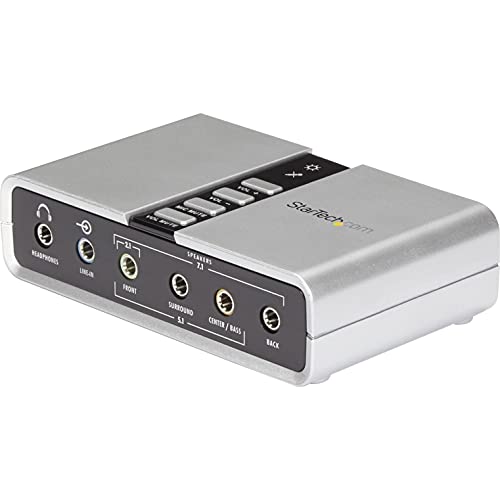
This external sound card adds up to 7.1 channel audio through a single USB port. It supports analog and digital outputs, including SPDIF, and offers line-in and microphone inputs. It is bus-powered and suitable for upgrading a desktop or laptop’s built-in audio for immersive gaming or home theater setups. It supports 44.1kHz and 48kHz playback/recording, with SPDIF options for digital connections.
UGREEN USB to Audio Jack Adapter
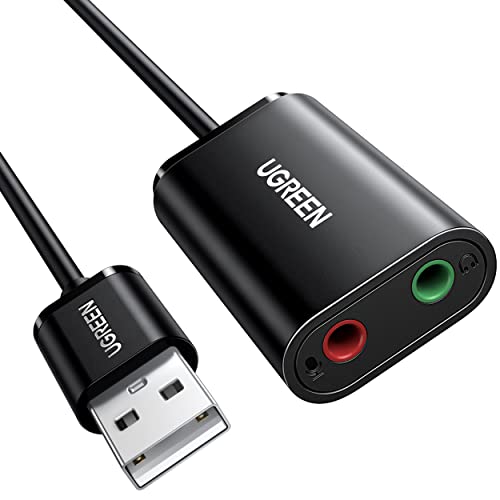
UGREEN’s USB to Audio Jack Adapter emphasizes a high-resolution DAC for clearer sound. It delivers enhanced audio with a built-in DAC and supports up to 16-bit/48kHz, improving output fidelity for music, gaming, and remote recording. It is plug-and-play, requiring no drivers or power source for quick setup on Windows, macOS, Linux, and consoles like PS5 or Switch.
YEY USB 7.1 USB Sound Card
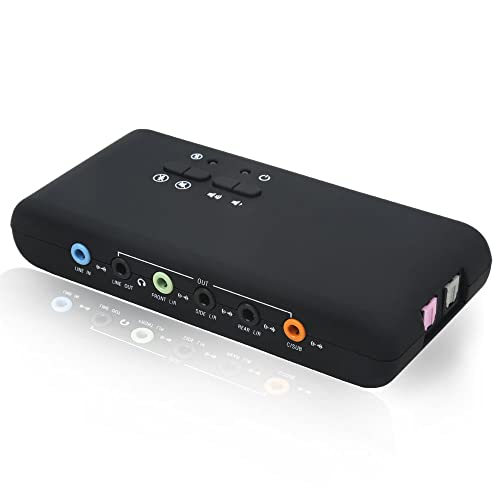
YEY’s external sound card offers 8-channel DAC output and 2-channel ADC with S/PDIF input/output, plus loop-back support. It provides enhanced digital-to-analog and analog-to-digital conversion with self-power or bus-power options. Aimed at home theaters and critical listening, it supports IEC60958 consumer formats, ensuring reliable audio performance for recording and playback.
Cubilux CB5 USB Audio Interface

The Cubilux CB5 USB Audio Interface converts a USB port into multiple inputs and outputs: two mic inputs, a line-in, line-out, and a headphone jack. It supports multi-track recording with independent device naming, and records up to 96kHz/24-bit. This makes it suitable for podcasting, streaming, and music production where separate tracks and monitoring are important.
Buying Guide
Key considerations when choosing an external sound card for recording include:
- Input/output options: Decide how many microphones and line sources you need. Look for multiple mic inputs and line-in options if you plan multi-track recording.
- Channel support and formats: Choose devices that support your target sample rate and bit depth (common targets are 24-bit, 96kHz). Consider 5.1/7.1 surround support if you work with surround sound content.
- Monitoring and latency: Look for direct monitoring or low-latency drivers to avoid echo and delay during live recording or streaming.
- Connectivity: USB-C vs USB-A compatibility matters for newer laptops. Bus-powered models are convenient but ensure your device gets enough power for stable operation.
- Software compatibility: Some units pair with Windows only, while others support macOS and Linux. Check driver requirements and bundled software if you need editing capabilities.
- Build and portability: If you travel or record on the go, prefer compact, durable designs with simple plug-and-play setups.
- Cost of ownership: Consider long-term reliability, warranty, and the need for any external power adapters or cables.