If you’re expanding a Mac workflow with photo libraries, video editing, or professional backups, external RAID storage can boost capacity, speed, and data protection. The following picks align with macOS compatibility, robust RAID options, and portable or desktop form factors. This guide highlights five top choices, their key features, and what to consider when selecting a drive array for Mac systems.
style=”font-weight:bold;”>Summary of Selected Products
- LaCie Rugged Raid Shuttle 8TB — Rugged, portable RAID with self-encrypting security
- WD My Book Duo 16TB — Desktop dual-drive RAID with built-in backups
- OWC Mercury Elite Pro Dual — High-performance USB-C/Thunderbolt 3 RAID enclosure
- TERRAMASTER D2-320 — 2-bay USB 3.2 Gen 2 RAID enclosure with high capacity options
- ORICO 4 Bay Raid Enclosure — Flexible RAID modes up to 88TB total capacity
LaCie Rugged Raid Shuttle 8TB: Portable RAID for Mac and PC
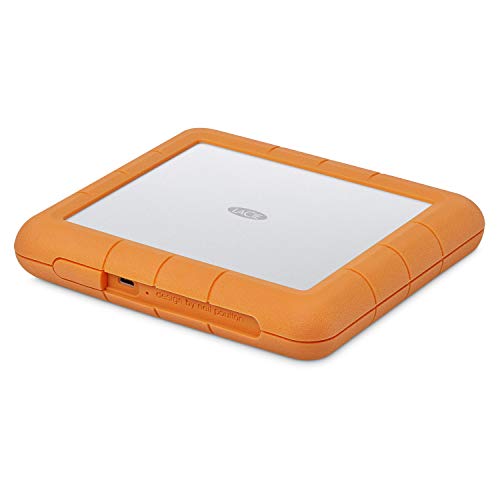
LaCie’s Rugged Raid Shuttle combines portable storage with RAID capabilities suited for Mac users who need resilience. The 8TB capacity supports on-the-go workflows and large media libraries. Its rugged design helps protect against drops, dust, and water, while a built-in RAID wizard simplifies configuring RAID 0 for speed or RAID 1 for redundancy. A self-encrypting password system adds a layer of security, keeping sensitive project data protected even if the drive is lost or misplaced. Ideal for remote shoots, field editing, or traveling teams that rely on macOS compatibility.
WD My Book Duo 16TB: Desktop RAID with Auto Backup

The WD My Book Duo provides substantial capacity in a desktop form factor with built-in RAID-0 readiness. The dual-drive configuration supports easy RAID setups and supports USB 3.1 Gen 1 compatibility, making it a solid plug-and-play option for Mac users who need large-scale storage and straightforward restoration workflows. Its automatic backup features help safeguard creative work and institutional archives, while password protection and potential software tools enhance data security and workflow efficiency for macOS environments.
OWC Mercury Elite Pro Dual: Fast USB-C/Thunderbolt 3 RAID

OWC’s Mercury Elite Pro Dual offers high-speed storage with a real-world transfer rate of up to 974 MB/s in tested configurations. It supports hardware RAID settings, including RAID 0 and 1, as well as Span and JBOD, providing flexibility for Mac workflows that demand speed or data redundancy. The enclosure supports USB-C and Thunderbolt 3, ensuring compatibility with modern Macs and other systems. This enclosure is well-suited for editors and photographers needing reliable, fast external storage with expandable RAID options.
TERRAMASTER D2-320: High-Capacity 2-Bay USB RAID Enclosure

The TERRAMASTER D2-320 is a hardware RAID DAS enclosure that leverages USB 3.2 Gen 2 for up to 10 Gbps transfers. It supports RAID 0, RAID 1, JBOD, and SINGLE configurations, making it versatile for Mac users who need a straightforward, fast two-bay solution. When paired with 8TB drives, it can provide substantial total capacity while sustaining high transfer speeds, especially with SATA hard drives in RAID 0 or SSDs in RAID 0 for speed-centric tasks. Its 44TB total per pair capability appeals to users with heavy media libraries or large backups.
ORICO 4 Bay Raid Enclosure: Flexible RAID Up to 88TB

ORICO’s four-bay RAID enclosure focuses on flexibility and expandability. It supports eight RAID modes, including RAID 0, 1, 3, 5, 10, JBOD, CLONE, and CLEAR, enabling dual data backup and varied performance profiles. It accepts 3.5-inch SATA disks with a maximum possible setup up to 88TB per unit, making it suitable for large-scale projects, video workflows, and archival storage. The USB 3.0 interface offers up to 235 MB/s transfer rates when paired with compatible drives, balancing price and capacity for Mac-centric users who want configurable RAID without breaking the bank.
Buying Guide: Key Considerations for Mac RAID Storage
- Storage capacity vs. performance: Determine if you need maximum capacity, peak speed, or a balance. RAID 0 offers speed; RAID 1 prioritizes redundancy. JBOD and SPAN provide flexible layouts for mixed drives.
- Form factor and portability: Choose portable drives for on-the-go editing or desktop enclosures for around-the-desk reliability and larger drives. Field workflows often benefit from rugged designs or water/dust resistance.
- Interface compatibility: Ensure USB-C or Thunderbolt 3/4 support for macOS. Thunderbolt 3/4 delivers higher throughput, especially with PCIe-based RAID enclosures.
- Security and encryption: Some drives offer hardware encryption and password protection, which is valuable for sensitive media or client work. Check macOS compatibility and ease of use with FileVault or drive-level encryption.
- RAID options and maintenance: Hardware RAID controllers are generally more reliable for Macs than software RAID. Consider hot-swappable drives and rebuild times in case of a drive failure.
- Backup integration: Look for drives with built-in backup software or seamless compatibility with macOS backup tools. Automated scheduling and versioning can protect ongoing projects.
- Future expansion: If you anticipate growth, select enclosures that support larger drives, more bays, or easy expansion paths without replacing the entire system.
- Budget and reliability: Higher-end enclosures tend to offer better cooling, longer warranties, and sturdier enclosures—important for long-term Mac workflows that rely on data integrity.