External IDE hard drive docks offer a simple, cable-free way to access legacy IDE drives alongside modern SATA drives. This guide highlights five versatile docks that support 2.5″ and 3.5″ drives, IDE and SATA interfaces, and convenient features like USB connections, cloning, and card readers. Each product below is designed to help you recover data, back up files, or clone drives without opening your computer. Read on to compare compatibility, speeds, and features across top options.
| Product | Brand | Key Benefit |
|---|---|---|
| Tccmebius TCC-S865 | Tccmebius | USB 3.0 with dual slots; built-in card reader |
| Tccmebius Docking Station (2-in-1) | Tccmebius | USB 2.0; IDE + SATA compatibility; all-in-one reader |
| StarTech Dual-Bay USB 3.0 Dock | StarTech.com | Independent bays; hot-swapping; IDE + SATA support |
| Unitek USB 3.0 to IDE/SATA Converter | Unitek | Dual-head IDE; supports multiple drives; includes power |
| FIDECO External Docking Station | FIDECO | Offline clone option; USB 3.0 speed; broad OS support |
The following sections review each product’s core specs, how it handles IDE and SATA drives, and practical use cases. The goal is to help you pick a dock that fits whether you’re recovering data from old drives, backing up current systems, or performing quick drive-to-drive clones.
Tccmebius Docking Station: 2-In-1 IDE & SATA With Card Reader
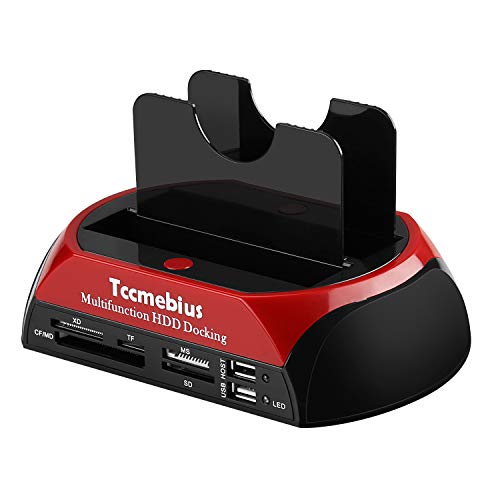
This docking station combines one IDE port and one SATA port for 2.5″ and 3.5″ drives, supporting IDE I/II/III and SATA I/II/III HDDs and SSDs. It includes adjustable IDE connectors and a built-in all-in-one card reader, enabling quick access to XD, TF, MS, CF, and SD cards. The USB 2.0 data transfer rate reaches up to 480 Mbps, making it suitable for basic file transfers and data preservation tasks. An emphasis on One-Touch Backup helps you copy data from your computer to an external drive with minimal steps. Note that the OTB software is not compatible with macOS or iOS systems.
Key considerations: While USB 2.0 limits throughput for large transfers, the dock’s versatility shines in handling mixed-drive environments and card formats. It’s a practical choice for users who need both IDE and SATA access in a single unit and who also rely on basic card reading capabilities during recovery workflows.
VSVABEFV IDE/HDD Docking Station

This 2.5″ and 3.5″ dual-bay docking station supports both SATA and IDE drives, making it a flexible option for mixed-drive setups. It features USB 3.0 fast transfer rates and a built-in USB hub, along with multi-card slot support for SD/MMC/MS cards and more. Notably, the device can read one IDE and one SATA drive at the same time, though it cannot operate three drives concurrently. The dock’s cloning capability and hot-swapping support make it convenient for quick data transfers and backups.
Practical considerations: If you routinely work with older IDE drives alongside modern SATA disks, this dock offers a straightforward solution. Users should note the limitation on simultaneous drive reads (up to one IDE and one SATA), which affects multitasking during cloning or large transfers.
StarTech Dual-Bay USB 3.0 Docking Station
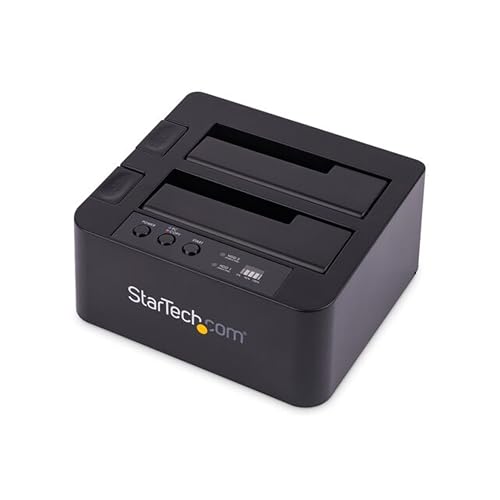
This StarTech dock is designed for two bays, supporting 2.5/3.5″ SATA and IDE drives for backup, disk imaging, or data transfer over USB 3.2 Gen 1 (5 Gbps). It includes top-loading design, hot-swapping capability, and separate drive bays for SATA and IDE. The package includes the necessary cables and a universal power adapter, with a focus on reliability and durability. It’s OS independent and well-suited for professional environments that require frequent drive swaps and cloning tasks.
Highlights: The dedicated bays and hot-swap capability reduce downtime during data recovery projects. Although it’s more expensive than basic USB 2.0 docks, the higher-speed USB 3.0/3.2 interface accelerates large backups and disk imaging tasks significantly.
Unitek USB 3.0 IDE/SATA Converter Kit

Unitek offers a flexible external adapter kit that supports 2.5″ and 3.5″ IDE and SATA drives, including optical drives. It features a dual-head IDE connector (40-pin and 44-pin) plus one SATA II connector, enabling operation of up to three drives simultaneously in some configurations. Data transfer rates reach up to 5 Gbps over USB 3.0, and the kit includes a 12V/2A power adapter to ensure stable operation for multiple drives. This solution is ideal for users who need to connect multiple drive types to a single PC or Mac without internal installation.
Considerations: The ability to run three drives at once is powerful, but it may require careful power management and cable organization to avoid power or data conflicts. The kit’s versatility makes it a strong choice for tech enthusiasts handling varied storage media.
FIDECO External Docking Station

The FIDECO dock focuses on USB 3.0 performance with wide compatibility, supporting only SATA HDDs and SSDs across 2.5″ and 3.5″ formats. A notable feature is the Offline Clone option, allowing you to clone drives without a computer—useful for rapid duplication tasks. It supports Windows, macOS, and Linux, emphasizing broad OS compatibility. The dock’s clone button provides an easy, stand-alone solution for duplicating drives, which can be a time-saver in professional data management workflows.
Performance and practicality: The offline cloning capability is a highlight for users who need to duplicate drives without connecting to a PC. While the drive bays are limited to SATA drives, the combination with USB 3.0 speeds makes it a solid choice for regular backups and data transfers in mixed storage environments.
Buying Guide: How to Pick Your External IDE Dock
Key factors to consider when selecting an external IDE dock include drive compatibility, connection speed, cloning capabilities, and ease of use. Here are practical considerations to guide your choice:
- Drive compatibility: If you still work with IDE drives, ensure the dock supports IDE I/II/III in addition to SATA I/II/III. Some docks also accept 2.5″ and 3.5″ drives, which is ideal for mixed environments.
- Interface speed: USB 3.0/3.1/3.2 provides faster data transfer than USB 2.0. For large backups or disk imaging, prioritize USB 3.x models with reliable power delivery.
- Cloning and offline cloning: Cloning features save time by duplicating drives without a PC. An offline clone option is especially useful for quick duplication tasks in manufacturing or IT departments.
- Power requirements: Some docks require external power adapters, especially when handling multiple drives or 3.5″ drives. Confirm the power needs to prevent drive underpowering or instability.
- Card reader functionality: Built-in card readers are convenient for photographers or multimedia workers who transfer from memory cards. Note any limitations on simultaneous operations.
- Operating system compatibility: While many docks are OS-agnostic, check for any noted limitations (e.g., One-Touch Backup software not available on macOS or iOS).
- Physical design and build quality: Durable chassis, accessible drive bays, and well-labeled ports contribute to long-term reliability in IT workflows.
Use cases span data recovery from legacy IDE drives, archival projects, and quick backups of current systems. If you frequently switch between IDE and SATA drives, prioritize a dock with both interfaces and a user-friendly cloning or backup workflow. For professionals who need fast transfers, docks with USB 3.x connectivity and reliable cooling/port protection are essential. If you work with multimedia cards, a dock with an integrated card reader adds convenience, but verify the supported card formats and capacity.