Choosing the right external hard drive for your phone means balancing storage capacity, speed, and compatibility across devices. This guide highlights five top options that pair well with modern smartphones and tablets, whether you’re backing up photos, transferring 4K video, or expanding on-the-go workspace. Each pick supports USB-C connectivity, ruggedness, and easy setup with Android, iPhone, and computer ecosystems. Explore practical performance, durability, and cross-device compatibility to find the best external storage for your mobile lifestyle.
Summary of chosen products:
- SSK Portable SSD 1TB External Solid State Drive – USB 3.2 Gen2, up to 1050 MB/s
- SanDisk 2TB Extreme Portable SSD – IP65, USB-C, up to 1050 MB/s
- Seagate Portable 2TB External Hard Drive HDD – USB 3.0, easy plug-and-play
- ezekers Portable 500GB External Hard Drive – USB 3.0 & USB-C, multi-platform
- YOTUO 1TB External Hard Drive with 7-in-1 hub – USB-C multiport and SD/TF reader
SSK Portable SSD 1TB External Solid State Drive

The SSK 1TB external SSD is designed for high-speed mobile storage with a USB 3.2 Gen2 interface. Read speeds reach up to 1050 MB/s and write speeds around 1000 MB/s, delivering rapid file transfers for large media, backups, and apps on compatible devices. It is engineered for cross-platform use, including iPhone 15/Pro, Windows, Mac, Android, and tablets, making it a versatile choice for users who move between ecosystems. The drive includes SMART monitoring for health tracking and TRIM support to sustain long-term performance.
Key considerations include capacity transparency across operating systems, where Windows may report around 931 GB due to binary vs decimal calculations, while MacOS often shows the full 1 TB. The LED activity indicator helps confirm active transfers, and the rugged internal controller ensures stable performance during on-the-go use. For travelers and power users, the 1TB model provides ample room for backups, photo libraries, and work files without frequent reallocation.
SanDisk 2TB Extreme Portable SSD

The SanDisk 2TB Extreme Portable SSD delivers NVMe-level performance in a rugged, portable form factor. With up to 1050 MB/s read and 1000 MB/s write speeds, this drive is built for fast transfers of high-resolution media and large project files. It carries an IP65 rating for water and dust resistance and can withstand drops of up to 3 meters, making it a reliable choice for fieldwork, travel, or outdoor shoots. A carabiner loop adds convenience for securing the drive to bags or belts when mobile.
Performance consistency can vary with host devices and configurations, so users should account for real-world results that may differ from internal testing. The 2TB capacity balances ample storage with portability, enabling long-term backups and a robust media library. The drive remains a practical option for photographers, videographers, and remote workers who require dependable external storage on the go.
Seagate Portable 2TB External Hard Drive

The Seagate Portable drives offer straightforward, plug-and-play storage with a 2TB capacity suitable for Windows or Mac computers. This external hard drive uses USB 3.0 for compatibility and fast data transfer, enabling simple backup workflows with drag-and-drop operations. It is designed to work with a variety of devices, including PCs, laptops, gaming consoles, and media centers, making it a flexible option for shared storage in multiple environments. No software installation is required for setup, providing a quick path to expanded storage on the go.
When evaluating, consider that HDDs like Seagate favor capacity and cost efficiency over pure speed compared to SSDs. For users prioritizing portability and broad compatibility over sustained ultra-fast transfers, the Seagate 2TB HDD offers reliable, large-scale backup capability. It’s suitable for archiving media collections or extending storage for multiple devices in households or small offices.
ezekers Portable 500GB External Hard Drive

The ezekers 500GB portable drive offers USB 3.0 and USB-C compatibility for broad device support, including PCs, Macs, Android phones, and iPhones via appropriate adapters. The compact 2.5-inch form factor enhances portability, making it easy to carry as a pocket-sized storage companion. The product emphasizes cross-platform functionality, ensuring seamless use across PS4, Macs, phones with USB-C, and gaming consoles, which is attractive for users who want a single drive capable of moving data between multiple devices.
With a 500GB capacity, this option is ideal for users who primarily need extra space for everyday file backups, media libraries, and app data. It balances portability with sufficient capacity for backups and episodic content, while keeping costs reasonable for casual and light-professional use. As with all external HDDs, expect slower sustained write speeds compared to SSDs, especially on non-optimized hosts.
YOTUO 1TB External Hard Drive With 7-in-1 Hub
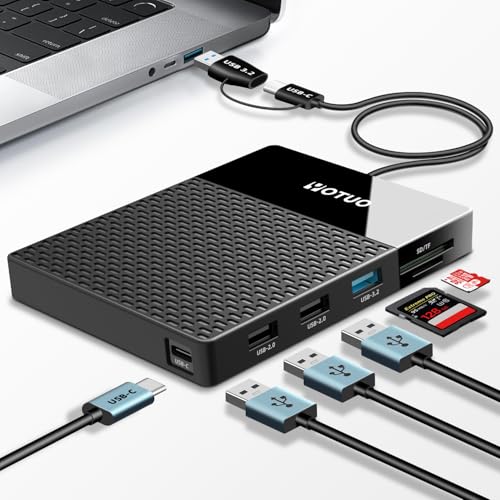
The YOTUO 1TB drive combines an external hard disk with a built-in 7-in-1 hub, including USB-C, USB 3.0, SD/TF card reader, and additional ports. This all-in-one design supports Windows, Mac, Android, TV, laptops, and tablets, enhancing multi-device productivity. The USB-C and USB 3.0 dual sockets expand compatibility, enabling easy data transfer across ecosystems without multiple adapters. This flexibility is especially useful for users who frequently switch between devices or need quick access to SD cards and flash storage in a single device.
Performance varies across interfaces and device capabilities, but the hub approach provides practical value by consolidating storage and port options. The 1TB capacity is suitable for daily work, media libraries, and project backups, while the built-in hub can reduce clutter and improve workflow efficiency for multi-device setups.
Buying Guide: Key Purchase Considerations
- Storage Type: SSDs offer higher speed and lower latency than HDDs. If you work with large video files or require rapid backups to your phone, prioritize SSD options like the SSK or SanDisk Extreme drives.
- Interface and Speed: USB-C with USB 3.2 Gen 2 provides the best transfer rates for phones and tablets. Real-world speeds depend on host device compatibility and file types.
- Durability and Longevity: IP ratings, drop protection, and rugged construction add resilience for transit. For fieldwork, select models with water and dust resistance or robust housings.
- Capacity: Choose a capacity that fits current needs with room to grow, while balancing cost and device compatibility. 1TB, 2TB, and 500GB options cover a broad spectrum of use cases.
- Cross-Platform Compatibility: If you switch between iOS, Android, Windows, and Mac, look for drives marketed as multi-platform or USB-C ready with broad compatibility notes.
- Portability vs. Longevity: SSDs tend to be lighter and quieter with better shock resistance, while HDDs generally offer higher capacity at a lower cost per gigabyte.
- Backup Scenarios: Consider whether you need ready-made backup software or simple drag-and-drop transfers. Some drives include software or cloud integration options.
- Brand and Support: Reputable brands often provide firmware updates and reliable customer support. Check warranty terms and accessibility of updates.
Across these options, the best choice depends on your priority: ultimate speed and compactness (SSK or SanDisk Extreme SSDs), maximum on-the-go capacity with ruggedness (SanDisk and Seagate HDDs), or a versatile hub-and-storage solution (YOTUO). Evaluate your device ecosystem, typical file sizes, and how often you transfer data to ensure the selection aligns with your mobile storage needs.