Investing in an external hard drive is a practical step for safeguarding photos, videos, documents, and games. This guide highlights top options designed for Windows and Mac, with varying capacities to fit budgets and storage needs. Each pick emphasizes simple plug-and-play setup, broad compatibility, and dependable performance for everyday use or gaming consoles. Read on to compare features and find the best external drive for your setup.
Overview of the selected products:
| Product | Brand | Capacity | Connection | Key Benefit |
|---|---|---|---|---|
| Seagate Portable 2TB | Seagate | 2TB | USB 3.0 | Easy on-the-go storage |
| Seagate Portable 1TB | Seagate | 1TB | USB 3.0 | Compact backup capacity |
| Seagate Portable 5TB | Seagate | 5TB | USB 3.0 | Large media library |
| Maxone 500GB Ultra Slim | Maxone | 500GB | USB 3.0 | Slim, durable portable option |
| Seagate Portable 4TB | Seagate | 4TB | USB 3.0 | Balanced capacity |
| WD Elements 2TB | WD | 2TB | USB 3.2 Gen 1 | Plug-and-play reliability |
| Aiolo Innovation 500GB | Aiolo Innovation | 500GB | USB 3.0 | Fast transfers for mixed use |
| WD 5TB Elements Portable | Western Digital | 5TB | USB 3.2 Gen 1 | High capacity on the go |
Seagate Portable 2TB External Hard Drive HDD

The Seagate Portable Drive offers a straightforward storage solution with a 2TB capacity designed for use with Windows or Mac computers. It emphasizes drag-and-drop backup, with automatic recognition when connected—no software required for initial setup. This makes it a practical option for users who want quick, reliable access to large media libraries or project files on the go. The drive is compatible with gaming consoles and supports casual data transfer tasks, making it a versatile choice for households with mixed devices.
Seagate Portable 1TB External Hard Drive HDD

With 1TB of storage, this Seagate model targets personal backups and everyday file expansion. It is designed to work with Windows or Mac and supports simple drag-and-drop transfers for quick backups. While some Mac users may need to reformat for optimal macOS compatibility, setup remains automatic upon connection. The compact form factor makes it a practical travel companion for students or remote workers needing extra space beyond a laptop’s internal drive.
Seagate Portable 5TB External Hard Drive HDD
This 5TB Seagate portable drive is ideal for large collections of videos, photos, and games. It follows a familiar plug-and-play workflow, compatible with Windows and Mac and designed for easy backups via drag-and-drop. The large capacity supports long-term storage of high-resolution media and reduces the frequency of data archiving. Users should consider whether their setup benefits from a larger-capacity, portable option or if a desktop drive with Ethernet sharing would be more suitable.
Maxone 500GB Ultra Slim Portable External HDD

The Maxone drive emphasizes portability with a notably slim profile (about 0.4 inch thick) and an all-aluminum body for durability and cooling. It uses USB 3.0 for faster transfers and is marketed as broadly compatible with Windows, Mac, and various game consoles. The device is suitable for users who prioritize a lightweight, pocketable solution for quick backups, travel, or on-the-go data access, while still offering solid performance for everyday tasks.
Seagate Portable 4TB External Hard Drive HDD
The 4TB Seagate portable drive provides a balanced option for users who need more space than 2TB but don’t require the largest capacity. It supports drag-and-drop backups and is compatible with Windows or Mac. The setup remains straightforward, with automatic recognition when connected. This drive is well-suited for multimedia libraries, project backups, and gaming profiles that benefit from a portable yet capacious storage solution.
WD Elements Portable 2TB

The WD Elements 2TB drive emphasizes plug-and-play reliability with a simple design and USB 3.0/3.2 Gen 1 interfaces. It is compatible with both Windows and Mac via direct connection and requires no additional software for basic use. The compact enclosure makes it a straightforward option for students, remote workers, or anyone needing reliable, portable storage with broad device support and easy file transfers.
Aiolo Innovation 500GB Ultra Slim

The Aiolo Innovation drive focuses on fast USB 3.0 data transfers, leveraging a thick copper cable and reported read/write speeds that aim to deliver quick backups and file transfers. Its ultra-thin design targets portability and quiet operation, with broad compatibility across Windows, Mac, and major gaming consoles. This option suits users who want a compact, high-speed drive for everyday backups and travel use, balancing speed and portability with a smaller capacity.
WD 5TB Elements Portable
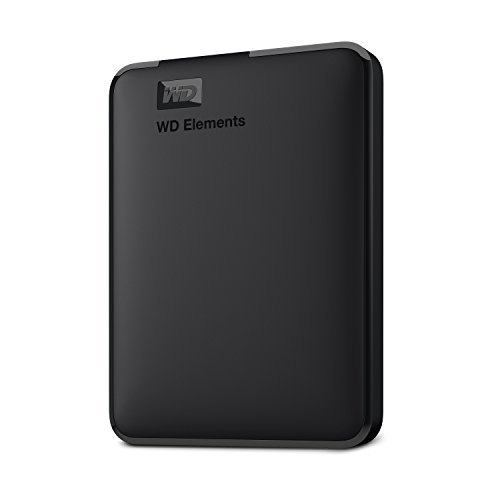
The Western Digital 5TB Elements Portable drive offers substantial storage capacity in a portable form factor with USB 3.2 Gen 1. It emphasizes plug-and-play usability for Windows and Mac users who need large-scale backups or media libraries on the go. This model is ideal for households with large video collections or creative projects that require frequent transfers and ample space without sacrificing portability.
Buying Guide: Key Purchase Considerations
- Capacity: Choose a drive that fits your data growth trajectory. For photos and documents, 2–4TB covers many users; for large video libraries or game collections, 5TB or more is advantageous.
- Interface and speed: USB 3.0/3.2 Gen 1 transfers are common and adequate for everyday use. If you need faster transfers, look for USB 3.2 Gen 2 or USB-C interfaces and higher sustained write speeds.
- Portability vs. desktop form: Portable drives are ideal for on-the-go backups and travel; desktop-level drives (not covered here) often offer higher capacities and faster sustained performance with less emphasis on portability.
- Compatibility: Most drives support Windows and Mac with plug-and-play. Some may require formatting adjustments for Mac. Consider whether you need console compatibility for PlayStation or Xbox.
- Reliability and warranty: One-year rescue services are mentioned for certain Seagate models. Review warranty terms and data recovery options when evaluating long-term value.
- Security and durability: If you transport drives frequently, prioritize a slim, rugged chassis and consider encryption features if sensitive data is stored.
- Backup workflow: Assess whether you prefer automatic backups via software or a simple drag-and-drop approach. Some drives emphasize automatic recognition without software.
In sum, the right external hard drive balances capacity, portability, and ease of use for your specific needs. Whether you’re expanding a home media library, safeguarding work files, or keeping a portable game collection, the selections above offer a range of capacities and form factors designed to align with common American storage needs. Always verify device compatibility with your operating system and devices before purchase.