Whether you’re expanding your home media library, backing up precious files, or creating a portable networked storage device, the right external hard drive network adapter or enclosure can simplify access and speed. This article highlights five versatile options—from USB-to-Ethernet adapters that add wired network reliability to multi-bay enclosures that scale storage for families or small offices. Each pick focuses on speed, compatibility, and ease of use to help you choose confidently.
Summary of Selected Products
| Product | Brand | Key Benefit | Interface | Max Speed |
|---|---|---|---|---|
| uni USB to Ethernet Adapter | uni | Driver-free plug-and-play for quick wired networking | USB 3.0 to Ethernet (RJ45) | Up to 1 Gbps |
| TP-Link UE306 | TP-Link | Compact USB-to-Ethernet with broad compatibility | USB 3.0 to RJ45 | Up to 1 Gbps |
| SSK 2TB Portable NAS | SSK | Wireless NAS with own Wi‑Fi hotspot | Wi‑Fi / USB | Up to 300 Mbps |
| Unitek USB to IDE/SATA Converter | Unitek | Flexible external drive adapter for multiple drive types | USB to SATA/IDE | Up to 5 Gbps |
| ORICO 5 Bay Enclosure | ORICO | High-capacity, tool-free hot-swap enclosure | USB C to SATA | Up to 5 Gbps |
These options cover a spectrum from portable, plug‑and‑play USB adapters to larger, USB-C connected multi-bay enclosures. Read on to see how each one fits different storage and network needs, from quick laptop fixes to home media centers.
Uni USB To Ethernet Adapter For Quick Wired Networking
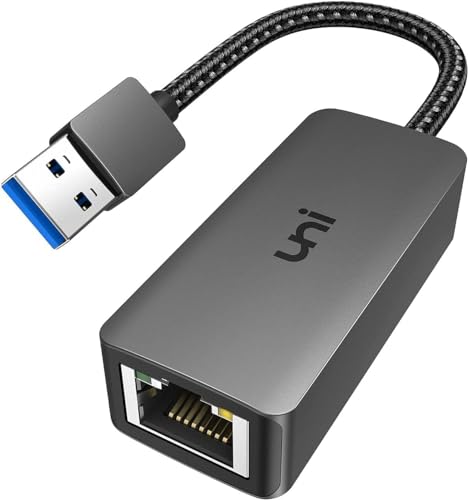
The uni USB to Ethernet Adapter enables 10/100/1000 Mbps wired networking via USB 3.0, with backward compatibility for USB 2.0 and 1.1. For full 1 Gbps performance, use CAT6 or newer Ethernet cables. It is plug-and-play, meaning no driver installation is required on most devices, though Windows 11 may need a driver from the product guides. It’s designed to boost network speed for online classes, video conferences, large file downloads, streaming, and gaming on USB‑3.0 laptops. Note: not recommended for TV usage.
TP-Link UE306 USB To Ethernet Adapter

TP-Link’s UE306 adds a reliable wired connection to laptops, tablets, and ultrabooks with USB 3.0 to RJ45. It delivers 10/100/1000 Mbps, supporting fast transfers, HD streaming, online gaming, and video conferencing. It’s USB 3.0 powered, with backward compatibility for USB 2.0/1.1. The device is compatible with Windows, macOS, and Linux, and it also supports Nintendo Switch connectivity for a wired experience where preferred. No external power is required for typical use.
SSK Portable NAS With Built-In Wi‑Fi Hotspot
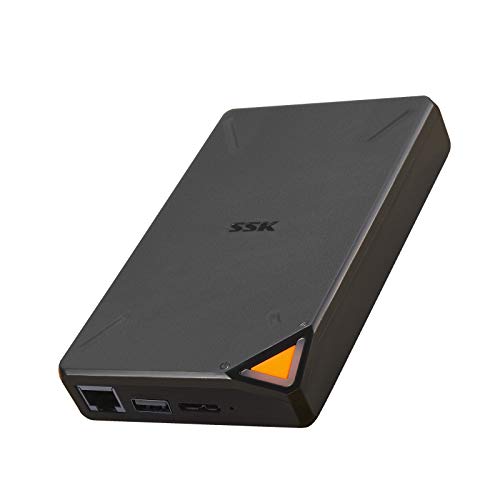
SSK’s 2TB portable NAS provides wireless access with its own hotspot, enabling remote management from PCs, smartphones, or tablets. It supports up to 300 Mbps wireless transmission and offers features like one-click backup, remote access, and multi-user sharing. The device uses Samba and DLNA protocols to allow sharing across smart TVs, laptops, and other devices in a LAN. It also supports creating private and public areas for data security and easy cloud-like access without a fixed location.
Unitek USB 3.0 To IDE & SATA Converter Kit

The Unitek kit supports 2.5″ and 3.5″ SATA HDD/SSD and IDE drives (plus optical media). It offers multiple drive compatibility with a single USB connection, and you can operate up to three drives simultaneously. Data transfer rates reach up to 5 Gbps, with backward compatibility to USB 2.0/1.1. A 12V/2A power adapter is included to ensure stable operation, especially when testing or running multiple drives at once. This is ideal for drive cloning, backups, and rapid data transfer tasks.
UGREEN USB To Ethernet Adapter

UGREEN offers a 1000 Mbps USB-to-Ethernet adapter with plug-and-play simplicity. It works with Windows, macOS, Linux, and Chrome OS, and requires no drivers for many scenarios. It is also compatible with Nintendo Switch and Switch Oled, expanding wired network options beyond traditional PCs. The adapter helps maintain stable, high-speed connections for gaming, HD streaming, uploading, and downloading tasks by leveraging USB 3.0 performance to reach gigabit speeds when paired with capable hardware and cables.
SATA To USB 3.0 External Drive Adapter

The SATA-to-USB 3.0 adapter quickly accesses 2.5″ and 3.5″ SATA drives, enabling drive cloning, backups, and standalone drive usage without opening a computer. It supports up to 5 Gbps transfer speeds with UASP, which improves performance over standard USB 3.0. It is backward compatible with USB 2.0/1.1 and offers hot-swapping for convenient swaps between drives while connected. This is suitable for diagnostic work, data recovery, or expanding legacy systems with modern USB speeds.
ORICO 5 Bay USB-C Enclosure
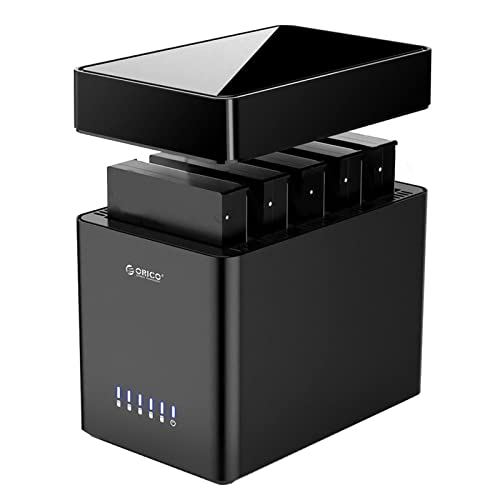
The ORICO 5-bay enclosure supports up to 90TB of total drive capacity, with 3.5″ SATA HDD bays and tool-free magnetic design for quick drive swaps. It features a USB-C connection and a USB 3.1 Gen 1 interface, delivering up to 5 Gbps. The enclosure is designed for home storage expansion, media libraries, and backups, with a Linux caveat noted for multi-drive access in some setups. It’s a practical option when you want centralized, expandable storage that’s easy to set up and maintain.
Buying Guide: Key Purchase Considerations
When choosing an external hard drive network adapter or enclosure, consider these factors to match your needs:
- Storage scale and bay count: For growing libraries or family use, multi-bay enclosures (like the ORICO 5 Bay) offer scalable capacity, easy drive swapping, and centralized backups.
- Interface and speed: USB-C or USB 3.0 with UASP support delivers the fastest transfers. For wired networks, prioritize Gigabit Ethernet (1 Gbps) compatibility and reliable drivers, especially on older devices.
- Compatibility: Ensure the device supports your operating system (Windows, macOS, Linux) and any gaming consoles or media devices you intend to use, such as Nintendo Switch.
- Power requirements: Some enclosures need external power, especially multi-drive docks. Check included adapters and power stability for long sessions.
- Ease of use: Plug-and-play solutions save time, while others may require driver installation. Consider whether you need hot-swapping capabilities or remote access features.
- Security and access: Wireless NAS options (like the SSK) provide remote access and user sharing, but evaluate security features such as private/public areas and encryption when handling sensitive data.
- Physical design and portability: If you travel or move between rooms, lighter USB adapters and compact NAS devices are advantageous; larger enclosures suit home storage centers.
- Future-proofing: Look for devices that support higher capacities and modern interfaces to minimize the need for replacements as your data grows.