Discover efficient ways to keep your external drives, SSDs, and small accessories secure while you work on a laptop. The following picks are adhesive, pocket-style organizers designed to attach to your notebook or desk setup, helping you avoid misplacing drives during meetings, travel, or daily use. Each option emphasizes portability, compatibility, and a straightforward setup so you can choose the right fit for your gear and workflow.
Summary of chosen products
| Product | Brand | Key Benefit | Compatibility Highlights |
|---|---|---|---|
| Afterplug 2-Pocket Adhesive Pouch (Black) | Afterplug | Double pocket with safety strap for quick access | External 2.5″ HDD/SSD, USB cables, mouse, more |
| Slipdrive Portable Hard Drive Sleeve (Small) | Slipdrive | Ultra-slim stick-on sleeve with strong 3M adhesive | Most portable SSDs/HDDs, compact footprint |
| Afterplug 2-Pocket Adhesive Pouch (Gray) | Afterplug | On-the-go organization with universal fit | Portable SSDs, accessories, peripherals |
| DriveSlide – Aesthetic External Drive & Hub Holder | DriveSlide | Lock-and-key system to secure drive and hub | External drives, USB hubs, compatible with laptop surfaces |
| ESR Portable External Drive Carrying Case | ESR | Practical sleeve for easy access to essentials | External drives, power banks, cables, mouse |
Afterplug 2-Pocket Adhesive Pouch (Black)

The Afterplug two-pocket adhesive pouch is designed for quick access to essential tech items during travel or meetings. Its double-pocket design includes a built-in safety strap to secure smaller items such as external portable SSDs, USB cables, and a magic mouse. The pouch offers a universal fit for common portable drives, including SanDisk Extreme/Extreme Pro, Samsung T5/T7, Crucial X8, and other small devices. This solution emphasizes on-the-go organization without adding bulk to the laptop itself.
Key features include a stick-on adhesive system that provides a reliable bond while remaining residue-free upon removal. The built-in safety strap helps prevent accidental drops, and the extra storage pocket accommodates smaller accessories like earbuds or charging cables. This option is well-suited for professionals who frequently travel or attend meetings and need a dedicated, secure spot for their essential gear.
Performance considerations: compatibility with a broad range of external drives and accessories makes it a versatile option, while the two-pocket design balances capacity with portability. Potential downsides could include a limited space for larger drives depending on the bag’s size and the surface texture of the laptop underside where it is applied.
Slipdrive – Portable Hard Drive Sleeve (Small)

The Slipdrive small sleeve offers on-the-go convenience by attaching directly to your laptop or tablet. Its 3M adhesive ensures a secure bond that helps prevent misplacement of external drives during use or transport, yet it removes cleanly without leaving residue. The sleeve is designed to be ultra-slim (about five by 3.2 inches), making it suitable for most SSDs and compatible with typical laptop footprints without adding noticeable bulk.
With a focus on simplicity and portability, Slipdrive provides a practical solution for users who want their external storage out of the way but within easy reach. The adhesive is strong enough to withstand typical daily movements but gentle enough to avoid damage to the device surface during removal. This option is particularly appealing to travelers and remote workers who value a tidy, cable-free desk setup.
Considerations: its compact size may limit compatibility with larger HDDs, and the adhesive’s long-term reliability can vary with heat or repeated attachment cycles. The product excels when used with compact drives and lightweight accessories that benefit from a minimalistic attachment.
Afterplug 2-Pocket Adhesive Pouch (Black) for 2.5″ Drives

This variant of the Afterplug pouch is tailored for 2.5-inch HDDs and SSDs, maintaining the same dual-pocket layout and safety strap. Its compatibility extends to popular portable drives from Seagate, WD, LaCie, Toshiba, and WIOTA, and it also accommodates essential accessories like wireless mice, AirPods, USB cables, and small battery packs. The design centers on ensuring that larger drives remain securely tethered and easy to locate, reducing the likelihood of misplacement during travel or meetings.
Strengths include organized storage for multiple devices in one compact unit, plus a robust adhesive system designed to stay put across various laptop surfaces. It is particularly beneficial for users who carry multiple drives and a mix of accessories and seek a streamlined, stick-on solution that stays put throughout a work session or commute.
DriveSlide – Aesthetic External Drive & Hub Holder

DriveSlide focuses on a sleek, modern look while helping organize a laptop workspace. The product features a lock-and-key system: the Lock adheres to the laptop as the base, and the Key adheres to a hard drive or hub as the attachment device. This setup enables a secure, removable attachment for drives or hubs, allowing users to move their equipment with their laptop without tangled cables or loose devices. The design is minimal yet functional, aligning with contemporary workspace aesthetics.
Key considerations include the balance between visual appeal and secure attachment, as the system hinges on the efficacy of the adhesive connections. The kit can help reduce desk clutter and provide a tidy, integrated solution for users who rely on constant portability and easy transport of drives and hubs during presentations or collaborative sessions.
ESR Portable External Drive Carrying Case
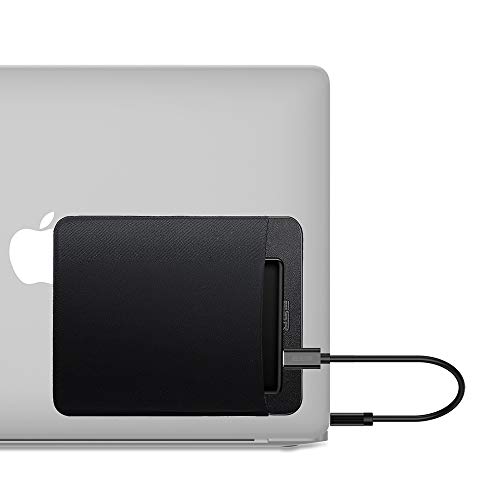
ESR’s carrying case serves as a compact sleeve to secure external drives, power banks, cables, and a wireless mouse in one accessible place. It emphasizes portability with a simple, practical interior that keeps essentials on-hand without adding bulk to a laptop setup. The design is well-suited for users who want an all-in-one sleeve that can travel with a device or be attached to a protective case or bag for quick access.
Considerations for ESR include durability of the sleeve material, the security of the zipper or closure, and the sleeve’s ability to accommodate a range of drive sizes. While not a sticky-adhesive solution, it offers a structured alternative for travelers who prefer a protective case with separate compartments for different items.
Buying Guide
Key purchase considerations for external hard drive laptop holders and sleeves:
- Size and compatibility: Match the pouch or sleeve to the largest drive you commonly carry (SSD vs HDD) and consider the number of pockets you need for accessories like cables, mice, or memory cards.
- Adhesive vs. case: Adhesive pockets save space and keep items directly attached to your device, but may leave residue or require reattachment over time. Cases offer protection and organization without modifying the device surface.
- Surface compatibility: Some adhesive solutions perform best on smooth surfaces; if your laptop has coatings or textures, test adhesion on a small area first.
- Security and stability: Double-pocket designs and integrated safety straps help prevent items from slipping out during movement, travel, or vibrations in transit.
- Portability vs. capacity: Slim sleeves prioritize portability, while larger pockets provide more storage at the cost of bulk. Consider your typical travel scenarios to strike the right balance.
- Durability and materials: Look for high-quality adhesives (such as 3M) and durable fabrics or sleeves that resist wear, heat, and repeated attachment cycles.
- Removal impact: If you frequently remove and reattach, ensure that the adhesive or closure mechanism does not damage your device or leave sticky residues.
- Multi-device compatibility: If you use both SSDs and HDDs, select products that clearly list compatibility with common drive sizes and brands to avoid mismatches.
In evaluating these options, consider your typical work environment—whether you travel frequently, work in shared spaces, or need a permanent desk-side solution. A combination of adhesive pouches for quick access and sturdy cases for protection can provide a balanced setup that reduces repetitive searching for drives and cables. For teams or offices, standardized organizers help maintain consistency across devices and reduce the risk of misplaced drives during shifts in personnel or rooms.