Seeking a reliable external enclosure to turn internal drives into portable, high-speed storage? This guide covers top enclosures and docks that support 2.5″ and 3.5″ SATA drives, with USB 3.0, UASP, and tool-free setups. Each option prioritizes compatibility, cooling, and ease of use for Windows, macOS, and Linux systems. The following selections are ideal for backups, media libraries, and creating external drive bays without complicated installation.
Summary of chosen products
| Product | Brand | Type | |
|---|---|---|---|
| SABRENT EC-DFLT | SABRENT | Docking Station | Supports 2.5″ and 3.5″ SATA drives with UASP |
| UGREEN External Enclosure | UGREEN | Enclosure | High capacity support up to 20TB, heat dissipation |
| SABRENT EC-KSL3 | SABRENT | Enclosure | Tool-free setup with LED indicator |
| CLAVOOP 3.5 Enclosure | CLAVOOP | Enclosure | UASP, auto-sleep, anti-shock, up to 20TB |
| ORICO Lay-Flat Dock | ORICO | Docking Station | Lay-flat design, up to 24TB, USB 3.0 with UASP |
SABRENT EC-DFLT External Docking Station

The SABRENT EC-DFLT is a universal dock designed to accommodate both 2.5-inch and 3.5-inch SATA drives, turning internal drives into external storage without tools. It features SuperSpeed USB 3.0 connectivity for high-speed transfers and UASP support to boost performance on compatible hosts. Firmware updates are available on the Sabrent site, ensuring compatibility with larger-capacity drives as they become available.
Key considerations include ensuring your host supports UASP for maximum throughput and confirming you have the latest firmware for larger drives. The dock’s lay-flat design helps with airflow, reducing heat during sustained transfers. For media libraries, backups, and quick data migrations, this dock offers straightforward plug-and-play operation.
UGREEN External Hard Drive Enclosure (3.5″ / 2.5″)
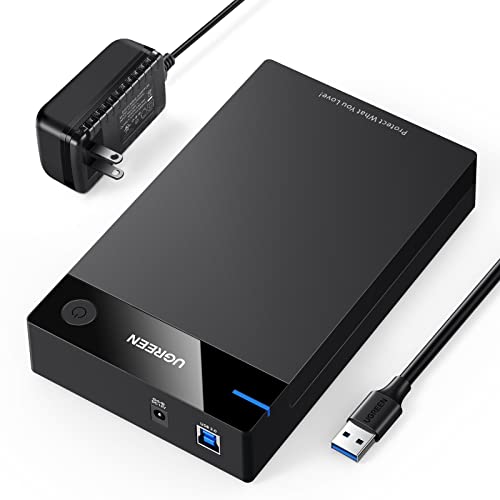
This 3.5″ enclosure supports both 3.5″ and 2.5″ SATA drives and is designed for high-capacity use, with support up to 20TB and 5Gbps transfer speeds via USB 3.0. UASP acceleration helps improve throughput, and the device is backward compatible with USB 2.0 and 1.1. The enclosure uses an intelligent chip and anti-shock design with soft rubber strips to cushion drives during operation, along with heat-dissipation holes to maintain cooler temperatures during heavy use.
Pros include robust physical protection, good heat management, and strong compatibility with major drive brands. The main trade-off is that high-capacity drives may require adequate power delivery, and users should verify drive sizes before purchase to ensure fit.
SABRENT EC-KSL3 Tool-Free Enclosure
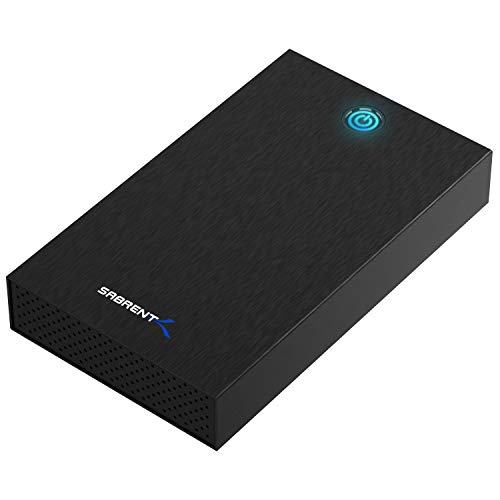
The SABRENT EC-KSL3 simplifies installation with a tool-free design, allowing quick drive swaps in seconds. It supports both 2.5″ and 3.5″ SATA drives and provides USB 3.0 connectivity with UASP, delivering faster data transfers. The enclosure includes a power adapter and cable, and it’s compatible with Windows, macOS, and Linux systems. An LED indicator shows activity, and the setup emphasizes ease of use for users who swap drives frequently or want a portable external drive bay.
Potential limitations include the need to verify drive height for 3.5″ SSDs/HDDs within the enclosure, and ensuring you select a USB port that supports USB 3.0 for peak performance.
CLAVOOP 3.5″ Enclosure with UASP

The CLAVOOP 3.5-inch enclosure supports UASP with USB 3.0, delivering high-speed transfers up to 336 MB/s read speeds in testing. It features a sturdy ABS body with large ventilation holes and non-slip pads for stability and cooling during operation. The design emphasizes heat management, auto-sleep to save energy, LED indicators for status, and plug-and-play operation with no tools required for setup. It’s designed to host large drives up to 20TB, making it suitable for backups and large data archives.
As a potential drawback, users should ensure proper power supply adequacy, as high-capacity drives can be power-intensive, especially when using multiple enclosures in a workstation environment.
ORICO Lay-Flat Docking Station
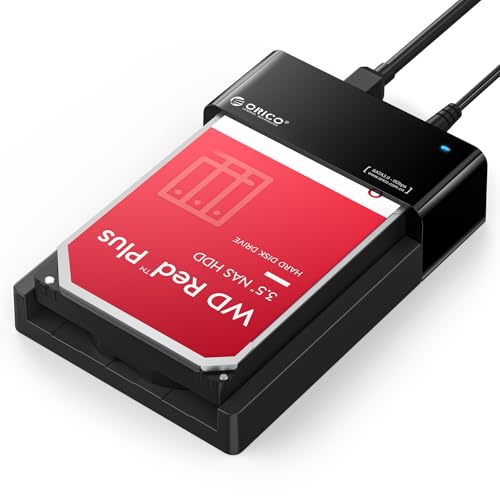
The ORICO 2.5/3.5-inch lay-flat docking station combines a sleek design with robust performance. It supports USB 3.0 with UASP, enabling fast data transfers up to 5Gbps and backward compatibility with USB 2.0. The lay-flat form factor promotes efficient cooling, with a large drive capacity up to 24TB supported across both drive sizes. This dock is ideal for quick cloning, backups, and data migration tasks, offering a straightforward plug-and-play experience for users on Windows, macOS, and Linux systems.
Considerations include ensuring you attach a reliable 12V power supply and confirming drive height compatibility, as some 3.5″ drives with larger mounting hardware may require slight clearance. The dock’s simplicity is a strength for users who want rapid drive access without enclosure assembly steps.
Buying Guide: Key Purchase Considerations
When selecting an external hard drive enclosure or docking station, several factors determine long-term satisfaction and performance:
- Drive compatibility and sizes: Ensure the enclosure supports 2.5″ and/or 3.5″ drives, and check drive height limits for 3.5″ drives with larger mounting features.
- USB interface and protocol: Prefer USB 3.0 or USB 3.1/3.2 with UASP support to maximize transfer speeds, especially for large backups or media libraries.
- Cooling and heat dissipation: Lay-flat designs, built-in ventilation, and heat-dissipation features help sustain performance during heavy data transfers.
- Plug-and-play and OS compatibility: Look for tool-free installation, LEDs for status, and broad OS support (Windows, macOS, Linux).
- Power requirements: For 3.5″ drives, confirm the enclosure includes an adequate external power adapter; underpowered setups can throttle performance.
- Build quality and protection: Anti-shock features, robust housings, and non-slip bases improve reliability in portable setups.
- Future-proofing: Some enclosures advertise capacities up to 20TB or 24TB. Consider planned storage growth and drive availability when choosing.
- Warranty and firmware: Some docks and enclosures offer firmware updates. Check manufacturer support policies for ongoing compatibility with new drives.
In practice, universal docking stations excel for drive cloning and rapid data transfers, while dedicated enclosures prioritized for single-drive stability and compact form factors are ideal for portable backups. For media libraries and large archives, choosing a model with strong airflow and a reliable power supply reduces thermal throttling and intermittent disconnects.