Finding the right external storage for a Mac involves balancing capacity, speed, durability, and compatibility. The following selection focuses on drives that work well with macOS, whether you need large backups, fast transfers for media work, or portable storage for on‑the‑go use. Each product below highlights key features, connectivity, and real‑world considerations to help you choose the best match for your Mac setup.
| Product | Brand | Capacity | Type |
|---|---|---|---|
| Seagate Portable 2TB External Hard Drive HDD | Seagate | 2TB | USB 3.0 Hard Drive |
| JOIOT 256GB USB C Flash Drive Dual USB 3.0 | JOIOT | 256GB | USB-C / USB-A Flash Drive |
| SSK Portable SSD 1TB External | SSK | 1TB | USB 3.2 Gen2 SSD |
| Seagate Portable 4TB External Hard Drive HDD | Seagate | 4TB | USB 3.0 Hard Drive |
| WD 2TB Elements Portable External Hard Drive | WD | 2TB | USB 3.0/3.2 Hard Drive |
Seagate Portable 2TB External Hard Drive

The Seagate Portable 2TB External Hard Drive is designed for cross‑platform use, including Mac. It connects via USB 3.0 for fast transfers and works with Windows or macOS without software installation. Backups can be performed with simple drag‑and‑drop operations, making it a practical option for photographers, videographers, and general users who need reliable, portable storage. The drive is ready to recognize automatically once plugged into a Mac or PC, facilitating quick setup for backup tasks or media libraries. A one‑year Rescue Service is included for added peace of mind.
JOIOT 256GB USB C Flash Drive

This 2‑in‑1 USB flash drive provides both USB-C and USB‑A connectors for broad compatibility with Macs, iPhones (non‑Lightning models), tablets, and USB‑A computers. It supports USB 3.0 speeds with read speeds up to 80MB/s and write speeds up to 25MB/s, delivering practical performance for transferring high‑resolution photos, videos, and other media. The dual‑end design is ideal for users who switch between devices, though note that it is not intended for Lightning iPhone/iPad. It is plug‑and‑play on supported systems, with no software required.
SSK Portable SSD 1TB External

The SSK 1TB Portable SSD delivers high performance with USB 3.2 Gen2, targeting fast data access for Mac, Windows, and Android. It lists read speeds up to 1050MB/s and write speeds up to 1000MB/s, enabling quick backups of large media libraries, video projects, and game files. An LED indicator shows drive activity, and S.M.A.R.T. monitoring helps track health. The drive is designed to be durable with features like TRIM for sustained performance, making it a strong choice for users who require speed and reliability on the go.
Seagate Portable 4TB External Hard Drive

Seagate’s 4TB Portable Drive provides ample capacity for large backups and media libraries. It’s designed for flexibility across Windows and Mac environments, with simple drag‑and‑drop backup workflows and automatic recognition when connected. The USB 3.0 interface supports fast transfers for bulk cloning, video editing projects, and photo archives. While larger than typical portable drives, its compatibility and plug‑and‑play setup make it suitable for Mac users seeking a straightforward, high‑capacity solution for travel or desktop backups.
WD 2TB Elements Portable External Hard Drive

The WD Elements 2TB Portable is a compact, plug‑and‑play option that works well with Mac and Windows. It emphasizes high capacity in a small footprint, with USB 3.0 connectivity and broad compatibility. The drive is intended for easy on‑the‑go storage, backups, and media libraries. WD’s software options can help with file organization and protection, though the basic drag‑and‑drop workflow remains the core user experience. This drive is a practical pick for users who want dependable, mass storage that travels well with a Mac setup.
WD 2TB My Passport for Mac

The WD My Passport for Mac is a Mac‑specific external drive that pairs USB 3.1/3.0 compatibility with native Mac software support. It includes Mac‑ready features, password protection, and backup software tailored for macOS. The slim, durable design makes it a strong option for Mac users who want seamless integration with Time Machine or other macOS backup workflows. If you value native macOS compatibility and straightforward setup, this drive aligns well with a Mac ecosystem.
Crucial X10 1TB Portable SSD
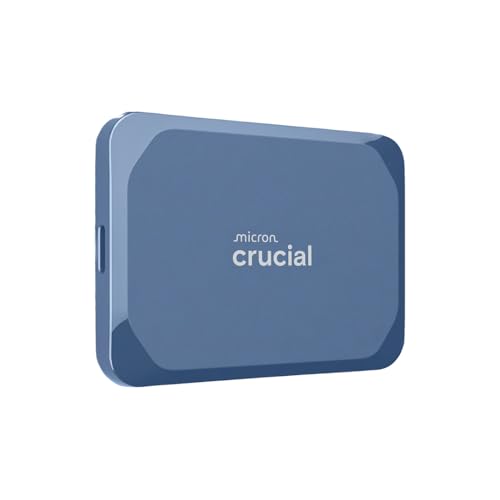
The Crucial X10 1TB Portable SSD offers high read speeds up to 2,100MB/s and robust durability with IP65 dust and water resistance and drop protection. It is designed for creators, students, and PC gamers who need fast, reliable external storage across different devices, including Mac, Windows, iPad Pro, and Android. The USB‑C and USB‑A compatibility supports easy connection to modern Macs, making it a compelling option for portable, high‑performance storage that travels well with portable setups and creative workflows.
Buying Guide: Key Purchase Considerations
When selecting an external drive for a Mac, consider these factors to align with workflow and device ecosystem:
- Storage type: Hard disk drives (HDDs) offer large capacities at lower cost per terabyte, ideal for backups and media libraries. Solid-state drives (SSDs) provide faster transfers, better durability, and responsive performance for editing and frequent access.
- Interface and speed: USB 3.0/3.2 and USB-C support determine transfer speeds and compatibility with newer Macs. For SSDs, look for USB‑C with high read/write speeds to maximize data throughput.
- Capacity needs: If you handle large media projects or extensive backups, aim for 2TB or more. For travel and light use, 256GB–1TB options may suffice.
- Mac compatibility: Some drives are tailored for Mac with built‑in software for Time Machine or encryption. Others are universal but may require formatting for macOS (APFS or HFS+).
- Durability and portability: Consider rugged features, IP ratings, drop resistance, and size/weight for on‑the‑go storage.
- Security: Password protection and hardware encryption help protect sensitive data on portable drives.
- Backup workflow: If you rely on Time Machine, ensure compatibility or native Mac support. For cross‑platform use, formatting options and software features should fit your workflow.
- Longevity and warranty: Look for drives with a solid warranty and reliable brand history to minimize risk of data loss.
In sum, macOS users have options across HDDs and SSDs, with choices spanning high capacity for backups to high‑speed portability for active projects. Evaluate your typical file sizes, how often you transfer data, and whether macOS‑specific features (like Time Machine compatibility) matter most to your setup.