Whether you’re restoring older footage, transferring data from legacy devices, or simply expanding connectivity, external FireWire options for laptops remain essential in certain workflows. This guide highlights five practical choices, from simple adapters to full external drives, to help you connect FireWire devices to modern laptops with USB or PCIe interfaces. Each pick prioritizes reliability, compatibility, and ease of use for American readers.
| Product | Brand | Type | Key Benefit |
|---|---|---|---|
| Firewire To USB Adapter Cable | Herfair | Adapter Cable | Simple FireWire 400 to USB 2.0 for viewing files |
| FireWire 400 Cable 4 Pin To 4 Pin | GINTOOYUN | FireWire Cable | Direct 4-to-4 pin connection for DV/Camcorders |
| RIIEYOCA 6-Pin USB to FireWire Adapter | RIIEYOCA | Adapter Cord | Plug-and-play USB to FireWire conversion |
| Padarsey PCIe Firewire Expansion Card | Pardarsey | PCIe Card | Desktop expansion for multiple FireWire ports |
| WD My Book Studio 3TB FireWire 800 | Western Digital | External Hard Drive | High-capacity FireWire 800 with USB compatibility |
Note: The list focuses on devices that enable FireWire connections with laptops or desktops, including adapters, cables, expansion cards, and external drives. Some items are designed for viewing only or require compatible hosts for FireWire 400/800 connections.
Firewire To USB Adapter Cable For FireWire 400 To USB 2.0

The Herfair FireWire to USB adapter is a simple, plug-and-play solution featuring USB 2.0 Type-A to FireWire 400 (4-pin) connectors. It supports viewing files from devices like DV camcorders and external drives on a computer or laptop. Note that this cable is designed for output from FireWire devices to USB input and does not support reverse data capture.
Key features: USB 2.0 interface, 400 Mbps data transfer potential, 4-pin FireWire 400 output, plug-and-play operation. It’s best used for viewing existing video files or transferring data where capture is not required.
GINTOOYUN FireWire 400 Cable 4 Pin To 4 Pin

This FireWire 400 (IEEE 1394a) cable features 4-pin connectors on both ends, enabling direct connections between computers and devices like camcorders, external drives, or printers that use the FireWire standard. It emphasizes triple-shielded construction and hot-swappable operation, delivering up to 400 Mbps bandwidth when used with compatible hardware. It’s suitable for settings where a stable, plug-and-play FireWire link is needed.
StarTech.com 4 Port PCI 1394a FireWire Adapter Card
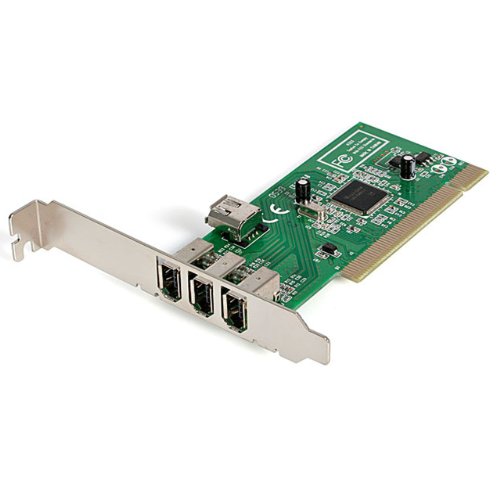
The StarTech 4-port PCI FireWire card provides three external FireWire 400 ports plus one internal port, delivering up to 400 Mbps per channel and compatibility with IEEE 1394a and older standards. It’s designed for desktop workstations needing reliable FireWire expansion, supporting daisy-chaining and multi-device connectivity. While primarily for desktops, this card is relevant in mixed environments with PCI Express-equipped systems or workstations that require additional FireWire bandwidth.
RIIEYOCA USB 2.0 To IEEE 1394 FireWire Adapter Cable

The RIIEYOCA 6-pin FireWire adapter converts USB 2.0 to FireWire, enabling connection from compatible cameras, DV devices, or camcorders to a computer. It is designed as plug-and-play with hot-swapping capability and offers 100/200/400 Mbps IEEE 1394 transmission rates. This option is useful when a laptop lacks native FireWire ports but still needs to interface with FireWire-equipped devices.
WD My Book Studio 3TB FireWire 800 External Drive

The WD My Book Studio combines large storage with legacy FireWire 800 compatibility and USB connectivity. It supports high-speed transfers, making it suitable for archival projects or rapid data backups from FireWire-equipped devices. It is designed for Mac and PC use, offering a robust external storage solution with FireWire 800 compatibility and USB access for cross-platform use.
Buying Guide
Key purchase considerations for external FireWire solutions include:
- Connection type and direction: Some cables and adapters transfer data from FireWire devices to a PC via USB, while others enable direct FireWire-to-FireWire connections. Ensure the direction matches your need (viewing vs. data transfer).
- FireWire standard: FireWire 400 (IEEE 1394a) vs. FireWire 800 (IEEE 1394b) compatibility affects bandwidth and device compatibility. Check devices you plan to connect and confirm supported standard.
- Host compatibility: Laptops may lack PCIe or PCI slots; consider dongles, USB adapters, or external drives with built-in interface support for your OS and hardware.
- Power requirements: Some FireWire devices are bus-powered, while others require external power. Verify if the solution provides sufficient power for all connected devices.
- Data transfer speed: 100/200/400 Mbps and above; USB 3.0/USB-C options often maximize speeds for mixed environments but ensure connectors and drivers are compatible.
- Use-case considerations: For archival and editing workflows, external drives with FireWire support and robust reliability are preferable to simple adapters that only view files.
- Platform and drivers: Ensure driver support for your operating system version. Some older FireWire devices may require legacy driver support or specific configurations.
- Durability and build quality: For on-the-go use, rugged enclosures or shielded cables help preserve signal integrity and data safety.
- Expandability: If you need multiple FireWire devices, consider PCIe/PCI expansion options or multi-port external drives with FireWire and USB interfaces for flexibility.
In summary, the best choice depends on your exact setup: simple viewing from cameras or DV devices may be satisfied with FireWire cables or USB adapters, while broader workflows benefit from multi-port expansion cards or high-capacity external drives with FireWire support. Always verify device compatibility with your laptop and the intended FireWire standard to maximize performance and reliability.