Choosing the right external DVD drive can simplify media playback, data backups, and software installations on laptops, desktops, and all-in-one PCs. This guide highlights top options with USB 3.0 or USB-C interfaces, plug-and-play setup, and broad compatibility across Windows, macOS, and Linux. Each selection below is evaluated for speed, reliability, and ease of use to help you pick a model that fits your workflow without extra adapters or drivers.
Summary table of chosen products:
| Product | Brand | Interface | Key Strength |
|---|---|---|---|
| Rioddas External CD/DVD Drive | Rioddas | USB 3.0 | Plug & Play, stable copper mesh tech |
| Amicool External DVD Drive | Amicool | USB 3.0 / USB-C | Dual interfaces, broad compatibility |
| YOTUO External CD/DVD Drive | YOTUO | USB 3.0 / USB-C | Slim, portable, dual interface |
| ORIGBELIE External CD DVD Drive | ORIGBELIE | USB 3.0 / USB-C | Ultra-slim with robust read/write speeds |
| BPAKDU External CD/DVD Drive | BPAKDU | USB 3.0 | 8-in-1 hub plus CD/DVD writer |
Rioddas External CD/DVD Drive for Laptop
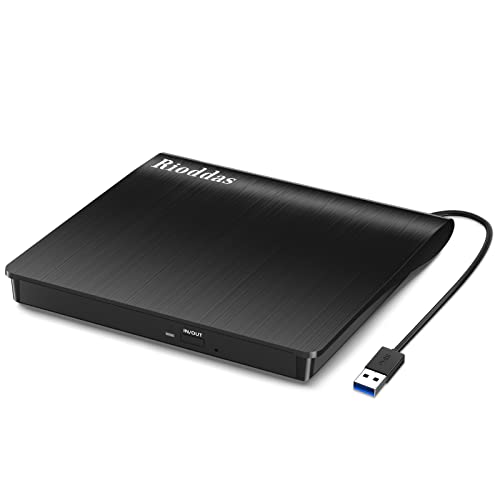
This Rioddas drive uses USB 3.0 for fast transfer speeds up to 5Gbps and maintains compatibility with USB 2.0. It’s designed for plug-and-play operation, requiring no external power adapter or driver installation. For desktops, use a rear USB port to ensure stable power delivery. The device includes a physical eject button and copper mesh tech to improve data transmission reliability, reducing the risk of playback or burn errors during disc operations.
Features at a glance:
- Plug & Play with USB-powered operation
- Supports USB 3.0 and is backward compatible with USB 2.0
- Stable performance to minimize freezing and errors
- Intelligent eject button for safety when the host fails to recognize the drive
- Copper mesh technology for more consistent data transmission
Amicool External DVD Drive USB 3.0 / USB C

The Amicool model blends USB 3.0 and Type-C interfaces for versatile connections. It is advertised as plug-and-play with minimal driver requirements, but recommends connecting directly to a USB port on the computer (preferably a rear port on desktops) to ensure adequate power. It supports multiple disc formats (DVD+R, DVD-R, CD-R, CD-RW) with read speeds up to 8x for DVDs and 24x for CDs, and data transfer rates up to 5Gbps. Note that it does not support DVD-RAM or Blu-ray discs, and some modern macOS setups may require additional tweaks for full functionality.
Key considerations:
- Dual interface (USB 3.0 and Type-C) for flexible use with new and old devices
- Direct connection to a host USB port improves reliability and speed
- Broad OS compatibility including Windows, macOS, and Linux
YOTUO External CD/DVD Drive

The YOTUO drive emphasizes portability with a slim, light form factor and a recessed cable design to reduce clutter. It uses both USB 3.0 and USB-C interfaces, delivering up to 5Gbps data transfer. Its reading speeds reach up to 8x for DVDs and 24x for CDs, supporting a broad range of disc formats for daily tasks like media playback or software installation. The device is noted to work with Windows, macOS, and Linux, and it remains compact enough for travel use while still offering reliable performance.
Highlights include:
- Plug-and-play operation with automatic recognition
- Dual USB 3.0 and Type-C connectivity
- Back compatibility across major operating systems
ORIGBELIE External CD DVD Drive
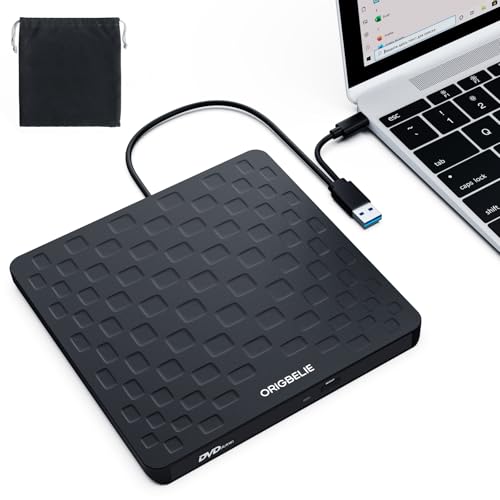
The ORIGBELIE drive is designed for versatility and speed, offering USB 3.0 with backward compatibility to USB 2.0/1.1. It advertises a maximum 8x DVD read and 24x CD write/read speed, with data transfer rates up to 5Gbps. The device supports a wide range of Windows, Linux, and macOS versions. It is compatible with both USB-A and USB-C connectors, but the product page notes certain restrictions for specific platforms and configurations, so users should ensure their system settings align with the drive’s requirements.
Practical insights:
- Broad OS and device compatibility
- Both USB-A and USB-C connectivity
- High-speed data transfer with reliable error correction
JKNJX External CD/DVD Drive

The JKNJX model emphasizes USB Type-A and Type-C compatibility, with a plug-and-play setup. It delivers up to 8x DVD read and 24x CD write/read speeds and supports USB 3.0 up to 5Gbps, while remaining backward compatible with USB 2.0/1.1. The drive is designed to work with a wide array of computers including Windows, macOS, and many Linux distributions. It highlights straightforward operation and reliable disc handling, but users should be mindful of power requirements on some desktop configurations and the need for direct USB connections to ensure stable operation.
Key takeaways:
- Solid speed ratings for both read and write tasks
- Broad cross-platform compatibility
- Direct connection recommended for best performance
BPAKDU External CD/DVD Drive

Consisting of an 8-in-1 USB 3.0 ultra-slim portable package, the BPAKDU drive doubles as a USB 3.0 hub and includes multiple ports and card readers. It is designed to power from a single USB 3.0 connection, with an optional extra power cable if needed for additional stability on some laptops. It supports CD/DVD reading and writing, and is compatible with Windows, macOS, and Linux systems. The built-in hub functionality can be handy for users who need to connect multiple USB devices simultaneously, though some configurations may require driver troubleshooting in rare cases.
What to consider when choosing an external DVD drive:
- Interface options: USB 3.0 vs USB-C; dual interfaces offer broader compatibility with newer laptops and desktops
- Power delivery: Some desktops may require rear USB ports or extra power adapters to ensure stable operation
- Disc format support: DVD±R/RW, CD-R/RW; note any limitations on DVD-RAM or Blu-ray support
- Portability: Slim profiles and light weights are ideal for travel
- Compatibility: Ensure the drive supports your operating system version and hardware configuration
Buying Guide: Key Purchase Considerations
- Compatibility and use case: If you primarily burn discs, look for drives with robust write speeds and reliable error correction. For casual playback, read speeds and stability are more important.
- Interface and power: USB 3.0 is common and fast; USB-C adds future-proofing. Some desktops require back-panel USB ports for sufficient power; consider a powered hub if you’ll use multiple devices.
- Portability vs. features: Slim devices save space, but some multi-function models (8-in-1 hubs) add value if you need extra USB ports or card readers.
- Software and compatibility notes: Most drives are plug-and-play, but a few may require driver tweaks on certain OS versions. Check product notes for macOS-specific caveats or Linux compatibility.
- Durability and build: Copper mesh or other shielding can contribute to stable data transmission and reduced interference, which helps with long sessions of reading or burning.
Overall, the selections above provide a spectrum of sizes, speeds, and features to fit different setups—whether upgrading a modern ultrabook, stocking a home media PC, or equipping a family computer for backups. The common thread is reliable plug-and-play operation, broad OS support, and fast data transfer without needing extra power adapters or driver installations in most cases.