Discover top external Blu-ray drives that provide fast reading and writing, wide compatibility, and convenient features for backups, media playback, and data transfer. The following selections cover multi-port hubs, 100GB BD disc support, and portable designs to fit desk setups or travel needs. Each model includes key benefits and notable specs to help you compare at a glance.
| Product | Brand | Notable Feature |
|---|---|---|
| Wbacon 7 in 1 External Blu Ray Drive | Wbacon | SD/TF slots, 100G BD support |
| ASUS BW-16D1X-U | ASUS | 16x BD writing, USB 3.0 |
| aelrsoch External Blu ray Drives | aelrsoch | USB 3.0/Type-C, dual power option |
| Yaeonku 8 in 1 External Blu Ray Drive | Yaeonku | HDMI output, LAN port |
| juwuoi External Blu Ray Drive | juwuoi | 100G BD support, USB 3.0/Type-C |
Below are five carefully chosen external Blu-ray drive options, each with strong compatibility across Windows, macOS, and Linux, plus convenient features for backups, media playback, and data transfer. This guide presents objective specs to help you decide which model aligns with your workflow.
Wbacon 7 in 1 External Blu Ray Drive

Brand: Wbacon. This 7-in-1 external Blu-ray drive is designed for PC, Mac, and other devices. It provides BD, DVD, and CD reading and writing, with additional SD/TF card slots and multiple USB-C and USB ports. It supports 100GB BD discs for high-capacity backups and content archiving. The device reads Blu-ray discs at up to 6x, DVDs at up to 8x, and CDs at up to 24x. A compact, portable form factor makes it suitable for travel and on-the-go use. Note: SD and TF card usage is mutually exclusive, but both can function alongside USB ports when used separately.
ASUS BW-16D1X-U
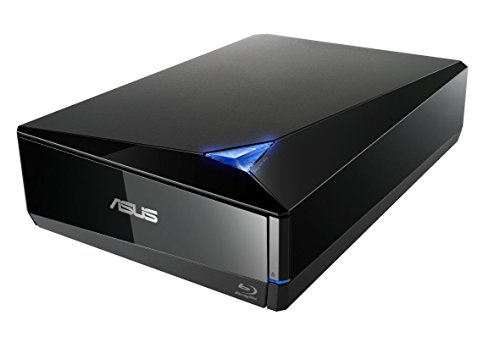
Brand: ASUS. The BW-16D1X-U delivers high-speed 16x Blu-ray writing with BDXL support for up to 128 GB storage. It offers broad OS compatibility, including Windows and macOS, through USB 3.0. This model emphasizes fast media creation and reliable performance in a compact external enclosure, suitable for creating backups or distributing Blu-ray media. It supports Windows 10/8/7, macOS, and older Windows variants with USB 3.0 connectivity.
aelrsoch External Blu ray Drives

Brand: aelrsoch. This external Blu-ray drive emphasizes fast USB 3.0 data transfer rates and robust BD (100GB) handling, along with CD/DVD reading and writing. It includes a dual USB power design to improve stability during operation and burning. It’s designed for compatibility with Windows, macOS, and Linux, but playback may require third-party software. A compact, travel-friendly form factor supports on-the-go use and reliable data transfer.
juwuoi External Blu Ray Drive

Brand: jwuwoi. This external Blu-ray drive supports 100G BD discs with read speeds up to 6x and 8x for DVDs, plus 24x for CDs. It provides a 7-in-1 hub including USB 3.0, USB 2.0, Type-C ports, and SD/TF readers. The unit ships with dual USB cables to accommodate both USB-C and USB-A hosts. Cross-platform compatibility spans Windows, macOS, and Linux, though Blu-ray playback may require third-party software and proper licensing.
Yaeonku 8 in 1 External Blu Ray Drive

Brand: Yaeonku. This 8-in-1 external drive adds HDMI output and LAN connectivity to a Blu-ray/DVD drive, expanding multimedia capabilities beyond simple disc access. It supports 100GB BD discs and high-speed reading/writing via USB 3.0 and Type-C interfaces. A built-in HDMI path enables direct connection to displays, while the LAN port opens file sharing over networks. Software compatibility for Blu-ray playback is environment-dependent, with recommended third-party players available.
Wbacon 7 in 1 External Blu Ray Drive (With Carrying Case)
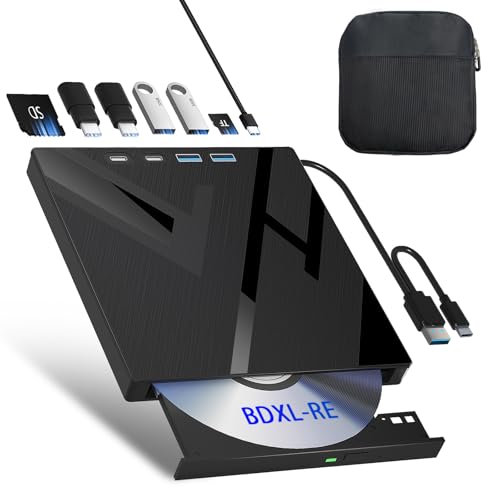
Brand: Wbacon. This variant adds a protective carrying case for safe transport. It maintains 100GB BD read/write capability and reads BD up to 6x, DVDs up to 8x, and CDs up to 24x. The 7-in-1 hub configuration includes SD/TF card slots and multiple USB and Type-C ports for data transfer and charging. Like other options, be aware of card slot usage rules and ensure software support for Blu-ray playback as needed.
Buying Guide
- Disc format support: Ensure BD-R/BD-RE, BD-ROM, DVD±R/RW, and CD-R/RW are supported by the drive. If you need 100GB BD discs, confirm 100G support and write speeds.
- Connection interface: Look for USB 3.0 or USB-C with high bandwidth for fast burning and reliable streaming. Some models include dual USB cables to accommodate different host ports.
- Software requirements: Blu-ray playback and certain disc features may require third-party software (e.g., PowerDVD, Leawo, VLC). Macs and Linux users may need additional codecs or players.
- Power considerations: Some drives offer dual USB power or optional power adapters to ensure stable operation during long reads/writes and burning tasks.
- Portability vs. hub features: Portable drives are lighter and smaller, but 7-in-1 or 8-in-1 models provide built-in card readers and extra ports. Choose based on workflow needs—travel vs. desktop use.
- Software compatibility and drivers: Confirm compatibility with your operating system versions (Windows, macOS, Linux). Some devices require specific BIOS or software updates for optimal performance.
- Product protection: Models with carrying cases or rugged housing offer added protection during transit, useful for students and traveling professionals.
These external Blu-ray drives provide diverse features to support data backup, multimedia playback, and disc creation across multiple platforms. When choosing, balance disc support, connectivity, and portability with your typical use case.