For laptop users who need reliable optical disc access, external Blu-ray drives deliver read, write, and playback capabilities without internal upgrades. This guide highlights five solid options designed for Windows, macOS, and Linux systems, balancing speed, power options, and portability. Each model supports high-capacity discs, robust error correction, and easy USB-C or USB-A connectivity for modern laptops.
| Product | Brand | Key Benefit | Interface |
|---|---|---|---|
| Aelrsoch External Blu-ray Drive 1 | Aelrsoch | Fast USB 3.0 reading and writing | USB 3.0 / USB-C |
| Aelrsoch External Blu-ray Drive 2 | Aelrsoch | Dual USB power design for stable operation | USB 3.0 / USB-C |
| Wbacon 7-in-1 External Blu-ray Drive | Wbacon | Multi-port versatility with SD/TF slots | USB 3.0 / USB-C |
| JuWuOi External Blu-ray Drive | JuWuOi | 100GB BD support with broad compatibility | USB 3.0 / Type-C |
| Yaeonku 8-in-1 External Blu-ray Drive | Yaeonku | All-in-one with HDMI/LAN ports | USB 3.0 / Type-C |
Aelrsoch External Blu-ray Drive With USB 3.0/Type-C

This external Blu-ray drive emphasizes fast data handling with USB 3.0’s 5Gbps bandwidth, enabling rapid BD, DVD, and CD transfers. It supports BD up to 100GB, plus standard discs, and offers strong error correction, low noise, and low power consumption. Note that playback on some devices may require separate software such as PowerDVD or VLC, and it isn’t compatible with TVs or tablets. The unit is designed for easy portability and can be powered through compatible USB interfaces, though certain high-demand playback tasks may need additional software to enable full Blu-ray functionality.
Aelrsoch Dual-Power External Blu-ray Drive

This variant adds a second USB power input to ensure stable operation, reducing the risk of interruption during disc reading or writing. It shares USB 3.0/Type-C compatibility for flexible connections and is built for portable use with a compact form factor. Users should pair it with compatible Blu-ray playback software to view movies or manage disc content, since software is not bundled with the drive.
Wbacon 7-in-1 External Blu-ray Drive

Boasting a 7-in-1 design, this drive blends Blu-ray reading and burning with additional ports and card slots. It supports 100GB discs and offers reading speeds up to 6x for Blu-ray, 8x for DVDs, and up to 24x for CDs. With SD and TF card readers, two USB-C ports, and USB 3.0/2.0 compatibility, it serves as a compact hub for transferring media, backing up data, or copying files between devices. The SD/TF card cannot be used simultaneously, but USB connections remain versatile for everyday use.
JuWuOi External Blu-ray Drive For Laptop

This drive emphasizes broad BD compatibility with 100GB disc support, USB 3.0 and Type-C interfaces, and a 5Gbps transfer rate. It also highlights a 0.8-meter extension data cable for flexible placement and a dedicated power port to maintain stable operation during extended use. Playback requires compatible software, and the drive is designed to work with Windows, macOS, and Linux ecosystems for data backup or media creation tasks.
Yaeonku External Blu-ray Drive 7-in-1

Yaeonku’s 7-in-1 model combines 100GB BD support with multiple USB ports and card readers. It supports 3D Blu-ray reading, has high-speed USB 3.0/Type-C data transfer, and includes a unique in-take design intended to reduce dust ingress. For Blu-ray playback, third-party software is required, and HDMI compatibility expands potential display arrangements when paired with compatible software and hardware.
Synteryx External Blu-ray Drive
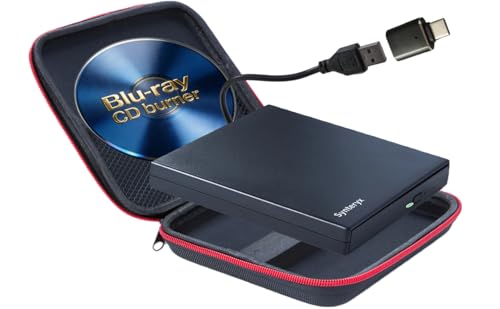
Synteryx offers a slim, portable option that reads Blu-ray discs and writes CDs/DVDs. It supports a broad range of BD-R, BD-RE, DVD-R, DVD-RW, CD-R, and CD-RW formats. While it enables plug-and-play use with a standard USB connection, Blu-ray playback and disc creation require compatible third-party software purchased separately.
LLMHHKYK Ultra-Portable 5-in-1 Bluray Drive

This 5-in-1 device combines Blu-ray/DVD/CD playback and burning with dual USB-A ports and SD/TF readers. It supports Blu-ray playback via third-party software and touts multi-device connectivity. It emphasizes high-speed burning and broad compatibility across Windows, macOS, and Linux environments, making it a flexible solution for mixed hardware setups.
Yaeonku 8-in-1 External Blu-ray Drive

The 8-in-1 model stacks HDMI and LAN ports with USB 3.0/Type-C and SD/TF readers. It supports 100GB disc handling, up to 6x BD read, 8x DVD read, and 24x CD read. The HDMI output enables video and audio transmission without extra cables, though software compatibility remains important for Blu-ray playback on a computer.
Buying Guide: Key Purchase Considerations
- Disc compatibility and capacity: If you frequently handle BD-R/RE, BD-XL, DVDs, and CDs, confirm BD capacity (100GB) and read/write speeds to match your typical library and backup needs.
- Interface and power: USB 3.0 and USB-C provide fast data transfer; some models include an extra power cable for stable operation. Check your laptop’s ports and power requirements before buying.
- Software requirements: Most drives rely on third-party software for Blu-ray playback and writing. Verify compatibility with PowerDVD, Leawo, VLC, AnyDVD, or other preferred players.
- Portability versus hub features: Some models offer SD/TF card slots and additional USB ports, acting as a light hub. If you need extra peripherals, prioritize those designs.
- HDMI and LAN options: Some drives include HDMI out for standalone playback, or LAN to enable network sharing. Consider your display setup and network needs when selecting a model.
- Cross-OS compatibility: Ensure the drive works with Windows, macOS, or Linux as required, and verify whether driver-free operation is supported on your system.
- Dust management and reliability: Inhalation or sealed designs can help reduce dust ingress, potentially extending drive life in travel scenarios.
When selecting an external Blu-ray drive for a laptop, balance portability with performance. If you need frequent backups or large-file handling, prioritize models with 100GB disc support and robust USB-C compatibility. For multimedia playback on a home setup, consider drives with HDMI output or strong software ecosystems. Always confirm software requirements before relying on a drive for Blu-ray playback, and ensure your laptop can supply sufficient power for extended sessions.