When you need reliable wireless connectivity across rooms or with faraway devices, an extended range Bluetooth adapter can be a smart upgrade. This guide highlights five top options designed for PC and laptop use, emphasizing long range, stable connections, and easy plug-and-play setup. Each option supports modern Bluetooth versions and is compatible with Windows systems. Below you’ll find detailed product sections, then a buying guide to help you choose the right adapter for your setup.
| Product | Brand | Estimated Range | Key Tech |
|---|---|---|---|
| UB500 Plus | TP-Link | Noted as extended range with newer chips | Bluetooth 5.3, EDR |
| Long Range USB 5.3 Adapter | Techkey | Up to 328 ft / 100 m open area | Bluetooth 5.3 + EDR |
| USB Bluetooth 5.4 Adapter | Techkey | Up to 500 ft / 150 m open area | Bluetooth 5.4 + EDR |
| Hakimonoe USB Bluetooth 5.4 | hakimonoe | Up to ~492 ft | Bluetooth 5.4 |
| ZEXMTE 5.4 USB Adapter | ZEXMTE | Up to 590 ft | Bluetooth 5.4 + dual antennas |
TP-Link USB Bluetooth Adapter UB500 Plus

TP-Link’s UB500 Plus adds Bluetooth 5.3 with EDR, improving speed and coverage over older standards. The device is designed to convert non-Bluetooth PCs, desktops, or laptops into Bluetooth-capable machines with a focus on faster data transfer and efficient power use. It’s backward compatible with older Bluetooth generations, ensuring broad device compatibility. The adjustable antenna helps optimize signal reception for desktop setups or home offices. Ideal for wireless peripherals like keyboards, mice, headphones, and speakers, the UB500 Plus emphasizes speed and extended reach without requiring professional installation.
Long Range USB Bluetooth 5.3 Adapter

This Techkey adapter leverages Bluetooth 5.3 with EDR and dual-mode BR/EDR plus BLE for low energy consumption and high-speed transfers. It is marketed as plug-and-play—no drivers required—so you can use the Bluetooth function immediately after plugging in. The claimed 328-foot line-of-sight range is achieved via Class 1 radio technology and a high-gain antenna. Expect faster response, reduced interference, and broad compatibility with devices like mice, keyboards, headphones, and headsets. Real-world range will vary with walls and other obstructions.
USB Bluetooth 5.4 Adapter for Desktop PC
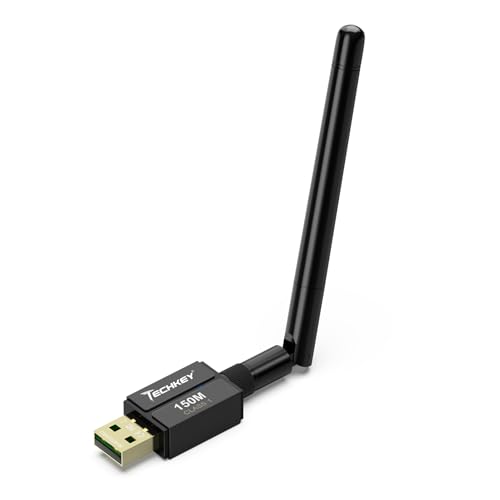
Techkey’s 5.4 Bluetooth adapter emphasizes a long-range connection of up to 500 feet in open areas, aided by a high-gain antenna. It uses Bluetooth 5.4 with EDR and BLE, supporting dual mode for faster data transfer and lower energy consumption. The plug-and-play design makes setup straightforward for Windows PCs and laptops, enabling quick pairing with headphones, keyboards, mice, speakers, and printers. The product targets users seeking reliable wireless coverage across larger rooms or floor plans without complex installation steps.
Hakimonoe USB Bluetooth 5.4 Adapter

Hakimonoe’s USB Bluetooth 5.4 adapter targets Windows PC users seeking extended range and easy setup. It enables Bluetooth wireless transmission to devices such as headsets, speakers, keyboards, and mice. The listing notes the importance of disabling existing Bluetooth before installation to maximize performance and range, and it highlights that the range can be affected by obstructions and wireless interference. This model focuses on broad compatibility and straightforward use for non-Bluetooth PCs needing quick wireless upgrades.
ZEXMTE 5.4 USB Bluetooth Adapter

ZEXMTE offers a 5.4 Bluetooth adapter with dual-mode BR/EDR + BLE and a dual-antenna Class 1 setup designed to blanket large spaces. The listing emphasizes a long-range reach (up to 590 feet) for reliable connections with multiple devices such as speakers, keyboards, mice, headsets, and more. The device is described as PA-powered for stable connections and is aimed at environments with significant wireless activity, including homes and offices. It’s presented as a robust choice for users needing broad coverage and multi-device support.
[Upgraded] 1Mii B06Pro Long Range Receiver

The 1Mii B06Pro is a Bluetooth 5.3 receiver with dual antennas and class 1 capability, offering substantial range for home stereo systems and other Bluetooth-enabled gear. It supports aptX Low Latency and aptX HD for high-fidelity audio, along with 3D surround options. The unit is designed to be used with a home stereo setup, providing a long-range wireless link between the receiver and Bluetooth-enabled speakers or headphones. Users should note the potential impact of obstacles and nearby Wi-Fi devices on performance.
Buying Guide: Key Considerations For Extended Range Bluetooth Adapters
When selecting an extended range Bluetooth adapter, several factors influence performance and suitability for your setup. This guide covers critical considerations and comparisons to help you decide which model best fits your needs.
- Range versus environment: Open-area ranges (e.g., 328 ft, 500 ft, or 590 ft) are best-case scenarios. Walls, furniture, and interference can significantly reduce real-world distance. Consider a model with dual antennas or Class 1 radio for higher propagation resilience in larger spaces.
- Bluetooth version and profiles: Newer versions (5.3, 5.4) offer improved speed, range, and energy efficiency. Look for support for BR/EDR and BLE if you plan to connect a mix of audio, input devices, and sensors.
- Plug-and-play versus driver needs: Some adapters require no driver installation, providing immediate compatibility with many Windows versions. Others may need drivers for certain features or older operating systems—budget for driver availability if you’re using Windows 7 or older hardware.
- Device compatibility: Confirm compatibility with your devices (headphones, keyboards, mice, speakers, game controllers) and any existing Bluetooth built-in features on your PC or laptop. Multi-device pairing is a bonus for flexible setups.
- Antenna design and interference: High-gain antennas and dual-antenna configurations can improve signal quality and reduce dropouts, especially in multi-room homes or offices with competing 2.4 GHz devices.
- Power and placement: Desktop connectors with external USB ports allow flexible placement. Avoid USB hubs that may create interference or limit bandwidth when multiple devices are in use.
- Interference and coexistence: Consider routers, microwaves, and other Bluetooth devices in your space. Some adapters advertise anti-interference features to sustain performance in crowded 2.4 GHz environments.
- Audio latency and loss: If you plan to use Bluetooth audio, opt for models supporting aptX Low Latency (where available) to minimize lip-sync issues, especially for video content or gaming.
In sum, for larger rooms or offices, prioritize models with higher range claims, dual antennas, and strong backward compatibility. For simple desktop setups, a plug-and-play option with robust range and easy pairing often suffices. Assess your environment, the devices you connect, and whether you need immediate setup or driver support to make the best choice.