ExpressCard 54mm adapters convert USB and other interfaces into ExpressCard slots, expanding legacy laptops with modern USB 3.0 speeds and hot-swapping capabilities. This guide highlights five reliable options, covering flush‑mount designs, USB 3.0 hubs, PCMCIA compatibility, and converter cards. Each product is chosen for compatibility with ExpressCard/54mm slots, practical drive support, and straightforward installation. Read on to compare form factors, throughput, and ease of use to find the best match for your aging notebook.
| Product | Brand | Key Benefit |
|---|---|---|
| JMT 3 Ports Hidden Inside USB 3.0 to ExpressCard 54mm | JMT | Adds three USB 3.0 ports via ExpressCard/54mm |
| StarTech 2 Port Flush Mount ExpressCard 54mm USB 3.0 Card | StarTech.com | Flush-mount, two USB 3.0 ports with UASP |
| Cablecc ExpressCard to PCMCIA 54mm Converter Card | cablecc | 34mm ExpressCard to 54mm PCMCIA compatibility |
| Mustpoint 5Gbps 2 Port USB 3.0 HUB ExpressCard | Mustpoint | Hidden hub design with USB 3.0 ports |
| Digigear CardBus PCMCIA to 34mm ExpressCard | Digigear | PCMCIA/CardBus to ExpressCard compatibility |
JMT 3 Ports Hidden Inside USB 3.0 to ExpressCard 54mm

The JMT ExpressCard 54mm USB 3.0 adapter provides a compact, plug-and-play solution for laptops lacking sufficient USB 3.0 ports. It fits ExpressCard/54mm slots and adds three USB 3.0 Type-A ports on one end, with a standard 54mm ExpressCard interface on the other. It supports USB 2.0 and 1.1 as backwards compatibility and offers hot-swapping. The device includes a QR code for driver downloads and adheres to ExpressCard/54mm standards, making it a practical extension for USB peripherals on compatible notebooks.
Cablecc ExpressCard to PCMCIA 34mm to 54mm Converter Card

The Cablecc adapter is designed for USB-based ExpressCard/34mm devices and expands compatibility to PCMCIA/54mm slots. It supports data transfer rates up to 480 Mb/s, enabling USB-connected devices to work through older PCMCIA or CardBus interfaces. This converter is suitable for users needing broader legacy slot support and simpler plug-and-play installation.
StarTech.com 2 Port Flush Mount ExpressCard 54mm USB 3.0

StarTech’s flush-mount ExpressCard 54mm adapter features two USB 3.0 ports with transfer rates up to 5 Gbps and UASP support for efficient data flow. The flush-mount design helps save desk space while maintaining strong connectivity. This option is ideal for slim laptops where side clearance is precious and a clean, integrated look matters as much as performance.
Mustpoint 5Gbps 2 Port USB 3.0 HUB ExpressCard
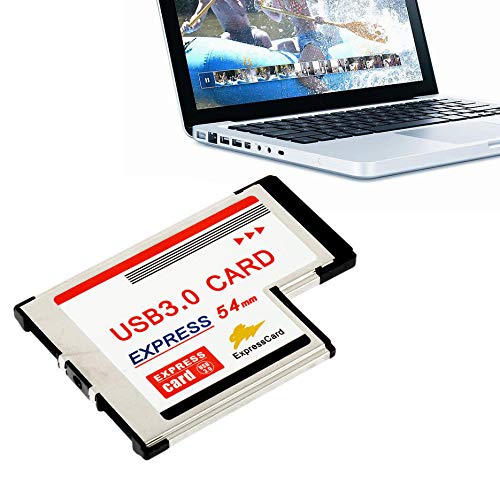
The Mustpoint ExpressCard hub delivers two USB 3.0 ports in a compact, hidden design with a focus on speed and reliability. It leverages a robust ASM chipset (Renesas uPD720202) to ensure stable connections and consistent throughput. This solution suits users needing rapid peripheral expansion without occupying extra space on crowded laptop edges.
Digigear 16/32 Bit CardBus PCMCIA to ExpressCard

Digigear’s CardBus PCMCIA to ExpressCard adapter supports a broad range of PCMCIA and CardBus PC Card applications, including 16- and 32-bit configurations. It enables legacy devices such as memory cards, security peripherals, and older I/O devices to work with ExpressCard-enabled notebooks. Compatibility with Windows XP, Vista, and Windows 7 expands its usefulness for older systems.
Buying Guide
Key considerations
- Compatibility: Ensure the adapter matches your ExpressCard slot type (34mm or 54mm) and that the device supports USB 3.0 or your preferred interface. Check for backward compatibility with USB 2.0/1.1 if you still rely on older peripherals.
- Form factor: Decide between a flush-mount, hidden, or standard insertion design. Flush-mount and hidden designs save space but may require more precise alignment on some laptops.
- Throughput and performance: For USB 3.0, verify supported transfer rates (up to 5 Gbps is common) and whether UASP is enabled for improved efficiency with storage devices.
- Power and charging: Some adapters supply power through the ExpressCard interface; confirm whether your peripherals require external power or can run off bus power.
- Driver support: Look for adapters with straightforward driver downloads or built-in drivers. QR codes or included documentation can simplify setup on older laptops.
- Future-proofing: If you anticipate expanding USB peripherals, choose an adapter with multiple ports or hub functionality to minimize the need for multiple inserts.
- Compatibility with PCMCIA/CardBus: If you still use legacy devices, consider adapters like Digigear that bridge PCMCIA/CardBus to ExpressCard for broader compatibility.
Perspective comparisons
- Best for space-saving: Flush-mount designs from StarTech provide a tidy look and minimal protrusion, ideal for ultralight laptops.
- Best for maximum port count: Multi-port USB 3.0 adapters, like the JMT option, offer more USB ports in one card, reducing the need for separate hubs.
- Best for legacy device support: Cablecc and Digigear give broader compatibility for 54mm PCMCIA and 34mm ExpressCard ecosystems, useful for older peripherals.
- Best for performance and reliability: Mustpoint’s hub with a Renesas chipset emphasizes stable, high-speed transfers for demanding storage and peripherals.
Overall, selecting the right ExpressCard 54mm adapter depends on whether you prioritize compact form, number of USB ports, or compatibility with older PCMCIA devices. All five options in this guide provide dependable pathways to expand your laptop’s connectivity, aligning with common needs in modernizing aging notebooks without sacrificing portability.