For homes and offices with a mix of wired and wireless gear, an Ethernet to WLAN adapter can bridge gaps between networks. These devices let printers, smart TVs, gaming consoles, and other Ethernet-only equipment access Wi‑Fi without moving to a new router or running cables. Below is a curated guide to top options, including real-world use cases, performance notes, and what to look for when choosing your connection bridge.
Summary of Selected Products
- BrosTrend AC1200 WiFi to Ethernet Adapter — Dual-band, 1200 Mbps, universal compatibility
- TP-Link USB to Ethernet Adapter (UE306) — USB 3.0, 1 Gbps, plug-and-play
- Vonets VAP11N-300 — 300 Mbps wireless bridge with multiple power options
- UGREEN USB to Ethernet Adapter — 1 Gbps, driver-free on most systems
- IOGEAR Universal Ethernet to Wi‑Fi Adapter (GWU637) — 300 Mbps, WPS support
BrosTrend AC1200: Dual-Band Ethernet To Wi‑Fi Bridge
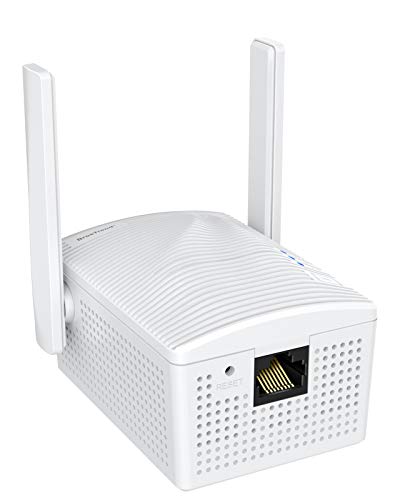
The BrosTrend AC1200 adapter converts a wired Ethernet port into a wireless client, letting Ethernet-enabled devices access a Wi‑Fi network. It plugs into a wall outlet for power and supports dual-band performance up to 867 Mbps on 5 GHz or 300 Mbps on 2.4 GHz. This makes it suitable for streaming, online gaming, and general web use. It requires no driver installation and works with a wide range of devices including printers, smart TVs, Blu-ray players, and game consoles. Its 802.11ac compatibility provides a practical upgrade path for devices that lack built-in wireless radios.
Key points:
– Dual-band AC1200 performance improves wireless reach for non‑Wi‑Fi devices.
– Works with many Ethernet-enabled devices without software setup.
– Easy WPS‑based setup can simplify network configuration.
– Power from an electrical outlet ensures stable operation in rooms without accessible USB power.
TP-Link UE306: USB To Ethernet Adapter

The TP-Link UE306 adds a reliable wired port to laptops, tablets, or other USB‑A devices. It delivers 10/100/1000 Mbps connectivity through USB 3.0, making it ideal for file transfers, HD video, online gaming, and video calls. It’s plug-and-play and compatibility extends to Windows, macOS, and Linux, with backward compatibility for USB 2.0. Notably, it also supports Nintendo Switch gaming in a wired setup, which can offer more stable downloads and gameplay than wireless connections. This makes it a versatile choice for mixed-device environments.
Key points:
– Fast USB 3.0 to Ethernet conversion with Gigabit performance.
– Driver-free operation on most major operating systems.
– Compact, portable design suitable for travel or mobile setups.
– Includes broad device compatibility, including Nintendo Switch in docked mode.
Vonets VAP11N-300: Mini WiFi Bridge To LAN

The Vonets VAP11N-300 is a compact WiFi bridge designed to extend wireless access to wired devices. It operates as a mini bridge and supports point-to-point transmission with practical range for typical home setups. It offers multiple power options, including DC power and USB, enhancing flexibility in tighter spaces or when USB power is the only available source. The device supports 802.11b/g/n and up to 300 Mbps, making it suitable for basic streaming, file transfers, or enabling a wired device in a Wi‑Fi-only environment.
Key points:
– Small footprint with versatile power options.
– Suitable for basic bridging needs and simple setups.
– 300 Mbps rate aligns with older Wi‑Fi standards; best for moderate usage.
– Easy to deploy for users who want a discrete bridge solution.
Anker USB-C To Ethernet Adapter: Portable Gigabit Hub
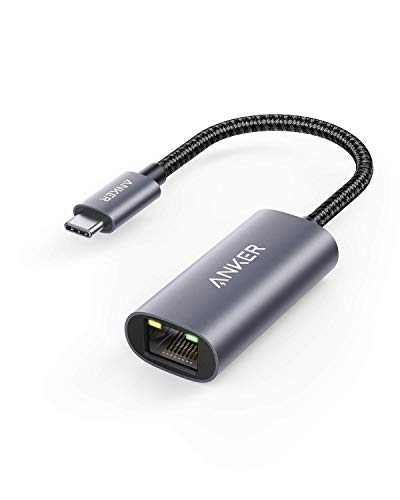
The Anker USB-C to Ethernet Adapter provides a compact solution for USB‑C devices to gain wired network access at up to 1 Gbps. It’s designed for use with modern laptops, tablets, and USB‑C equipped devices like MacBook Pro, iPad Pro, ChromeOS devices, and certain Windows PCs. The accessory emphasizes portability and stable performance, with a compact profile that slips easily into bags for travel. It’s particularly well-suited for users who prefer a dedicated wired connection for uploads, video calls, or gaming on USB‑C devices.
Key points:
– USB‑C to Ethernet with gigabit speed for compatible devices.
– Driver-free on most modern systems; simple plug-and-play experience.
– Ultra-portable and lightweight, ideal for on-the-go setups.
– Broad compatibility with a focus on USB‑C ecosystems.
UGREEN USB To Ethernet Adapter: 1 Gbps Solution

UGREEN’s USB to Ethernet adapter targets steady, high-speed wired connections via USB 3.0. It delivers 1 Gbps performance and is designed for broad compatibility, including Nintendo Switch in dock mode. The adapter emphasizes driver-free operation on Windows 11/10/8.x, macOS, Chrome OS, and Android, with Windows XP/7/8/8.1/Linux requiring drivers per the included instructions. The aluminum shell adds durability while helping with heat dissipation for longer sessions.
Key points:
– 1 Gbps wired performance with a durable aluminum shell.
– Driver-free on most modern operating systems; easy setup.
– Notable compatibility with Nintendo Switch in dock scenarios.
– Clear guidance on driver requirements for older systems.
IOGEAR GWU637: Wireless Ethernet Adapter With WPS

The IOGEAR GWU637 converts an Ethernet-only device into a wireless client, enabling Wi‑Fi access for printers, set-top boxes, gaming consoles, or other gadgets. It supports up to 300 Mbps on 2.4 GHz and features a push-button WPS setup for faster configuration. It’s important to note that this device is designed to work with standard home routers and is not intended for enterprise networks or mesh setups. With dual-antenna design, it can offer reasonable performance for basic streaming and downloads while maintaining compatibility across popular home networks.
Key points:
– Easy WPS setup and broad compatibility with standard routers.
– Up to 300 Mbps on 2.4 GHz; suitable for modest streaming and gaming.
– Dual-antenna design aims to improve stability and range.
– Not compatible with certain enterprise or open networks due to authentication limitations.
Buying Guide: Choosing The Right Ethernet To WLAN Adapter
- Device type and use case — Determine whether you need USB-to-Ethernet, wall-plug bridging, or a compact bridge. Laptops and tablets benefit from USB adapters; printers and consoles benefit from dedicated Ethernet-to-Wi‑Fi bridges.
- Wireless standards and speed — If you stream HD or require low latency for gaming, seek devices supporting 802.11ac or newer with 5 GHz capability. For basic connectivity, 2.4 GHz and 300 Mbps or more can suffice.
- Power options — Some bridges rely on wall power, USB, or both. Consider power availability in the intended installation area.
- Compatibility and driver requirements — Modern USB adapters often work driver-free on Windows/macOS/Linux, while some devices may require drivers on older systems. Check device compatibility with your operating system and any specific hardware (like game consoles).
- Ease of setup — Look for plug-and-play solutions or ones with simple WPS setup for quick configuration. This reduces installation time and complexity.
- Security features — Ensure WPA2/WPA3 support and AES encryption for safe wireless connectivity, especially for printers and home office devices that transmit data.
- Physical footprint and placement — Consider the size, heat dissipation, and placement needs. Smaller devices fit tight spaces; dual-band models help with signal stability in crowded Wi‑Fi environments.
- Future-proofing — If you anticipate upgrading routers or adding more wireless devices, choose a bridge with robust compatibility and up-to-date standards to minimize future changes.