This article reviews top Ethernet-to-WiFi adapters that let any wired device—from printers to smart TVs—connect to wireless networks. Each option is evaluated for compatibility, performance, and ease of setup, helping you choose a bridge that fits homes or small offices. Below is a quick summary of the featured products to guide your decision.
| Product | Brand | Key Benefit | Typical Use |
|---|---|---|---|
| BrosTrend AC1200 Ethernet to Wireless Adapter | BrosTrend | AC1200 dual-band speed for streaming and gaming | Smart TV, game console, Blu-ray, printer |
| VONETS VAP11G-300 WiFi Bridge | Vonets | Compact industrial bridge with 300Mbps | IP cameras, monitors, printers, IoT devices |
| VONETS VAP11G-300 WiFi Bridge | Vonets | 2.4 GHz bridge with flexible modes | Monitors, DVRs, medical devices |
| LIVINGTHING WiFi to Ethernet Adapter | LIVINGTHING | AC1200 dual-band with four-antenna setup | Printers, cameras, desktops |
| BrosTrend AX1500 WiFi 6 Bridge | BrosTrend | WiFi 6 speeds with Gigabit Ethernet | PCs, printers, TVs, DVRs |
BrosTrend AC1200 Dual-Band Ethernet To Wireless Adapter
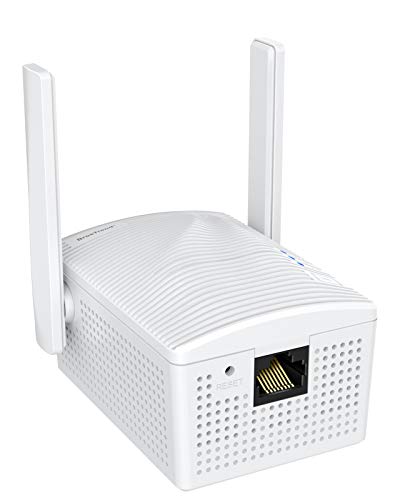
The BrosTrend AC1200 adapter enables any Ethernet-enabled device to access the Internet via a wireless connection. It operates from an electrical outlet and supports dual-band 867Mbps on 5GHz or 300Mbps on 2.4GHz. It is suitable for streaming, gaming, and high-quality music, and it does not require driver installation. This universal bridge is compatible with smart TVs, game consoles, Blu-ray players, printers, and more, providing a straightforward upgrade from wired to wireless connectivity.
Vonets VAP11G-300 WiFi Bridge
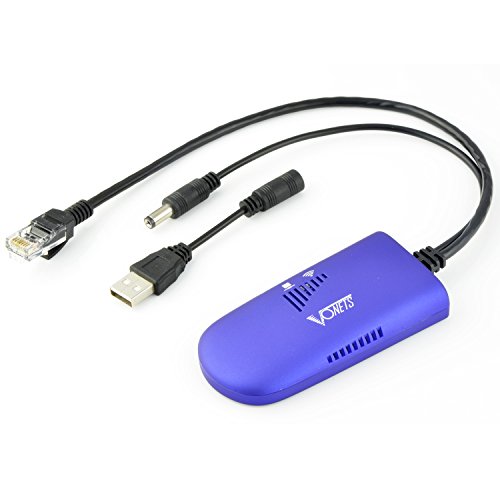
The VAP11G-300 is a compact industrial WiFi bridge that can function as a WiFi-to-Ethernet bridge or Ethernet-to-WiFi converter. It supports 802.11 b/g/n at up to 300Mbps and includes one 10/100Mbps Ethernet port. Power can be supplied via USB or DC, with a wide 5V-15V input range. It is well-suited for monitoring devices, IoT deployments, IP cameras, and network printers, offering flexible placement and reliable performance in constrained spaces.
Vonets VAP11G-300 WiFi Bridge (Second Variant)

This 2.4GHz WiFi bridge supports flexible modes including WiFi to Ethernet, Ethernet to WiFi, and bridging across networks. It provides 300Mbps and is compatible with 802.11b/g/n networks. Its point-to-point transmission range can reach up to 100 meters in ideal conditions, making it useful for longer-range connections to printers, monitors, and other network devices in larger spaces.
LIVINGTHING WiFi to Ethernet Adapter

The LIVINGTHING model upgrades wired devices to WiFi with AC1200 dual-band performance. It supports Linux, Android, macOS, and Windows systems, and highlights a 4-antenna design to improve signal reception. The device is suited for printers, network cameras, PC setups, and other Ethernet-only equipment requiring stable wireless access without complicated configuration.
BrosTrend AX1500 WiFi 6 Bridge

The AX1500 model brings WiFi 6 capabilities to a wired device, delivering up to 1Gbps through its Gigabit Ethernet port. It supports dual-band networks and is suitable for high-demand devices like PCs, printers, smart TVs, gaming consoles, and DVRs. The stronger antennas and amplifiers provide robust connections and improved range for reliable streaming and gaming experiences.
BrosTrend Dual Band 1200Mbps WiFi Bridge
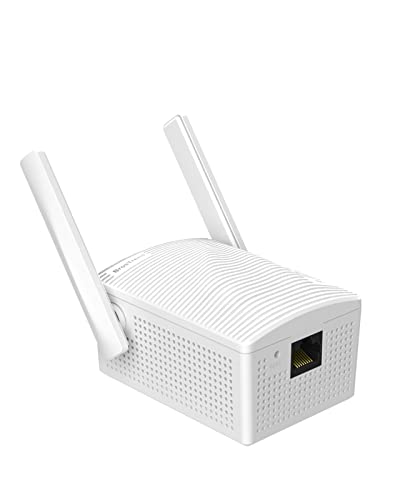
This universal WiFi bridge converts wired devices to wireless networks with RJ45 support. It offers 2 external antennas and a stable connection for smart TVs, printers, game consoles, cameras, and other Ethernet-only devices, enabling flexible placement and reliable performance across home networks.
Buying Guide: Key Considerations For Choosing An Ethernet-To-WiFi Bridge
- WiFi Standard and Speed: Look for AC1200, AX1200, or WiFi 6 options if you want higher theoretical speeds and better performance for streaming or gaming.
- Ethernet Port Type: Ensure a Gigabit Ethernet port if you need the maximum wired speeds, especially for printers or DVRs that handle high data loads.
- Frequency Band Support: Dual-band (2.4 GHz and 5 GHz) generally offers better stability and compatibility with more routers and devices.
- Power and Placement: Some adapters are plug-in devices powered from the outlet, while others use USB or DC power. Consider where you’ll place the bridge relative to power outlets and the router.
- Setup Simplicity: Devices that support WPS or offer straightforward web-based setup reduce the time to get online, especially for non-technical users.
- Compatibility: Verify compatibility with your router’s security (WEP/WPA/WPA2/WPA3) and ensure support for your specific devices, such as IP cameras, printers, or streaming boxes.
- Security Features: WPS, encryption standards, and ability to update firmware are important for protecting your home network.
- Use Case Fit: For gaming or video, prioritize low latency and stable throughput; for printers or IoT, reliability and ease of use may be more important than peak speed.
- Physical Constraints: Consider the size, mounting options, and antenna configuration to fit your equipment rack or living space.