Enterprise-grade storage combines reliability, high capacity, and robust performance to support data-heavy workloads. This guide highlights five enterprise-class drives—ranging from high-capacity HDDs to solid-state options—that are well-suited for business backups, media workflows, and data center or creative environments. Each product includes key specs and practical considerations to help IT managers and power users choose the right solution for their needs.
| Product | Brand | Type | Capacity |
|---|---|---|---|
| SanDisk Professional 24TB G-Drive | SanDisk Professional | External Desktop HDD | 24TB |
| SanDisk Professional 12TB G-Drive | SanDisk Professional | External Desktop HDD | 12TB |
| SanDisk Professional 6TB G-Drive | SanDisk Professional | External Desktop HDD | 6TB |
| Western Digital 3.84TB WD Gold NVMe | Western Digital | Internal NVMe SSD | 3.84TB |
| LaCie d2 Professional 10TB | LaCie | External Desktop HDD | 10TB |
SanDisk Professional 12TB G-Drive Enterprise-Class External Drive

The 12TB G-Drive from SanDisk Professional is built around a high-capacity Ultrastar 7200RPM drive inside, delivering dependable performance for business backups and media workflows. It uses USB-C with a 10Gbps interface, supporting up to 250MB/s read and write in typical scenarios. This model is Mac-ready and Time Machine compatible, with straightforward reformats for Windows environments. The enterprise-class design emphasizes reliability for continuous use in professional settings.
Key considerations
- High capacity for large archives and ongoing backups.
- 10Gbps USB-C interface supports fast data transfers.
- Mac-ready with Time Machine compatibility; reformats for Windows are available.
- 7200RPM Ultrastar HDD inside balances speed and durability for long-term workloads.
SanDisk Professional 6TB G-Drive Enterprise-Class External Drive

This 6TB model mirrors the 12TB variant’s enterprise design, equipped with a 7200RPM Ultrastar hard drive inside and a USB-C (10Gbps) interface. It supports high-speed backups and robust data handling for small to medium-scale business environments. Mac compatibility and Time Machine readiness make it versatile across mixed-OS workspaces, while the option to reformat for Windows expands deployment flexibility.
Key considerations
- Ideal for teams needing reliable backups with substantial capacity.
- Fast USB-C interface enables efficient data movement.
- Enterprise-grade hard drive inside supports steady performance under load.
- Cross-OS compatibility with simple reformatting.
SanDisk Professional 24TB G-Drive Enterprise-Class External
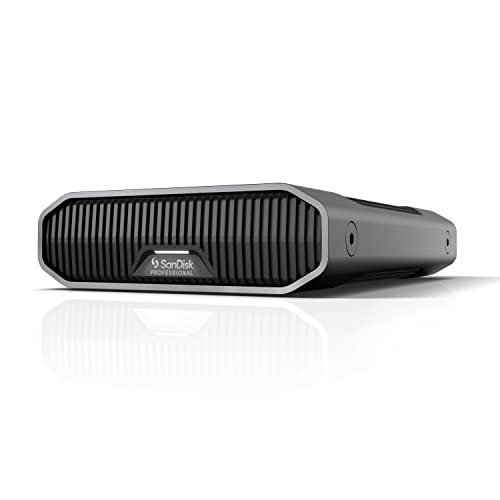
The 24TB model offers a massive external storage footprint for media libraries, backups, and archival workflows. Features include a USB-C (10Gbps) interface with proven sustained read/write speeds around 280MB/s in internal testing, making it suitable for large transfers and bulk backups. Like its smaller siblings, it houses an enterprise-class Ultrastar 7200RPM drive inside and remains Mac Ready with Time Machine compatibility.
Western Digital 3.84TB WD Gold NVMe Internal SSD

Western Digital’s WD Gold NVMe SSD targets enterprise workloads with fast PCIe-based storage in a 2.5″/7mm U.2/PCIe form factor. It emphasizes power loss protection for reliability and features secure erase capabilities to help meet data governance requirements. This drive is designed to enhance system responsiveness and productivity in business environments where fast access to data matters most.
LaCie d2 Professional 10TB External Drive

The LaCie d2 Professional provides abundant external storage for creatives and professionals with a 10TB capacity. It supports USB-C and Thunderbolt 3 connectivity, enabling fast transfers to modern workstations. The aluminum chassis helps reduce noise and vibration while offering durable construction suitable for on-set or studio environments. This model expands archival and ongoing project storage with enterprise-friendly capabilities.
Buying Guide: Enterprise-Grade Storage Considerations
- Workload requirements: Assess annual data transfer expectations and choose drives with MTBF and duty-cycle ratings that match workload intensity.
- Interface and speed: USB-C with 10Gbps or PCIe-based NVMe interfaces deliver faster backups and rapid file access for large projects. Consider whether external USB, USB-C, or Thunderbolt is needed for your setup.
- Capacity planning: Enterprises often favor scalable options; balance current needs with future growth by selecting drives with larger capacities or modular arrays.
- Form factor and integration: Desktop external drives suit on-site backups and archives, while NVMe internal SSDs fit server or workstation upgrade paths. Ensure compatibility with existing hardware and software ecosystems (Time Machine, Windows, Linux).
- Reliability and warranty: Enterprise-grade drives offer longer MTBF, vibration resistance, and robust warranties. For critical data, consider drives with vibration-tolerant designs and data integrity features.
- Security and data governance: Look for secure erase capabilities and encryption options where data sovereignty and compliance matter.
- Backup strategy: Use a 3-2-1 approach where feasible—three copies of data, on two different media, with one offsite. External drives complement cloud or NAS solutions for redundancy.
- Multi-OS compatibility: Ensure drives work seamlessly across macOS, Windows, and Linux if your teams operate in mixed environments.
- Long-term maintenance: Consider drive reliability, replacement costs, and ease of maintenance when selecting enterprise storage for ongoing operations.