Translating digital DVI signals to analog VGA remains a practical solution for pairing older monitors, projectors, or displays with newer computers. This guide highlights reliable DVI-I to VGA adapters that work without requiring extra power or drivers, focusing on models that utilize the DVI-I 24+5 pin standard to deliver a smooth, plug-and-play experience. Each option below is chosen for compatibility, build quality, and clear signal transmission up to 1080p.
| Product | Brand | Type | Key Benefit |
|---|---|---|---|
| Xelsluthe 2PCS DVI to VGA Adapter | Xelsluthe | DVI-I to VGA | Gold-plated, 1080p, dual-pack |
| Ruhza DTech DVI Male to VGA Female | Ruhza | DVI-I to VGA | Gold-plated, reliable build |
| Conable DVI to VGA Cable | Conable | DVI-D to VGA (note) | 1080p, shielded, durable |
| Zuya DVI To VGA Adapter | Zuya | DVI-I to VGA | Gold-plated, portable |
| axGear DVI-I To VGA Converter | axGear | DVI-I to VGA | Analog output via DVI-I |
Xelsluthe DVI-I To VGA Adapters, Gold Plated 24+5

The Xelsluthe adapter set includes two DVI-I to VGA converters designed for desktops, laptops, GPUs, and projectors with DVI-I ports. The product emphasizes compatibility with DVI-I 24+5 pin connections, allowing conversion from digital DVI to analog VGA signals. It’s not compatible with DVI-D-only ports, so users should verify port type before use. The kit features gold-plated connectors and copper contacts within a durable ABS shell, aiming to resist corrosion and maintain stable signal transmission in high-interference environments. Each adapter is compact, roughly 4.2 x 4 x 1.53 cm, suitable for both permanent setups and portable use. The plug-and-play design requires no drivers or external power, with support for up to 1080p at 60Hz.
Use cases include connecting a modern computer or GPU to an older VGA monitor or projector. It is ideal for classrooms, conference rooms, and home theater configurations where VGA is still prevalent. If you need a quick, no-fuss upgrade path from DVI-I to VGA without extra electronics, this dual-pack provides both redundancy and convenience in one package.
Ruhza DTech DVI-I To VGA Adapter
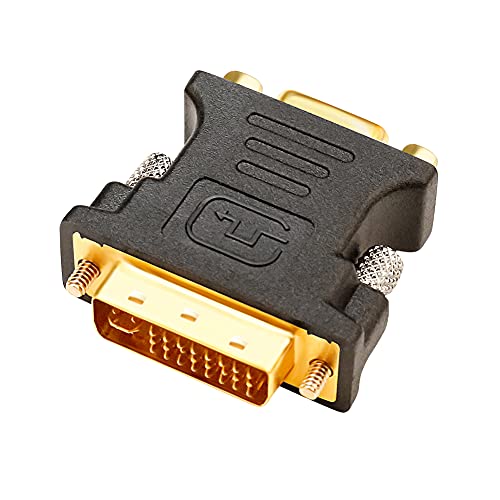
The Ruhza DTech adapter is a single DVI-I male to VGA female converter designed for quick connections between DVI-I sources and VGA displays. It highlights a gold-plated contact surface to resist corrosion and enhance durability, with a sturdy build intended to hold connections securely. The adapter supports up to 1080p Full HD resolution, making it suitable for standard HD content and presentations. A notable reminder is that audio does not transfer through VGA, so audio must be carried via separate connections if needed. This option provides a simple solution for upgrading displays without replacing legacy monitors.
Conable DVI To VGA Cable

The Conable DVI to VGA cable is a unidirectional DVI (DVI-D 24+1) to VGA connector designed to transmit video from a DVI source to a VGA display. It supports up to 1080p at 60Hz and emphasizes a robust copper core with gold-plated connectors and an aluminum shielding shell for improved signal stability and EMI/RFI protection. While the product clearly mentions its unidirectional nature and DVI-D to VGA compatibility, users should confirm that their device uses a DVI-I port if expecting a straight pass-through from digital to analog. This cable suits setups where one-off or occasional VGA displays are needed from modern devices lacking native VGA output.
StarTech.com DVIVGAMM10 10-Feet

StarTech’s DVIVGAMM10 offers a long 10-foot DVI-A to VGA display cable. The cable’s construction focuses on video signal integrity for longer runs, with a traditional HD-15 (VGA) to DVI-A (DVI-I) configuration. The product is a straightforward connection solution for users who want a dedicated cable rather than an adapter, ensuring compatibility with devices that provide DVI-A output and a VGA monitor. The extended length can be advantageous for conference rooms or setups where the computer and display are not in immediate proximity. The product is specifically a cable, not a converter, so verify your hardware supports DVI-A output before purchase.
CABLEDECONN 4-in-1 HDMI to HDMI/DVI/VGA

This multi-port adapter from CABLEDECONN combines HDMI input with multiple output options, including DVI and VGA. It is designed for situations where a single source needs to drive multiple displays or different display types. The product notes emphasize simultaneous but limited output, with HDMI and VGA potentially operating at the same time but at a maximum of 1080p. While the HDMI input is popular, VGA output requires the appropriate passive interfaces and compatible devices. Audio considerations apply since VGA carries video only; audio would require a separate pathway. This option suits multi-display environments where legacy VGA displays must be integrated with modern sources.
Zuya DVI To VGA Adapter

Zuya’s DVI-I 24+5 to VGA adapter is a compact converter designed to connect DVI-I controllers to VGA displays. The product stresses compatibility with DVI-I 24+5 interfaces (not DVI-D), gold-plated connectors for stable transmission, and a straightforward plug-and-play approach. It supports up to 1080p Full HD and clearly notes that it can only convert DVI-I to VGA, not DVI-D to VGA. The adapter’s design prioritizes portability, making it suitable for travel, classrooms, or quick replacements where a VGA monitor is the preferred display device.
axGear DVI-I To VGA Converter

The axGear DVI-I Female to VGA Male adapter is designed to bridge DVI-I outputs to VGA displays. It emphasizes compatibility with DVI-I sources and utilizes a simple conversion path to analog VGA. The product description notes a DVI-I 24+5 interface, with a focus on stable signal transfer and straightforward plugging. The included hardware suggests a compact, portable solution suitable for desk setups or occasional use with older displays. As with other DVI-I to VGA adapters, ensure that your device’s port includes the extra pins of DVI-I to guarantee successful operation.
Buying Guide: Key Purchase Considerations
- Port compatibility: Confirm your source device uses a DVI-I (24+5) port, not DVI-D (24+1). Only DVI-I carries the analog VGA signal and will work with these adapters.
- Signal direction: Some products are designed to convert DVI-D to VGA (not suitable for analog-capable devices). Look for DVI-I to VGA specifically if you require analog output.
- Resolution support: Most adapters in this list support up to 1080p at 60Hz. If you need higher refresh rates or resolutions, verify compatibility with your display and GPU.
- Power and drivers: Passive adapters are plug-and-play with no external power or drivers required. If you encounter no signal, double-check port type and cable connections.
- Build quality: Gold-plated connectors and copper contacts improve corrosion resistance and signal integrity. A robust housing helps durability in busy workspaces.
- Cable vs. adapter: Cable configurations (DVI-A to VGA cable) offer a direct, dedicated path for longer runs, while adapters provide flexibility for a wider variety of devices.
- Audio considerations: VGA does not transmit audio. If your setup requires sound, plan a separate audio path from the computer to the display or speakers.
- Port availability: If you need to drive multiple displays, consider multi-output hubs but note that simultaneous HDMI and VGA outputs often have 1080p limits per display.
- Usage context: For classrooms, conference rooms, or home theater, assess whether stability or portability is prioritized to select a suitable model (single adapter vs. pack).
- Port type verification: Before purchase, verify whether your device’s DVI port is DVI-I or DVI-D, and whether the adapter specifically supports DVI-I to VGA conversion.