For anyone looking to preserve memories from VHS tapes, camcorders, or DVD collections, a DVD to phone converter is a practical gateway. This guide highlights top options that convert analog video to digital files or directly to portable formats suitable for viewing on phones. Each product below supports different input sources, ease of use, and storage options, helping you choose a solution that fits your setup and goals. The following selections focus on standalone recorders and USB capture devices that minimize computer dependence while delivering clean digital outputs.
| Product | Best For | Output |
|---|---|---|
| Portta VHS to Digital Converter | Directly digitize analog video to MP4/MP3 | MP4 / MP3 |
| Roxio Easy VHS to DVD 3 Plus | Editing, burning to DVD, and digital conversion | DVD, digital formats |
| KOHO VHS to DVD Recorder | Standalone recording and media transfer | HD output to TV; USB/SD backup |
| Clariviews VHS to DVD Recorder | All-in-one recording from multiple sources | DVD/USB/SD |
| avedio links USB2.0 Video Capture Card | Computer-free capture via USB, versatile inputs | USB video files |
Portta VHS to Digital Converter

Portta’s device is a compact converter/recorder designed to digitize analog video and audio signals. It records up to 1080P/30Hz and supports AV/RCA, S-Video, and AUX inputs. The box is plug-and-play with no PC software or drivers required. It includes a 3.0″ LCD preview screen and built-in speaker for direct playback of captured content. Storage relies on USB drives or TF cards, and the unit notes it can preview snapshots and playback directly from the capture box. It is ideal for users who want a simple, no-fuss method to convert tapes to digital files for mobile viewing.
Key considerations: ensure a powered USB storage solution for higher-capacity drives, verify input compatibility with your source device, and remember that this converter does not play tapes or DVDs—it’s a capture device only. Output formats include MP4 for video and MP3 for audio, with NTSC and PAL support for broader compatibility.
Clariviews VHS to DVD Recorder
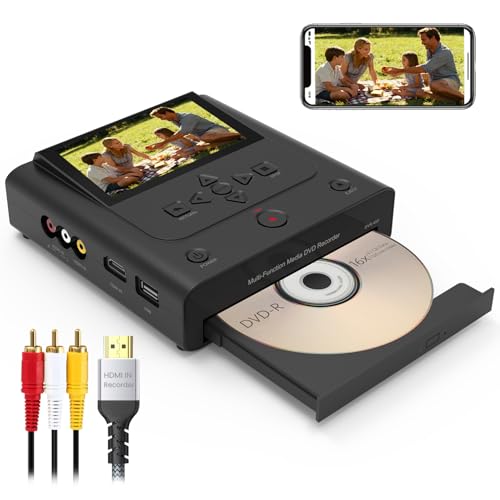
This standalone DVD recorder captures from VHS/VCR, Hi8, and camcorders and records directly to DVD or saves digital copies to USB or SD cards. It features HDMI and AV inputs for both old and modern sources. The built-in display allows previewing before recording, and the device can output via HDMI to modern TVs for high-quality playback. No computer is required, making it a straightforward option for archiving family memories to physical discs or digital backups that can be moved to phones later through formatting conversions.
KOHO VHS to DVD Recorder

KOHO’s model emphasizes multi-source compatibility and simple operation. It supports recording from VCRs, camcorders, and USB or SD storage devices to DVD, USB, or SD backups. The device claims up to 1080p output on external displays, with a focus on ease of use through direct recording without a PC. The built-in features include data transfer between USB/memory cards and discs for quick sharing. This option suits households looking to consolidate physical media storage while maintaining a clear path to mobile-friendly formats via later extraction or disc-to-digital processes.
Clariviews VHS to DVD Recorder (Second Model)

This model offers a similar standalone path with wide compatibility for legacy AV devices and built-in recording to DVD or digital backups. It emphasizes simple operation, allowing direct recording of analog sources to DVD-R/RW discs and to USB/SD storage, with the ability to view and select formats for playback. Users can also benefit from its 4.3-inch preview screen, ensuring the capture is accurate before finalizing. It positions itself as a versatile all-in-one solution for families transitioning from tape-based memories to durable digital formats and portable viewing options.
avedio links USB Capture Card
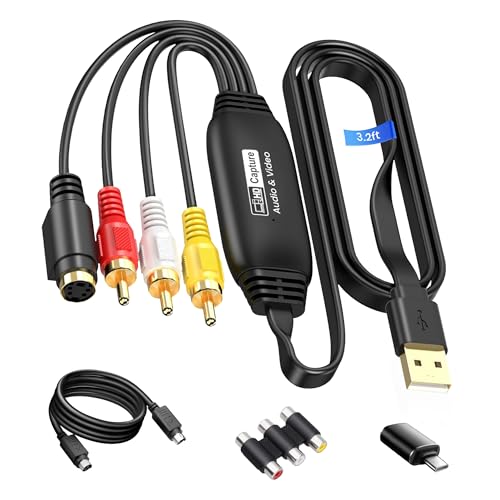
The avedio links capture device converts analog RCA inputs to high-definition USB video output, supporting up to 1920×1080 at 30Hz. It works with NTSC/PAL formats and offers RCA and S-Video inputs with USB 2.0 or Type-C capture. This option is ideal for users who want to connect legacy video sources to a computer or a storage device for later transfer to mobile-friendly formats. It includes a practical, 1-meter USB cable to improve placement flexibility during setup.
XMSJSIY RCA AV to USB C Converter

Compact and plug-and-play, this RCA AV to USB C converter captures video from sources like VHS/VCR/DVD and transfers it to a PC. It supports multiple video inputs (S-Video and composite RCA) with NTSC/PAL compatibility. The product emphasizes synchronized audio and video capture for reliable digital archives, saving stills via BMP or JPEG, and offers a resizable window for viewing. This device suits those who want a straightforward USB-C capture path for mobile-friendly edits or sharing on social platforms.
GINGIN RCA to HDMI Converter with Cables

This RCA to HDMI converter turns analog RCA input into 720P/1080P HDMI output for modern displays. It is a simple plug-and-play adapter that requires only USB power and a standard AV connection. It’s particularly useful for viewing older VHS/VCR content on TVs and projectors. While not a direct phone transfer device, the HDMI output makes later digitization or streaming to mobile-friendly formats straightforward if followed by a separate capture step or a streaming-capable medium. It supports a wide range of classic video devices via AV input.
Buying Guide: Key Purchase Considerations
- Output needs: If your goal is to view on a phone, prioritize devices that export MP4 or allow easy transfer to mobile-friendly formats. Some standalones burn to DVD, then you can extract digital files later, while USB capture devices create digital files directly.
- Source compatibility: Ensure your legacy equipment (VHS players, camcorders, Hi8) is supported. Look for devices with AV/Composite, S-Video, HDMI, and USB/SD options to maximize compatibility.
- Storage options: Standalone recorders with USB/SD support let you save to portable drives and cards. For phone transfer, have a plan to move files to a phone-compatible format and storage medium.
- Ease of use: For non-technical users, standalone recorders with built-in preview screens and simple one-button recording reduce setup complexity compared with PC-based capture.
- Output quality: Look for 1080p capture when possible and verify whether the device preserves audio quality (LPCM or uncompressed audio). HDMI outputs improve playback on modern displays and can simplify later digitization steps.
- Future-proofing: If you anticipate digitizing large collections, consider devices with reliable firmware, robust storage options, and a clear path to transferring files to phones or cloud backups.
- Software needs: Some options require no PC, while others are PC-dependent. Decide whether you want to avoid software installation entirely or prefer flexible computer-based workflows.
- Warranty and support: Choose models from brands with accessible customer support and clear return policies, especially for archival purposes where reliability matters over time.
This selection covers a range of approaches—from direct capture to USB-based and HDMI-enabled paths—so you can pick a method that best fits your existing gear and your preferred workflow for converting old media into phone-ready formats.