Finding a reliable DVD recorder and digital capture device helps you preserve legacy videotapes, camcorder reels, and broadcasts for modern viewing. The following selections focus on standalone recorders that don’t require a PC, easy USB/SD recording, and broad input compatibility. Each option offers straightforward setup and capable output to HD displays, making it simple to archive family memories or digitize old media for streaming.
| Product | Brand | Key Feature |
|---|---|---|
| Portta VHS to Digital Converter | Portta | 1080P capture, AV/S-Video inputs, USB/TF storage, no PC needed |
| VHS to DVD Recorder (KOHO) | KOHO | Multi-format DVD recording, wireless transfer via app, HD output up to 1080p |
| Magnavox MDR865H | Magnavox | HD DVR with 500GB HDD, over-the-air recording |
| DigitPro VHS to Digital Converter 2.0 | DigitPro | One-touch 1080P, LCD preview, multiple storage options |
| ClonerAlliance Box Pro | ClonerAlliance | 1080p capture, HDMI/YPbPr/VGA inputs, USB recording, PC-free |
The selections above cover a range of sources—from VCRs and camcorders to gaming consoles and set-top boxes—while prioritizing user-friendly operation and broad compatibility. Each device supports direct-to-storage workflows and comfortable viewing on modern screens, helping you protect memories without needing a computer for every task.
Portta VHS To Digital Converter

The Portta device is designed to convert analog video and audio into digital formats, supporting AV/RCA CVBS, S-Video, and AUX inputs. It records up to 1080P 30Hz and stores to USB drives or TF cards via a built-in 3.0″ LCD with a speaker. It is a converter/recorder/capture box and does not play tapes or DVDs independently, so it’s best for digitizing content you already own and want to keep in MP4 or MP3 formats. Setup is plug-and-play, with recommendations to ensure inputs are correctly connected and volumes unmuted for the chosen source.
What to expect: straightforward on-device editing and preview, direct playback of captured footage, and flexible storage options. The lack of PC requirements makes it convenient for quick digitization projects, but it’s important to have reliable USB storage with adequate power for larger files. Compatibility supports NTSC and PAL formats, broadening its use for classic media collections.
KOHO VHS To DVD Recorder

The KOHO Cliviews DVD recorder supports multiple input sources beyond VCRs, including camcorders, USB storage devices, SD cards, mobile devices, and more. It records directly to DVD-RW/R, +RW/+R and other formats, enabling easy sharing on players that still read DVDs. The device emphasizes a PC-free workflow and offers file transfer capabilities between USB/memory cards and DVDs. Its built-in WiFi app support enables wireless transfer of photos, videos, and music to a disc, USB drive, or memory card via the Friendly Memories app. Output resolutions reach up to 1080p on external displays, delivering a convenient all-in-one digitization and archiving experience.
Advantages include flexible media transfer, broad compatibility with modern storage, and mobile-to-disc transfer options. Users should note that the initial setup may involve configuring the wireless app and ensuring compatible discs and media types are used for best results. The device aims to simplify family video digitization without a PC, while still enabling high-quality playback on a TV.
Magnavox MDR865H HD DVR/DVD Recorder

The Magnavox MDR865H combines an HD DVR with a built-in 500GB hard drive to capture over-the-air programming and other content. The device supports recording HD content directly, allowing households to schedule and manage recordings without needing a separate set-top box or PC. The standalone design makes it a practical option for households looking to consolidate DVR functionality with a DVD recorder, offering a familiar interface and straightforward operation.
Key considerations include the availability of over-the-air broadcasts in your region, the capacity of the HDD for long-term storage, and the balance between modern digital TV content and legacy media. The unit’s HDMI output ensures clean integration with current TVs for clear playback of both live and recorded material.
DigitPro VHS To Digital Converter 2.0

DigitPro’s VHS To Digital Converter 2.0 emphasizes one-touch digitization with a 1080P 30Hz recording capability. It supports AV/RCA and S-Video inputs, and records directly to USB or TF cards without requiring a computer or software. The built-in 3.5-inch LCD screen supports real-time preview and playback, with built-in speakers to gauge quality during the capture process. Optional HDMI output allows plugging into a larger display for monitoring results in real time. The device includes smart features like auto-pause/resume during signal loss and a time watermark, which can improve archival quality and organization.
Users should consider storage capacity and the need for a reliable power source for larger captures. The 1080p output ensures modern viewing quality, and the device’s simplicity makes it suitable for families and hobbyists digitizing several tapes or camcorder reels.
ClonerAlliance Box Pro
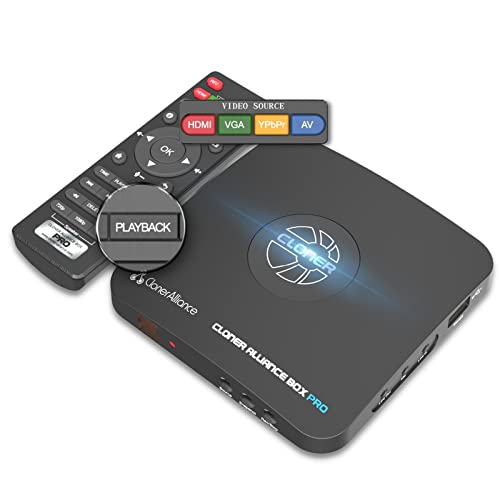
The ClonerAlliance Box Pro functions as a standalone 1080p@60fps video recorder and HDMI capture device, with input options including RCA, YPbPr, VGA, and more. It can save to USB storage and play back on a TV, eliminating PC dependence. The unit is positioned for versatility, supporting analog-to-digital conversion for archiving old tapes and live gaming capture. It also offers scheduling and broad compatibility with various media formats, making it a practical choice for users looking to digitize wide-ranging sources while maintaining a straightforward workflow.
Considerations include input compatibility with older devices, the need for USB storage capacity, and whether you intend to review captured files on a TV or a computer. The device’s PC-free workflow and scheduling features support long-term projects and routine archiving tasks.
Buying Guide: Key Purchase Considerations
- Source compatibility: Ensure the device supports your primary inputs (VHS/Hi8 tapes, camcorders, DVD players, gaming consoles) and your legacy formats (CVBS, S-Video, RCA).
- Storage options: Look for USB or SD/TF card support with adequate capacity. Some units support external power for high-capacity drives, which is important for long recording sessions.
- Output quality: Prefer devices that offer up to 1080p output for modern displays. Check whether the unit records in MP4/MP3 or other widely supported formats for easy playback and editing.
- PC-free workflow: If you want simplicity, select models that operate without a computer, while keeping in mind that PC-based workflows may offer additional editing options.
- Preview and editing features: A built-in LCD screen or HDMI output for real-time preview helps verify capture quality. Some models include scheduled recordings and auto-pause to optimize archives.
- App and wireless transfers: Some devices support smartphone apps for transferring files to discs, USB drives, or memory cards. Consider how this fits your workflow if you plan to digitize content from phones or cameras.
- Ease of use vs. flexibility: Standalone recorders tend to be user-friendly but may have fewer advanced editing capabilities. If you need extensive editing, you might pair a capture device with a PC-based editor.
- Reliability and support: Look for models with solid build quality and accessible customer support. Reading user reviews can reveal long-term performance patterns and any quirks with certain inputs.
- Discs and media types: If you plan to burn DVDs, check compatibility with DVD±R/DVD±RW formats and any included media or software.
These considerations help balance ease of use, archival quality, and future compatibility. When digitizing a large collection, plan a workflow that prioritizes stable storage, consistent file naming, and an organized archive structure to simplify retrieval and playback across devices.