Exploring dual Z-axis 3D printers and upgrade kits can significantly boost print stability, reduce layer ripple, and simplify bed leveling. This guide highlights five relevant options with features designed to improve accuracy and reliability for American makers, hobbyists, and small shops. Each entry includes a quick spec snapshot and a practical overview of how dual Z-axis systems impact print quality and workflow.
Summary Table Of Chosen Products
| Product | Brand | Key Benefit | Link |
|---|---|---|---|
| Ender 3 Dual Z-axis Upgrade Kit | Creality | Increased accuracy and smoother operation | View |
| Ender-3 S1 with Dual Z-Axis | Creality | Faster, auto-leveling and reliable dual Z-axis | View |
| Ender 3 V3 SE Dual Z-Axis | Creality | Sprite direct extruder with auto leveling | View |
| Longer LK5 Pro Dual Z-Axis Kit | Longer | Stable frame, large build volume | View |
| Longer LK5 Pro Dual Z-Axis Printer | Longer | Large print area with resume printing | View |
id=”Ender3Upgrade”>Creality Ender 3 Dual Z-Axis Upgrade Kit

The dual Z-axis upgrade for the Ender 3 family adds a second Z-screw and motor to stabilize the bed during printing. This setup reduces wobble and improves layer consistency, particularly on taller prints. The kit includes a lead screw, a metal power supply holder, and an additional stepper motor to synchronize bed movement on both sides. Users typically see improved first-layer stability and reduced z-axis ripple, which contributes to stronger, more accurate prints over time.
Key considerations:
- Compatibility: Designed for Ender 3, Ender 3 Pro, and Ender 3 V2 platforms.
- Installation: Requires mechanical adjustments and wiring to integrate the dual motors with existing firmware.
- Impact: More consistent bed leveling across the print area; potentially longer setup time but better long-term stability.
id=”Ender3S1″>Official Creality Ender-3 S1 Dual Z-Axis Upgrade
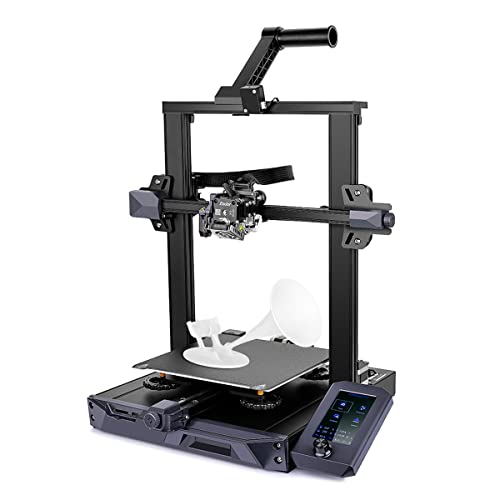
This Ender-3 S1 model emphasizes speed and reliability with a dual Z-axis framework. The kit supports the Sprite dual-gear direct extruder and includes an auto-leveling system (CR Touch) for consistent first layers. The dual Z-axis design helps maintain parallelism between the bed and nozzle as prints grow taller, which minimizes wobble and improves overall dimensional accuracy. A silent mainboard helps reduce printer noise during long print runs.
Key considerations:
- Auto leveling: CR Touch simplifies bed leveling, ideal for users who frequently print diverse materials.
- Direct drive: Enhanced extrusion control, beneficial for flexible filaments like TPU.
- Print size: 220×220×270 mm, suitable for a wide range of hobby projects.
id=”Ender3V3SE”>Creality Ender 3 V3 SE Dual Z-Axis Upgrade

The Ender 3 V3 SE combines dual Z-axis coordination with a Sprite direct extruder and auto-leveling features. Its dual Z-axis configuration reduces vertical misalignment during higher layers, boosting print uniformity and first-layer reliability. The upgraded airflow and drive components contribute to smoother, more consistent operation, while automatic bed leveling minimizes manual calibration time.
Key considerations:
- Speed and efficiency: Reported speeds up to 250 mm/s with strong acceleration, enabling faster prototyping.
- Reliability: Dual Z-axis helps maintain parallelism and reduces bed wobble during tall prints.
- First layer: Auto leveling supports consistent adhesion across the bed surface.
id=”LongerLK5Pro”>Longer LK5 Pro Dual Z-Axis Upgrade Kit
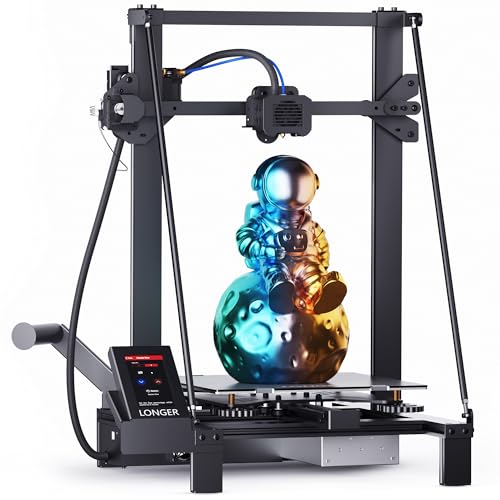
The Longer LK5 Pro upgrade kit adds a sturdy dual Z-axis arrangement with lead screws and a metal power holder. The kit is designed to improve print stability and accuracy on LK5 Pro machines and compatible models. The frame’s reinforced triangular structure helps dampen vibrations, supporting higher print quality on taller or more complex parts. It suits beginners aiming for stable upgrades without extensive rewiring.
Key considerations:
- Build stability: A solid triangular frame and accurate Z-axis alignment minimize wobble.
- Compatibility: Targets LK5 Pro series and similar beds with open-source focus.
- Volume: Large bed dimensions offer expansive print opportunities.
id=”LongerLK5ProPrinter”>Longer LK5 Pro Dual Z-Axis Printer

This standalone printer from Longer expands capabilities with a dual Z-axis system, a 11.8 x 11.8 x 15.7 inch build volume, a color touchscreen, and a silent motherboard. The dual Z-axis design promotes precise bed leveling and consistent layer deposition, especially on taller prints. Features like filament run-out detection and resume printing help mitigate interruptions during long jobs.
Key considerations:
- Build volume: Generous space supports larger models and functional parts.
- Automation: Color touchscreen and auto-leveling features streamline setup and operation.
- Open-source: Encourages community-driven upgrades and firmware customization.
Buying Guide: Dual Z-Axis And Upgrade Considerations
When selecting a dual Z-axis setup or a printer with dual Z-axis capability, consider these factors to match your needs:
-
<liPrint stability: Dual Z-axis reduces bed wobble and improves layer uniformity, especially on tall prints. Look for precise guides, rigid frames, and matched lead screws.
<liCompatibility: Ensure the upgrade kit fits your printer model (Ender 3 family, LK5 Pro, etc.). Check mount points, screw sizes, and power supply compatibility.
<liEase of installation: Some kits require firmware changes, wiring, and mechanical alignment. Determine whether you prefer a straightforward upgrade or a more customizable solution.
<liAuto leveling and sensors: Auto bed leveling (CR Touch or similar) simplifies calibration and helps maintain a consistent first layer across the print bed.
<liDirect extruder vs. Bowden: Direct drive systems improve control over flexible filaments but may increase print weight. Evaluate material needs and print quality goals.
<liNoise and speed: Silent boards and efficient drivers reduce noise during long prints. Higher speeds are possible with robust dual-axis support, but calibration is crucial for quality.
<liBuild volume and workflow: Larger beds enable bigger projects but may require more stable frames and precise Z alignment. Consider your typical project size.
<liOpen-source and community support: Open designs and active communities help with troubleshooting, firmware tweaks, and upgrades.
These options provide a spectrum from compact upgrades to full dual Z-axis printers. Users should balance the desire for higher precision with installation effort, compatibility, and ongoing maintenance needs.