For compact systems needing additional storage without sacrificing internal space, dual mSATA to SATA adapters offer a practical solution. These devices let you convert two mSATA SSDs into a 2.5″ SATA drive bay with options for RAID or JBOD, giving you a versatile path to expand storage, improve performance, and tailor data management to your setup. This guide highlights five top dual mSATA to SATA adapters and provides practical buying considerations to help you choose the right model for desktops, laptops, or embedded systems.
| Product | Brand | Notes |
|---|---|---|
| StarTech.com Dual mSATA SSD to 2.5” SATA RAID Adapter Converter | StarTech.com | RAID0/RAID1/JBOD, open-frame housing |
| NFHK Dual MSATA Mini-SATA SSD Card JBOD RAID Bridge | NFHK | JBOD options with RAID support |
| cablecc Dual MSATA Mini-SATA SSD Card JBOD Bridge | cablecc | JBODRAID support in 2.5″ enclosure |
| NFHK Dual MSATA NGFF B+M SSD Card JBOD RAID Bridge | NFHK | Supports MSATA and NGFF B+M keys |
| ELUTENG M.2 to SATA Adapter 2-in-1 Converter | ELUTENG | Supports M.2 SATA/NGFF to SATA |
StarTech.com Dual mSATA to 2.5” SATA RAID Adapter
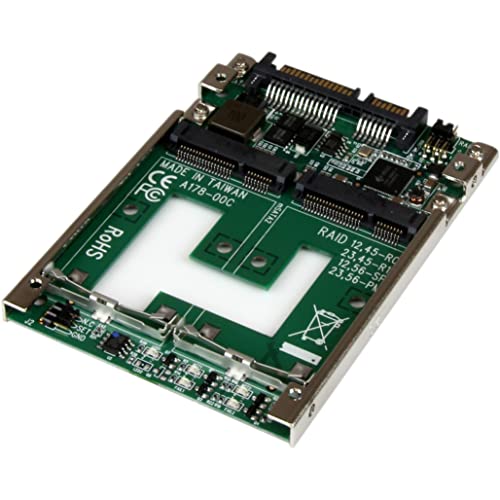
StarTech.com provides a dual full-size mSATA SSD bays setup that fits into a 2.5″ SATA form factor. The unit supports RAID0, RAID1, and JBOD configurations, with a robust open-frame steel mounting bracket suitable for compact workstations and test rigs. This adapter is designed for users seeking performance tuning and data protection options within a single, versatile enclosure. The open-frame housing allows for accessible cooling and easy wiring in custom builds.
NFHK Dual MSATA Mini-SATA Bridge Enclosure

This NFHK design enables connecting two MSATA drives to a 2.5″ SATA enclosure, offering JBOD as individual drives with RAID managed by the host system. It provides a practical solution for users who want independent drive operation with the option to configure RAID using compatible hardware or software. The adapter supports MSATA SSDs in SATA mode, making it suitable for legacy desktops or laptops needing added storage without NVMe complexity.
cablecc Dual MSATA to 2.5” Enclosure Bridge

Similar to other dual MSATA solutions, this cablecc bridge supports JBOD and RAID configurations through compatible host technology. It is designed to bridge two MSATA drives into a single 2.5″ bay, suitable for users who need extra storage with straightforward setup inside a desktop or laptop. The product emphasizes compatibility with MSATA in SATA mode and emphasizes flexible drive configurations for varied workloads.
NFHK Dual MSATA NGFF JBOD Bridge

This NFHK unit supports MSATA and NGFF B+M SSDs in a 2.5″ enclosure, enabling JBOD as individual drives or configured RAID with compatible host technology. The adapter is designed for desktop or laptop connections and is marketed for flexibility in drive types and RAID configurations, making it a versatile choice for mixed SSD environments where different form factors must coexist in a single chassis.
ELUTENG M.2 To SATA 2-in-1 Adapter

ELUTENG offers a 2-in-1 converter that handles M.2/M SATA to 2.5″ SATA III drives, supporting B and B+M keys. It highlights compatibility with M.2 SATA/NGFF and MSATA in SATA mode, excluding M key NVMe/PCIE drives. The design targets users needing to repurpose existing M.2/NGFF modules into a traditional SATA drive bay, with emphasis on clear compatibility guidance to avoid mismatches.
Buying Guide
Key purchase considerations include form factor compatibility, RAID versus JBOD needs, and drive type support. Assess whether your system supports RAID0 or RAID1 through the adapter or requires JBOD for independent drives. Confirm drive keys (B, M, or B+M) and ensure compatibility with your M.2 or MSATA modules. Look for open-frame housings if you need easy cooling and accessible installation in testing setups. Verify that the device supports the expected transfer speeds, and check the host system limits on RAID configuration for stability and performance.
Performance and reliability vary by brand and model. Some adapters emphasize high performance with RAID options, while others focus on flexible JBOD configurations. If you are integrating into a laptop or compact PC, check dimensions, mounting support, and whether the enclosure fits within a 7mm 2.5″ drive bay. Consider warranty and return policies, especially for mixed-drive environments where compatibility can be nuanced. For legacy systems, ensure BIOS/UEFI compatibility with adapters that present multiple SATA connections to the host controller.
Use-case perspectives:
- Pro users needing configurable RAID (speed or redundancy) for video editing or data workflows.
- Home users expanding storage in a desktop with mixed MSATA/M.2 modules.
- Developers testing multiple drives in a single enclosure for benchmarking.
In summary, choose an adapter that clearly lists supported form factors (MSATA, M.2 NGFF, M key vs B/M keys), the RAID options offered, and compatibility notes. A well-documented product with clear host-system requirements minimizes compatibility surprises and ensures reliable operation