Choosing the right dual monitor stand or mount can improve ergonomics, desk space, and productivity. This guide highlights five highly compatible options, covering a range of desk types, load capacities, and adjustment capabilities. Each selection is evaluated for versatility, ease of installation, and overall stability to help American readers make an informed purchase.
Summary of Selected Products
- HUANUO Dual Monitor Stand (Grey) — 13–32″, 4.4–19.8 lbs per monitor, full motion with C-clamp or grommet base
- VIVO Dual Monitor Desk Mount — 13–30″ monitors, up to 22 lbs each, full motion with C-clamp or grommet
- Mount-It! Dual Monitor Stand — 13–32″ displays, up to 19.8 lbs each, full motion with C-clamp or grommet
- ErGear Dual Monitor Arm — 13–32″ displays, up to 19.8 lbs per monitor, flexible tilt, swivel, rotate
- WALI Dual Monitor Stand — 17–32″ displays, up to 22 lbs per monitor, robust tilt/swivel/rotate
HUANUO Dual Monitor Stand — Full Motion With C-Clamp Or Grommet

This HUANUO model is designed for two monitors in the 13–32 inch range, with a combined weight capacity of 4.4 to 19.8 pounds per arm. It features full motion articulated arms for precise tilt, swivel, and rotation, enabling portrait or landscape configurations. The installation options include a dual C-clamp base for stability or a grommet mount for desk with a pre-drilled hole. The design prioritizes sturdy support and minimal desk wobble, making it suitable for gaming, coding, or design work.
Important compatibility notes emphasize three conditions for monitors: size, weight, and VESA pattern (75x75mm or 100x100mm). Desk compatibility focuses on wooden desks with appropriate thickness and no obstructive underside cross beams. The dual-arm system is engineered to keep screens steady while typing or gaming, delivering a clean, secure setup. The overall build supports daily, long-duration use in home offices or gaming setups.
WALI Dual Monitor Stand — 17–32 Inch, 22 Lbs Per Arm
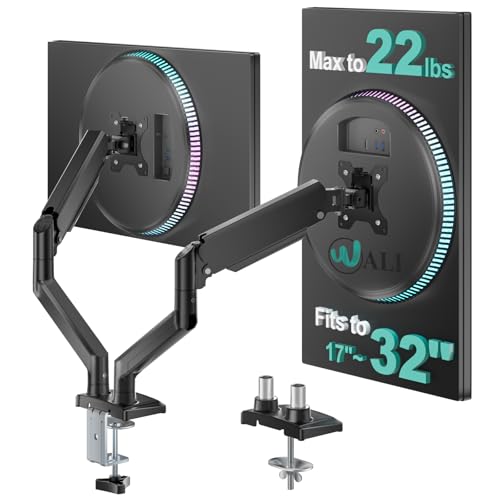
The WALI dual monitor stand supports most 17″–32″ displays with a weight capacity up to 22 pounds per arm and is compatible with VESA 75x75mm or 100x100mm patterns. It offers dynamic angle adjustments, including +90°/-90° tilt, +70°/-45° tilt, and a full 360° rotation for portrait or landscape orientation. A generous maximum extension of 19.3 inches and up to 17.3 inches of height adjustment help users achieve ergonomic alignment, reducing neck strain during long work or gaming sessions.
Designed for flexibility, this model emphasizes smooth motion and stable positioning. It integrates cable management features to minimize clutter along the arms and center pole. The installation options include a sturdy C-clamp for desks up to a typical thickness and an optional grommet mount, providing stable support for varied desk environments.
VIVO Dual Monitor Desk Mount — Up To 30″ Per Screen

The VIVO STAND-V002 supports two monitors up to 30 inches and 22 pounds each, with VESA 75x75mm or 100x100mm compatibility. Its articulation includes +90° to -90° tilt, 180° swivel, and 360° rotation, plus height adjustment along a central pole. This enables precise ergonomic positioning and portrait or landscape layouts, making it ideal for multi-tasking workflows, coding, or media editing.
Stability is reinforced through a heavy-duty C-clamp or optional grommet mount that secures the setup to the back of the desk. Cable management clips help keep the workspace tidy. Overall, this option prioritizes smooth movement, a wide range of motion, and compatibility with a broad set of displays and desk configurations.
MOUNT PRO Dual Monitor Stand — Full Motion, 2 Screens Up To 27 Inches

The MOUNT PRO model offers free-standing full motion support for two monitors up to 27 inches, with a maximum load of 17.6 pounds per arm. Its design emphasizes a stable V-shaped base to reduce tipping and to securely hold angled screens. The stand provides -90° to +70° tilt, -90° to +90° swivel, 360° rotation, and an adjustable height up to 18.1 inches, enabling a customizable viewing angle for productivity or entertainment tasks.
With universal compatibility for 13″–27″ displays and VESA patterns of 75x75mm or 100x100mm, this unit balances reliability and flexibility. The base design and extended arm reach contribute to a comfortable workspace, particularly on larger desks where a wide stance reduces reach strain.
ErGear Dual Monitor Arm — Heavy Duty, 19.8 Lbs Per Arm

The ErGear dual monitor arm is built for heavy-duty use, supporting two monitors from 13″ to 32″ with a maximum load of 19.8 pounds per arm and VESA patterns of 75x75mm or 100x100mm. It offers independent tilt, swivel, and rotation controls along with height adjustments up to 17.5 inches. This enables precise positioning to reduce neck strain and create a more ergonomic workstation for editing, gaming, or coding tasks.
Installation can be completed via a sturdy C-clamp or an optional bolt-through grommet mount suitable for desks up to a typical thickness. The product emphasizes easy, tool-free adjustments and flexible geometry, allowing multiple users to adapt the setup to their preferred posture and screen configuration.
Buying Guide: Key Purchase Considerations
- Monitor size and weight: Confirm each monitor falls within the 13″–32″ range and weight within the per-arm limit (commonly 4.4–19.8 lbs or 17.6–22 lbs depending on model).
- VESA compatibility: Ensure back mounting holes match 75x75mm or 100x100mm patterns for seamless mounting.
- Mount type: Decide between C-clamp or grommet mounting based on desk construction and thickness. Grommet mounts can offer a cleaner look but require desk holes.
- Adjustability: Look for tilt, swivel, and rotation ranges that suit your workflow. Full-motion arms support portrait and landscape modes and dynamic positioning.
- Desk compatibility: Check desk material, thickness, and whether there are obstructions underneath that could hinder mounting.
- Stability and stability features: A wide base or robust clamp reduces wobble, important for gaming or precision tasks.
- Cable management: Integrated clips or channels help maintain a tidy workspace and prevent cord strain.
- Dual-stand ergonomics: Position monitors at eye level and equidistant from your seating area to minimize neck strain and optimize posture.
- Installation effort: Some units are tool-free or easier to assemble than others; consider your comfort with DIY setup.
- Consistency across monitors: If two monitors differ in weight or size, verify the stand supports asymmetric loads or consider a model specified for mixed displays.
In choosing a dual monitor stand or mount, weigh the balance between maximum reach, tilt range, and the required desk footprint. For gamers, editors, or programmers who work long hours, a stand with smooth articulation and sturdy construction can improve comfort and efficiency. For open-plan setups or shared workspaces, consider how easily the mount can be adjusted to accommodate different users and tasks.