For users seeking a seamless multi-monitor setup, dual 27-inch curved monitors offer immersive viewing, enhanced focus, and improved productivity. This guide highlights five top options, each bringing large 27-inch panels, gentle 1500R or 1800R curves, and strong gaming or work features. Read on to compare built-in speakers, refresh rates, color accuracy, and mounting compatibility so you can choose the best dual-monitor package for your desk.
Summary table of selected products:
| Product | Brand | Key Feature | Curvature | Refresh Rate | Speakers | Mounting |
|---|---|---|---|---|---|---|
| 2-Pack Curved 27 Inch FHD | Generic | Built-in speakers, fast response, 99% sRGB | 1500R | 100 Hz | Yes | Wall Mount |
| Kado Dual Monitor Setup 27″ C27X Dual | Kado | Dual monitors for seamless viewing, ergonomic 1500R | 1500R | 75 Hz | Yes | VESA |
| Sceptre Curved 27-inch 100Hz | Sceptre | 1ms BR, 100% sRGB, built-in speakers | 1500R | 100 Hz | Yes | VESA |
| Samsung 27″ Essential S3 | Samsung | 100 Hz, game mode, eye comfort | 1800R | 100 Hz | Yes | VESA |
| Sceptre 27″ Prime Monitor | Sceptre | 1500R, 100 Hz, 99% sRGB | 1500R | 100 Hz | Yes | VESA |
Across these options, you’ll find dual-monitor bundles that emphasize immersive curves, reliable gaming throughput, and practical features like built-in speakers and VESA mounting. Each entry below includes a concise overview, relevant specifications, and a direct link to the Amazon listing for quick comparison.
2-Pack Curved 27 Inch FHD 100Hz Monitors

The 2-Pack Curved 27 Inch FHD monitors deliver a compact dual setup with built-in speakers and a 100 Hz refresh rate. The 99% sRGB coverage provides vibrant, accurate colors for both work and gaming. The 1500R curvature offers an immersive field of view, making it easier to take in content without moving your head excessively. Users benefit from a fast response time to reduce motion blur in fast-paced scenes, helping to keep action and details sharp in competitive gaming or dynamic video editing. Wall mounting compatibility adds flexibility for space-saving desk layouts.
Kado Dual Monitor Setup 27″ C27X Dual

Designed for a true dual-monitor workspace, the Kado C27X Dual Series emphasizes an ergonomic 1500R curve to minimize eye strain and neck fatigue during long sessions. The dual-screen configuration helps create expansive real estate for productivity tasks like data analysis, design, and content creation, while maintaining comfortable viewing angles. A fast response time keeps gaming and fast transitions smooth, ensuring that both the left and right displays stay in crisp focus during chaotic moments.
New Sceptre Curved 27-inch Gaming Monitor
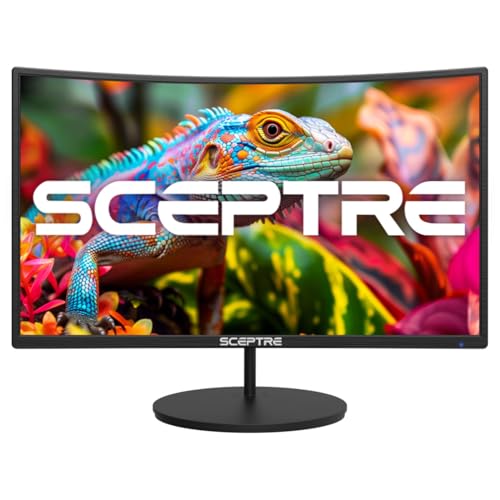
The Sceptre 27-inch gaming monitor blends a 1500R curved VA panel with a 100 Hz refresh rate and a 1 ms response time, delivering quick, responsive performance ideal for competitive play and fluid scrolling. The 99% sRGB color gamut enhances color accuracy for multimedia work, while built-in speakers simplify setup by reducing the need for external audio hardware. The monitor’s VESA compatibility adds mounting flexibility for multi-monitor configurations and optimized desk layouts.
Kado Dual Monitor Setup 27″ 1500R 75Hz

This Kado dual-monitor bundle features a 1500R curved design aimed at reducing eye strain and neck fatigue for extended sessions. With a 75 Hz refresh rate, it balances smooth visuals with energy efficiency and system load. The dual-monitor setup enhances productivity by providing ample horizontal real estate for multitasking, while the built-in speakers and VESA compatibility streamline both audio and mounting considerations.
Samsung 27″ Essential S3 (S36GD) Curved Monitor

Samsung’s 27-inch Essential S3 series delivers a highly immersive 1800R curved display with a sharp 100 Hz refresh rate. Game Mode and advanced eye comfort features tailor visuals for gaming and long work sessions, reducing fatigue while maintaining strong image clarity. The monitor supports multiple connections (HDMI and D-sub) and integrates well into a dual-monitor ecosystem with VESA mounting, enabling flexible workstation configurations. The muscle behind the display is consistent color and reliable performance for both entertainment and productivity tasks.
Sceptre New Curved 27-inch Gaming Monitor 1500R

The Sceptre 1500R curved gaming monitor packs a 1 ms response, 100 Hz refresh rate, and 100% sRGB coverage into a large, curved panel. In dual-monitor setups, these features help ensure consistent color and motion performance across both displays. With two HDMI ports and a DisplayPort option, connectivity remains flexible for diverse systems. Built-in speakers simplify space usage, while VESA mounting supports a tidy, wall- or desk-mounted configuration. The 1500R curve keeps the field of view consistent, ideal for immersive gaming and productive multitasking alike.
Buying Guide: Key Considerations For Selecting Dual 27-Inch Curved Monitors
- Panel curvature and viewing comfort: A 1500R or 1800R curve affects how the monitor envelops your field of view. For extended work or gaming sessions, a more pronounced curve reduces eye movement and improves immersion; however, individual preference matters, and desk depth should be sufficient to prevent glare.
- Refresh rate and response time: For gaming versatility, look for 75 Hz to 100 Hz or higher. A 1 ms to 5 ms response reduces motion blur, especially in fast-paced titles. If you primarily work with static content, a lower refresh rate may still satisfy productivity needs without sacrificing image quality.
- Color accuracy and gamut: Monitors with higher color gamut, such as 99% sRGB or better, provide more vibrant and accurate visuals—beneficial for photo editing, video work, and design-focused tasks.
- Built-in speakers and audio quality: Integrated speakers can minimize desk clutter, but consider external speakers or a quality headset if you rely on precise audio for gaming or media creation.
- Connectivity and ports: Ensure there are enough HDMI ports (and possibly DisplayPort) for dual-monitor setups and future-proofing. Check for compatibility with your PC or laptop and whether adapters are needed.
- Ergonomics and mounting: VESA compatibility enables flexible mounting options, including wall mounts or adjustable arms. If your workspace has limited desk depth, dual-monitor stands with tilt and height adjustability can improve comfort and reduce neck strain.
- Power and space: Dual 27-inch displays require ample desk space and power connections. Consider desk layout and cable management to maintain a clean workstation.
- Price-to-performance balance: Compare total features across models—curvature, refresh rate, color performance, and built-in features—against your budget to identify the best value for your needs.
Overall, the listed options offer solid dual-monitor setups that pair immersive curvature with practical features for both gaming and productivity. When selecting, prioritize curvature that matches your desk depth, check for sufficient ports to support your devices, and consider whether built-in audio meets your requirements or if external audio is preferred. Balance a capable refresh rate with color accuracy and ergonomic mounting to sustain comfort during long sessions.