For tattoo artists, a reliable drawing tablet can streamline concept sketches, stencil creation, and client consultations. The following five models pair responsive pens, wide color ranges, and ergonomic designs with software compatibility that suits professional tattoo workflows. This guide highlights each tablet’s strengths, helping you compare screens versus non-screen options, tilt support, shortcut keys, and pen accuracy to match your studio needs.
Summary of chosen products:
- XP-Pen Artist13.3 Pro: Screen-enabled drawing tablet with tilt function and wide color gamut.
- LitEnergy A4 LED Copy Board: Light pad for tracing and transferring designs, ultra-thin and portable.
- HUION Inspiroy H1060P: Large drawing area, battery-free stylus, extensive hot keys.
- GAOMON PD1161: Screen drawing tablet with on-screen sketching and a battery-free pen.
- XOPPOX Graphics Tablet: Non-screen tablet with extensive compatibility, battery-free pen, and shortcut keys.
XP-Pen Artist 13.3 Pro With Screen
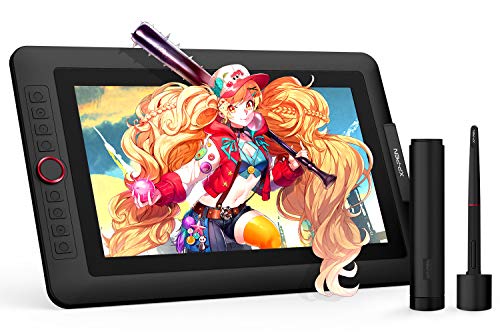
The XP-Pen Artist 13.3 Pro offers a fully laminated 13.3-inch Full HD display with a color gamut that supports 88% NTSC, Adobe RGB ≧ 91%, and sRGB ≧ 123%. With tilt support up to 60 degrees, artists can shading naturally, creating tattoo-worthy line work directly on screen. A 3-in-1 cable enables streamlined connections to computers, making it a strong option for studio setups where on-screen sketches can be shared with clients in real time. The included adjustable stand helps reduce wrist strain during long design sessions, while 8192 levels of pen pressure deliver precise control for fine outlines and bold fills. The device is designed to work with compatible software on PC or Mac, aiding translation of ideas from idea board to stencil.
LitEnergy A4 LED Copy Board Light Tracing Box

This ultra-slim tracing board provides a glare-free, evenly lit surface ideal for tracing tattoo designs onto transfer paper. The A4 visual area is clearly defined, and brightness is adjustable via an intuitive touch switch. Its low-profile form makes it easy to move between stations or travel to tattoo conventions. The energy-efficient LEDs reduce eye fatigue, which is important during long design review sessions with clients. While not a drawing tablet with a pen, it excels for accurate stencil creation and transfer, a common step in many tattoo workflows.
HUION Inspiroy H1060P Graphics Tablet

The HUION Inspiroy H1060P provides a 10 x 6.25-inch drawing area and a battery-free PW100 stylus with ±60° tilt support for shading and calligraphic strokes. Twelve programmable express keys plus 16 soft keys offer flexible shortcuts that mirror common tattoo design workflows, enabling quick access to layers, brushes, and navigation. The tablet’s slim profile and Mac/Windows compatibility make it a practical addition to most studios, allowing artists to achieve smooth lines and clean shading without frequent stylus charging interruptions.
GAOMON PD1161 Drawing Tablet With Screen
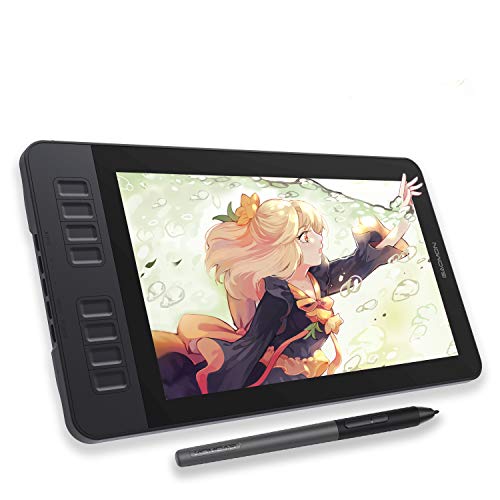
The GAOMON PD1161 is a compact 11.6-inch screen tablet that enables direct drawing on screen with a battery-free stylus. It features an anti-glare matte coating and the full HD display enhances skin-toned accuracy for tattoo line work. On-screen sketching accelerates the process of translating a client’s concept into your stencil. The on-tablet controls include a set of shortcut keys for quick actions, while the included pen offers a responsive drawing experience suitable for bold outlines and delicate shading. This model suits studios that prefer on-screen interaction without extra wiring complexities.
XOPPOX Graphics Tablet With Battery-Free Stylus

The XOPPOX tablet offers broad compatibility across Windows, macOS, and Android ecosystems with a battery-free pen featuring 8192 pressure levels. It includes 12 shortcut keys and 10 multimedia keys, enabling rapid adjustment of brushes and tools—useful during the tattoo design phase when switching between sketch, stencil prep, and client review. While not a screen model, it excels as a cost-efficient choice for artists who value portability, long battery life, and customizable hot keys for faster drawing and editing in favorite software suites.
Buying Guide: Key Purchase Considerations
- Screen vs. non-screen: On-screen tablets (e.g., XP-Pen Artist, GAOMON PD1161) enable direct drawing on the display, which helps replicate a natural drawing experience for tattoo outlines. Non-screen tablets rely on transferring work to a computer or monitor and are often more affordable or portable.
- Pen pressure and tilt: Look for 8192 pressure levels and tilt support if you frequently shade or render fine line work. Tilt sensitivity helps mimic real pencil or brush dynamics essential for tattoo shading.
- Display quality: For tattoo art, accurate color and skin-tone reproduction matter. A wide color gamut (NTSC/CIE) and better viewing angles improve the fidelity of stencils and concept art.
- Shortcut keys: Adjustable express keys and soft keys speed up workflows by enabling quick access to layers, brush sizes, undo, and zoom. This is valuable during design revisions with clients.
- Compatibility: Ensure the tablet works with your core software (Photoshop, Illustrator, Procreate on iPad alternative, Krita, Clip Studio Paint). Check OS support (Windows, macOS, Android) and driver compatibility with your system.
- Standalone capability: Some tablets like the X14 (standalone) do not require a computer, offering a dedicated creative device. This can simplify client consultations in studio spaces.
- Ergonomics and setup: Adjustable stands and comfortable form factors reduce wrist strain during long design sessions. Consider the weight and portability if you tour studios or conventions.
- Budget vs future-proofing: Higher-end screens offer better color accuracy and pressure sensitivity, but mid-range models still deliver solid performance for tattoo workflows. Consider your long-term needs and software upgrades.
- Warranty and support: A robust warranty and accessible customer support help minimize downtime in a busy studio environment.
These tablets provide a range of capabilities from traditional tracing and stencil transfer to screen-based drawing and full digital sketching. For tattoo artists, a combination of direct-on-screen drawing and reliable pen input will typically yield the most efficient workflow, enabling accurate client consultations and precise tattoo planning.