Finding the right drawing tablet for a MacBook Pro can elevate digital art, photography retouching, and note-taking. This guide highlights five standout options that pair well with macOS, offering pressure sensitivity, battery-free styluses, and customizable shortcuts. Each selection is evaluated for portability, compatibility, and overall usability, ensuring you can choose a model that fits your workflow and space.
Summary of chosen products:
| Product | Brand | Key Benefit | Connection |
|---|---|---|---|
| Intuos Small | Wacom | Pen-on-paper feel, wireless option | USB/Bluetooth |
| Deco 01 V3 | XP-Pen | High pressure levels, 8 express keys | USB |
| Intuos Small Bluetooth | Wacom | Bluetooth freedom, lightweight | Bluetooth |
| StarG640 | XP-Pen | Battery-free stylus, compact | USB |
| Inspiroy H1060P | HUION | Large working area, many hot keys | USB |
Wacom Intuos Small Graphics Drawing Tablet
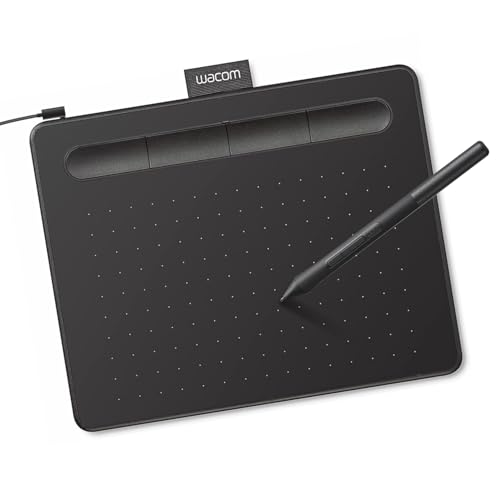
The Wacom Intuos Small delivers industry-leading control through EMR technology that feels like traditional pen on paper. It is compatible with macOS as well as Windows, making it a versatile option for MacBook Pro users who work across software packages. The tablet is designed for precise drawing, painting, photo editing, and markup tasks, with a sleek, portable profile that suits travel and studio use. A notable feature is the five-star reputation of Wacom’s pen performance, often preferred by professionals for reliable input and durability.
Key features include customizable ExpressKeys for quick access to tools, plus compatibility with multiple operating systems. The included software and training materials help new users ramp up quickly, while experienced artists appreciate the consistent pen feel and sophisticated precision. The small size keeps it portable for a MacBook Pro setup, yet it remains capable of detailed work when paired with compatible software. Consider this option if you prioritize a proven drawing experience and broad software compatibility.
XPPen Deco 01 V3 Drawing Tablet

XP-Pen’s Deco 01 V3 features 16,384 levels of pressure sensitivity and a tilt function, delivering naturally flowing lines and nuanced shading. The battery-free stylus means no charging interruptions, which is ideal for long sessions on a MacBook Pro. With eight customizable express keys, right- and left-handed users gain ergonomic access to essential shortcuts, boosting efficiency across creative and teaching tasks. It also supports Android connections, broadening its use beyond a single ecosystem.
The Deco 01 V3 is aimed at beginners and intermediate artists who want a high-quality drawing experience without a steep learning curve. Its compact 10×6 inch active area provides ample room for expressive strokes, while staying travel-friendly. The tablet integrates well with macOS and popular software like Photoshop, Illustrator, and Clip Studio Paint, making it a versatile choice for MacBook Pro users seeking both performance and value.
Wacom Intuos Small Bluetooth Graphics Tablet

This model mirrors the Intuos Small’s core strengths with an emphasis on wireless operation. Bluetooth connectivity enables neat, cable-free use alongside your MacBook Pro, reducing desk clutter. The battery-free EMR stylus maintains the same pen-on-paper feel and precision that professionals expect, while the cross-compatibility with major software suites supports drawing, painting, editing, and markup tasks on macOS. For those who value portability and a tidy workspace, the Bluetooth option offers a clean, unobtrusive setup.
Equipped with four ExpressKeys, this tablet lets users tailor shortcuts to frequently used tools, enhancing speed without sacrificing accuracy. It’s particularly useful for educators, students, and creators who move between locations or prefer working away from a desk. The combination of wireless capability, durable construction, and Wacom’s proven input system makes this a reliable choice for MacBook Pro users seeking freedom and reliability.
Drawing Tablet XP-Pen StarG640
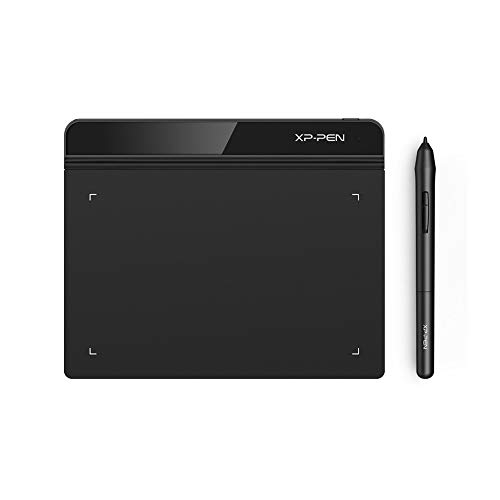
The StarG640 is a compact 6×4 inch drawing tablet that uses a battery-free stylus with 8,192 pressure levels. It is designed for on-the-go use with macOS and Windows, making it ideal for MacBook Pro users who sketch during commutes or in small workspaces. The lack of a battery in the pen ensures uninterrupted drawing sessions, while its slim profile facilitates easy transport in a laptop bag. This model suits beginners and students who want a simple, affordable path into digital art.
Although the StarG640 offers a smaller active area, its efficiency lies in its immediacy and ease of setup. It works well for basic illustration, hand-written notes, and e-signatures within Office and creative software. The tablet’s straightforward layout and quick access to essential tools make it a practical choice for those who prioritize portability without compromising the fundamental drawing experience on a MacBook Pro.
HUION Inspiroy H1060P Graphics Tablet

The Inspiroy H1060P offers a generous 10×6.25 inch drawing area and 12 customizable hot keys plus 16 soft keys, enabling a high degree of workflow customization. The battery-free PW100 stylus provides reliable pressure sensitivity with tilt support, supporting natural line variation and precise shading. This model is well-suited for MacBook Pro users who demand a larger canvas for detailed work, photo editing, or design tasks, while still integrating smoothly with major graphics programs.
HUION emphasizes a slim profile and sturdy build, making the H1060P a capable desktop companion or travel partner. The tablet supports macOS, Windows, and Android, offering broad compatibility. Its broad feature set appeals to artists and designers who need dedicated keys for frequent functions, as well as those who value a larger drawing surface for faster, more expressive digital art on a MacBook Pro.
Buying Guide: Key Purchase Considerations For MacBook Pro Users
- Compatibility and software: Ensure the tablet supports macOS versions you use and works with your preferred software (Photoshop, Procreate via macOS, Clip Studio, etc.).
- Pen technology: Battery-free pens with high pressure sensitivity provide a natural feel and minimal maintenance. Tilt support enhances shading accuracy.
- Active area and portability: A larger active area suits detailed work; smaller tablets excel for travel. Consider your typical working space and commute needs.
- Express keys and customization: More programmable keys allow faster access to tools, improving efficiency in busy workflows.
- Connectivity: USB-C, USB-A, or Bluetooth options affect desk setup and portability. Bluetooth reduces cable clutter but may require pairing management.
- Build quality and driver stability: Durable construction and reliable drivers reduce frustration during long sessions or major projects.
- Price-to-performance: Compare features like pressure levels, hot keys, and driver versatility against your budget to find the best value.
- Future-proofing: If you anticipate expanding into more complex software or larger canvases, consider a model with a bigger active area and more features.
In selecting a tablet for a MacBook Pro, weigh whether portability, screen real estate, or upgrade-friendly controls matter most. For students and light-duty art, smaller options with battery-free pens are typically sufficient. For professionals delivering high-detail work, larger tablets with extensive hot keys and robust drivers tend to offer better long-term value. All five options reviewed provide solid macOS compatibility, reliable input, and scalable performance across a range of creative tasks.