For users needing to drive DVI displays from a DisplayPort source, active DP to DVI adapters provide reliable signal conversion, supporting multiple screens and high resolutions. This article highlights five top options, detailing compatibility, features, and what to consider when choosing. Each product is selected for reliability, performance in Eyefinity or multi-display environments, and clear connection design.
Summary of chosen products:
| Product | Brand | Key Benefit | Resolution Support | Notes |
|---|---|---|---|---|
| CableCreation Active DP to DVI Cable, 6FT | CableCreation | Eyefinity multi-screen support | 1920×1200 / 1080p | Active DP to DVI, 6 ft, latch design |
| StarTech.com 3 ft DisplayPort to DVI Active Adapter | StarTech.com | Slim, integrated chip design | 1920×1200 / 1080p / 4K@30Hz | Active DP to DVI, EDID pass-through |
| Cable Matters Active DisplayPort to DVI Adapter | Cable Matters | Eyefinity Multi-Display Technology | 1920×1080@60Hz | Active, supports multi-monitor |
| StarTech.com DisplayPort To DVI Adapter – Active | StarTech.com | Compact, reliable | 1920×1200 | DP to DVI, 5.7 cable |
| Startech Connect Your DVI Dual Link Display To A DisplayPort Source | StarTech.com | Dual-link support | 2560×1600 | USB-Powered, active |
CableCreation Active DP to DVI Cable, 6FT

The CableCreation option is an active DP to DVI converter designed to connect DisplayPort sources to DVI displays. It supports Eyefinity multiple-screen configurations in SLS mode, allowing up to six displays to run from a single DP source when used with compatible hardware. It transfers signals from DisplayPort to DVI monitors at up to 1920×1200 or 1080p, providing a straightforward path from laptop or desktop DP outputs to DVI inputs. The DP latch design helps secure the connection during use. Note that it is a one-way adapter (DP to DVI) and does not convert DVI back to DP.
StarTech.com 3 Foot DisplayPort to DVI Active Adapter

StarTech’s 3-foot active DP to DVI adapter provides a compact solution with a built-in adapter chip within the DVI connector. It supports DP 1.2 (HBR2) to DVI-D single-link, delivering 1920×1200 or 1080p at 60 Hz, and can handle 4K at reduced refresh rates depending on source capabilities. EDID pass-through helps coordinate resolutions between source and display. It is compatible with a wide range of DP sources including desktops, laptops, docking stations, and workstations, and is suitable for classroom or conference room setups where a tidy, short cable is preferred.
Cable Matters Active DisplayPort to DVI Adapter

Cable Matters presents an active DP to DVI solution designed to enable Eyefinity Multi-Display setups. It connects a DisplayPort-equipped laptop or graphics card to a monitor with a DVI-D input. A DVI-D cable is required separately to complete the connection. It supports up to 1920×1080 at 60 Hz for mirroring or extending desktop displays. This adapter is not bidirectional, so it only transmits from DP to DVI and should be used when a DVI monitor is the target. It’s a solid choice for office workstations and multimedia setups that pair DP outputs with DVI displays.
StarTech.com DisplayPort To DVI Adapter – Active

StarTech’s active DP to DVI adapter delivers reliable conversion from DisplayPort to DVI-D single-link for up to 1920×1200 or 1080p at 60 Hz. It includes a 5.7-inch attached cable and EDID/DDC pass-through to maintain compatibility between source and display. This compact adapter is ideal for space-constrained setups, boardrooms, and home offices where a straightforward DP to DVI connection is required. It works with DP sources including desktops, laptops, and docking stations and supports Apple Cinema Display HD via DVI input on compatible displays.
Displayport To Dvi Adapter M/F Dp To Dvi Converter
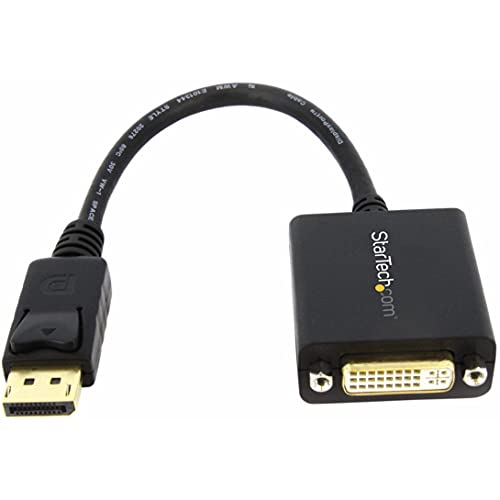
This StarTech DP to DVI adapter targets compatibility with DisplayPort 1.2 HBR2 to DVI-D single-link. It supports 1920×1200 or 1080p at 60 Hz and comes with a six-inch attached cable. It’s designed for passive DP++ sources as well as standard DP sources, providing a flexible option for connecting a DP-equipped computer to a DVI monitor or projector. EDID and DDC pass-through help ensure proper display output, and it’s a practical choice for both professional and home-use environments.
Monoprice DisplayPort 1.2a to DVI Active Adapter

Monoprice offers an active DP 1.2a to DVI adapter that supports dual-link DVI resolutions up to 2560×1600 at 60 Hz. This makes it a strong option for high-resolution multi-monitor setups using Eyefinity or similar configurations. The adapter is designed to work with NVIDIA and AMD graphics environments, providing broad compatibility across modern GPUs. It’s compact and easy to deploy in both office and home entertainment systems where high-resolution DVI output is needed from a DP source.
BENFEI DisplayPort to DVI, Gold-Plated

BENFEI’s compact DP to DVI adapter provides a gold-plated connection for improved signal transmission and durability. It connects a DisplayPort-enabled device to a DVI monitor or projector, supporting up to 1920×1080 at 60 Hz and a range of common resolutions. It’s sized for portability, making it a good option for business travel or quick presentations where a simple DP-to-DVI bridge is needed. Note that it is not bidirectional and requires a separate DVI cable for the full setup.
Startech Connect Your DVI Dual Link Display To A Displayport Source

StarTech’s dual-link solution expands beyond standard single-link DVI support, delivering up to 2560×1600 at 60 Hz for DVI displays connected to DisplayPort sources. This active adapter features EDID pass-through and USB-powered operation, making it suitable for digital signage, classrooms, and multi-monitor workstations that demand higher bandwidth. The compact design helps reduce cable clutter while maintaining robust performance for professional environments.
Buying Guide: Key Considerations For DP To DVI Active Adapters
- Active vs. passive: Active DP to DVI adapters actively convert DP signals to DVI and are essential when connecting non-DP-aware monitors, or when using Eyefinity/Multi-Display setups that require signal bridging.
- Supported resolutions: Check that the adapter supports the target monitor’s resolution and refresh rate (commonly 1920×1080 at 60 Hz or 1920×1200 at 60 Hz; some dual-link or 4K scenarios may apply).
- Single-link vs. dual-link: Dual-link DVI supports higher resolutions; verify your display port and cable compatibility if you need 2560×1600 or higher.
- Compatibility with Eyefinity/Multi-Display: If you plan to run multiple displays, ensure the adapter and your GPU support Eyefinity or corresponding multi-display technology.
- Forward direction only: Most DP to DVI adapters are not bi-directional. They convert from DP to DVI only, so plan your setup accordingly.
- Cable management and length: Shorter adapters keep desks tidy; longer cables may introduce latency or signal degradation in some setups—verify the maximum recommended length for your device.
- Power considerations: Some StarTech models are USB-powered; ensure you have a suitable USB port available if needed.
- Build quality and connectors: Gold-plated contacts reduce corrosion and improve signal stability; look for sturdy housings and latch mechanisms for secure connections.
- Compatibility with newer DP standards: DP 1.2/1.4 or higher can impact available bandwidth; confirm that the adapter matches your GPU’s DP capabilities.