Discover top DisplayPort 1.4 MST hubs designed to expand a single DP output into multiple displays. This guide summarizes five leading options, highlighting core capabilities, compatibility, and practical use cases for Windows setups. Each product section includes a direct link to its Amazon listing for quick access.
| Product | Displays Supported | Resolution Capabilities | Power | OS Compatibility |
|---|---|---|---|---|
| StarTech MST14DP123DP | Three monitors | Up to 2x 4K 30Hz + 1x 4K 60Hz | USB bus-powered | Windows only |
| Cable Matters MST Hub | Three monitors (2 DP 1.4, 1 HDMI 2.0) | Triple monitor with HDR; flexible output | Bus-powered (optional USB-C power | Windows |
| fairikabe 3-Port DP1.4 Splitter | Three DP monitors | Up to 4K60Hz per port; 8K support with DSC | Bus-powered; discrete GPU recommended | Windows |
| StarTech MST14DP123HD | Three HDMI outputs | Up to 4K 60Hz per monitor | USB powered | Windows only |
| SIIG CE-DP0Q11-S1 | Three HDMI outputs via MST | HDMI 60Hz/4K options depending on GPU | USB powered | Windows |
Note: The exact multi-monitor configuration depends on your GPU, driver support, and the DP version on the host computer. Always verify your graphics card’s MST capabilities and the maximum number of displays it can drive simultaneously.
StarTech 3-Port DisplayPort 1.4 MST Hub (MST14DP123DP)

The StarTech MST14DP123DP converts a single DP 1.4 output into three displays, suitable for Windows systems with DP 1.4/HBR3/MST support. It supports up to two 4K monitors at 30 Hz and one 4K monitor at 60 Hz, enabling extended or mirrored display arrangements. No drivers or software are required, and the hub is USB bus-powered for simple setup. Compatibility is limited to Windows; macOS and some GPU configurations may have display limits defined by the GPU.
Key considerations
- Check GPU support for MST and the maximum number of displays your card can drive.
- Ensure a DP 1.4 host with HBR3 and MST capability for best results.
- Power needs: USB bus-powered; consider external power if your setup demands more stability.
Cable Matters MST Hub (1 DP 1.4 + 2 DP 1.4 + 1 HDMI 2.0)

This MST hub from Cable Matters adds two DP 1.4 ports and one HDMI 2.0 port for a triple-monitor setup. HDR support enhances color depth, and the design includes a built-in magnet for secure mounting on metal surfaces. It is bus-powered in most configurations, with a USB-C power port available when additional power is needed. The included 12-inch cable tail minimizes strain on the DP connections.
Key considerations
- HDR compatibility with supported GPUs and displays.
- Power options: bus-powered with optional USB-C power for reliability.
- MacOS compatibility is limited or not supported; Windows is the intended OS.
3-Port DisplayPort 1.4 Splitter (MST Hub), 8K/4K Capable

This 3-port MST hub supports three DP monitors via a single DP 1.4 output, with configurations including three 4K60Hz displays or one 8K monitor. It is designed for Windows desktops and requires a discrete GPU capable of handling the output. The device is bus-powered with no driver installation required and supports HDR and 7.1-channel audio through HDMI. Compatibility notes emphasize driver-free operation on Windows and GPU requirements for higher resolutions.
Key considerations
- GPU capability is critical for 4K60Hz or 8K configurations.
- Windows-only support; macOS is not supported for MST features.
- Avoid using HDMI-to-DP adapters, connect directly to DP ports for proper MST operation.
StarTech 3-Port MST Hub (DP 1.4 to 3x HDMI)

This StarTech model converts a single DP 1.4 output into three HDMI displays. It is USB-powered and supports HDR and 7.1-channel HDMI audio, with HDCP 2.2 compatibility. It remains Windows-focused, requiring GPUs capable of handling multiple display streams. It is backwards compatible with DP 1.2 hosts but benefits from DSC-enabled DP 1.4 hardware to maximize multi-monitor performance.
Key considerations
- HDMI output quality and compatibility with HDMI displays.
- Verify GPU, driver, and Windows support for triple HDMI outputs.
- HDCP 2.2 support may matter for protected content.
Cable Matters 101065 Mini DisplayPort MST Hub
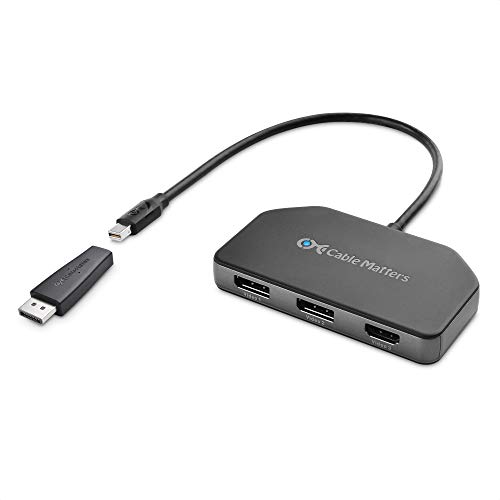
This mini DisplayPort MST hub includes a DP-to-MiniDP adapter and provides two DP outputs plus one HDMI port for triple-monitor setups. It is designed to deliver increased bandwidth for richer color and HDR content. The hub is bus-powered, with an optional USB power cable to address flicker or disconnect issues on low-power devices like certain Surface models. A built-in magnet allows secure mounting to metal cases, and its 12-inch tail reduces strain on the DP port.
Key considerations
- Ensure your device’s Mini DisplayPort version supports MST and HDR capabilities.
- Power considerations: USB power with optional USB-C port for reliability on low-power systems.
- MacOS compatibility is not supported for MST functionality.
Buying Guide: Key Purchase Considerations for DP 1.4 MST Hubs
- GPU and system compatibility: Verify your graphics card supports MST and determine the maximum number of displays it can drive. Look for GPUs with DP 1.4 and HBR3 support for higher refresh rates and resolutions.
- Display resolution and refresh rate goals: If you want 4K at 60Hz on all displays, ensure the hub and GPU can handle the combined bandwidth. Some hubs max out at 4K60Hz per port or offer split plans like 4K30Hz + 4K60Hz.
- Power requirements: Many hubs are USB-powered (bus-powered). For demanding configurations, consider hubs with a dedicated USB-C power input to prevent flicker or dropouts.
- Connector types and target displays: Choose a hub that aligns with your monitor inputs (DP, HDMI, or a mix). Direct DP outputs generally yield more reliable MST performance than adapters or indirect connections.
- OS and driver considerations: Most MST hubs are Windows-focused. MacOS support for MST is limited or not available on many devices, so plan accordingly if you’re using a Mac.
- Mounting and cable management: Some hubs include magnetic mounting or short cable tails—useful for a tidy workspace and reduced cable strain.
- GPU scalability: Some GPUs have practical limits on the number of displays due to internal architecture. Always confirm the maximum displays against your specific GPU model and driver version.
- Future-proofing: If you expect upgrading to higher resolutions or faster refresh rates, prioritize hubs supporting DP 1.4 with DSC and HDMI 2.0/2.1 compatibility where applicable.