Maximize desk space and improve ergonomics with a reliable double-stacked monitor stand. This guide highlights top dual-stack options that support two screens simultaneously, offering adjustable height, tilt, and rotation to fit different setups. Below you’ll find five carefully chosen models that balance stability, range of motion, and compatibility for American workspaces.
Summary of Selected Products
| Product | Brand |
|---|---|
| Dual Monitor Stand – Vertical Stack | Hemudu |
| HUANUO Vertical Dual Monitor Mount | HUANUO |
| HUANUO Dual Monitor Stand for 13 to 34 Inch | HUANUO |
| Putilsen Dual Monitor Arm Ultrawide | Putilsen Mount |
| ARES WING Dual Monitor Arm | ARES WING |
Hemudu Dual Monitor Stand — Vertical Stack
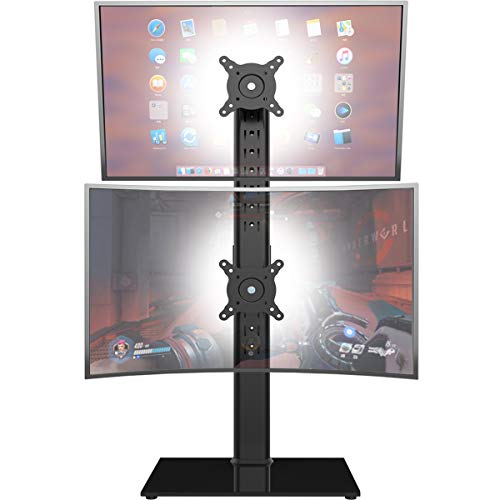
The Hemudu vertical dual monitor stand is designed to hold two screens ranging from 13” to 34” with a maximum per-screen weight of 44 lbs. It features 50x50mm, 75x75mm, or 100x100mm backside mounting hole compatibility and integrated cable management for a clean desk setup. The adjustable brackets offer a wide swivel range of +/- 50 degrees and tilt from -15 to +10 degrees, plus 12 levels of height adjustment along the central pole. This riser helps position monitors at ergonomic heights to support better neck, back, and shoulder posture during long work sessions.
HUANUO Vertical Dual Monitor Mount

Designed for two monitors in a stacked configuration, this HUANUO mount supports screens from 17” to 32” and up to 17.6 lbs per arm. It uses VESA patterns of 75x75mm or 100x100mm. The stand is fully adjustable, enabling tilt from -45° to +45°, swivel from -60° to +60°, and 360° rotation. By raising the monitors to ergonomic heights, it helps reduce neck and shoulder strain while improving work efficiency in multi-monitor setups.
HUANUO Dual Monitor Stand For 13 to 34 Inch

This HUANUO model fits two 13”–34” displays with VESA patterns 50x50mm, 75x75mm, or 100x100mm and supports a total load up to 44 lbs per monitor. It emphasizes space-saving vertical stacking and offers 13 height settings (9.5″ to 32.3″). Tilt is -15° to +10°, swivel ±50°, and 360° rotation for portrait or landscape viewing. The design prioritizes user comfort and posture across varying desk heights.
ARES WING Dual Monitor Arm
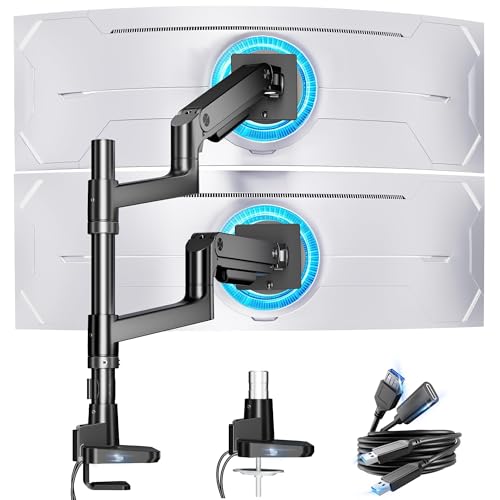
ARES WING offers a robust two-monitor setup suitable for ultrawide displays, supporting 17” to 49” screens with up to 44 lbs per arm. It provides a flexible gas-spring mechanism with a maximum height of 27.9″, arm extension up to 22.4″, and tilt from -50° to +20°, swivel ±90°, and 360° rotation. This model is designed for heavy-duty use and can accommodate a variety of screen curvatures and sizes while maintaining a tidy, organized work surface.
MOUNT PRO Vertical Dual Monitor Mount

Note: This model is included as context for comparison but appears as a secondary example in the broader category. It supports two monitors up to 32 inches with a 28-inch center column, enabling height adjustments and a full range of tilt and swivel movements. It is compatible with VESA 75x75mm or 100x100mm and holds up to 17.6 lbs per arm, providing flexible orientation between portrait and landscape modes. This design emphasizes adaptable height and space-saving vertical stacking.
MOUNT PRO Vertical Dual Monitor Mount — 32 Inch

Note: This entry expands on MOUNT PRO’s vertical dual mount solutions, illustrating broader compatibility with screens up to 32 inches, VESA 75x75mm or 100x100mm, and per-arm weight ratings up to 17.6 lbs. The configuration supports full motion including tilt up to 90°, rotation to landscape or portrait, and complete height adjustment across a 28″ column. This section serves to compare multiple MOUNT PRO variants and their ergonomics.
Buying Guide
- Screen size and weight compatibility: Verify each stand supports your two monitors’ size range and individual weight. If you have ultrawide or heavy displays, choose a model rated for higher per-arm loads (often 40–60 lbs).
- Mounting pattern: Most dual-stack stands use VESA 75x75mm or 100x100mm. Confirm your monitors’ VESA pattern to avoid adapters or incompatibility.
- Height adjustment and reach: A taller central column and flexible arm reach improve ergonomics, enabling eye-level alignment with a variety of seating positions.
- Articulation: Tilt, swivel, and rotation ranges determine how easily you can switch between portrait and landscape and reduce glare or awkward neck angles.
- Desk footprint and clamping: Consider clamp versus grommet mounting and the footprint required for the base or pole. Clamps are friendlier on fixed desks; grommets suit thicker tables or a cleaner underside.
- Cable management: Built-in channels or clips help keep cables organized, reducing clutter and snag risks on busy workstations.
- Stability and build quality: For heavier and ultrawide monitors, prefer stands with robust construction, reinforced joints, and validated load tests to prevent sagging or wobble.
- Ease of setup: Look for tool-free adjustments and straightforward installation with clear hardware compatibility notes and included mounting hardware.
- Upgrade path: If you anticipate future monitor changes, choose stands offering wider height ranges and greater tilt/swivel to accommodate new configurations.
- Included accessories: Some models include cable ties, mounting adapters, or accessory trays that enhance organization and usability.