DOCSIS 3.1 modems offer the latest in cable internet speeds and reliable performance for streaming, gaming, and work-from-home tasks. This guide highlights top 5 modem options that fit common American plans, with details on speed, compatibility, and setup. Use this as a quick reference to compare features and avoid rental fees by owning your own equipment.
Summary of Selected Products
| Product | Brand | Max Speed (Mbps/Gbps) | Key Benefit | Notes |
|---|---|---|---|---|
| ARRIS SURFboard SB8200 | ARRIS | Up to 2 Gbps | Multi-Gig DOCSIS 3.1 performance | Requires separate router |
| ARRIS SB8200-RB (Renewed) | ARRIS | Up to 1 Gbps | Popular DOCSIS 3.1 model with broad provider support | Renewed product |
| Netgear CM1000 | NETGEAR | Up to 1 Gbps | Widely compatible with major providers | Works with existing router |
| Hitron CODA56 (Modem Only) | Hitron | Up to 2.5 Gbps | High-speed multi-gig option, modem only | Requires router |
| ARRIS G18 | ARRIS | Multi-Gig with Wi-Fi 6 | Combo modem/router with Wi-Fi 6 | Includes router |
ARRIS SURFboard SB8200 DOCSIS 3.1 Multi‑Gig Cable Modem
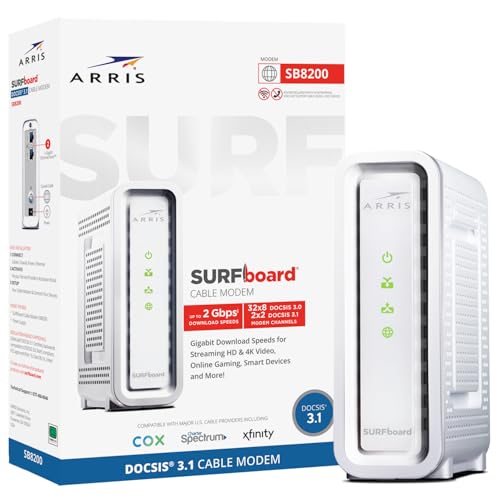
SB8200 is a DOCSIS 3.1 modem designed to support cable internet plans up to 2 Gbps. It provides two 1 Gbps Ethernet ports for convenient multi-device connections and is known for compact, modern design with visible LED indicators. This model is a strong choice for users who want ultra-fast wired speeds and to avoid monthly rental fees by owning the unit. Check with your provider to ensure plan compatibility before purchase.
ARRIS SB8200‑RB Renewed – DOCSIS 3.1 Gigabit Modem

The renewed SB8200 model offers DOCSIS 3.1 performance with compatibility across major US providers, including Xfinity, Cox, and Spectrum. It does not include built-in Wi-Fi, so a separate router is required. Availability and activation can vary by seller, so verify warranty and returns before purchasing. This option suits budget-conscious buyers who want reliable DOCSIS 3.1 speeds without paying new-device pricing.
NETGEAR Nighthawk CM1000 – DOCSIS 3.1 Modem

The CM1000 supports up to 1 Gbps speeds and is certified for major cable providers like Xfinity, Spectrum, and Cox. It’s a solid choice for users who want to leverage a separate Wi-Fi router for wireless coverage. It’s not compatible with certain fiber or DSL services, so confirm your provider’s compatibility prior to purchase. Using this modem can reduce rental fees and simplify upgrading to faster speeds as plans improve.
Hitron CODA56 – DOCSIS 3.1 Modem Only
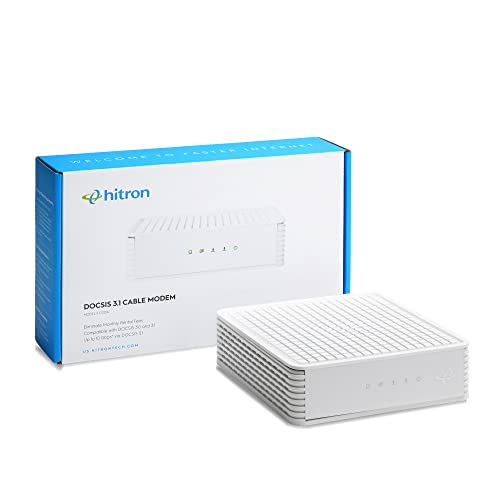
The CODA56 modem-only option offers up to 2.5 Gbps network performance and requires a separate router to deliver Wi-Fi. It is certified for major providers like Xfinity, Spectrum, and Cox. As a modem-only device, it is ideal for users who already possess a capable Wi-Fi solution or want to build a customized home network with mesh systems. Verify provider compatibility and speed tier with your plan before purchasing.
Hitron CODA56 Multi‑Gigabit DOCSIS 3.1 Modem

This variant emphasizes multi-gig capability with up to 2.5 Gbps Ethernet, suitable for plans from multiple certified providers. Like other modem-only devices, it requires a separate router for wireless coverage. It’s a practical upgrade for users who want higher-throughput potential and to future-proof against upcoming speeds while staying within DOCSIS 3.1 standards.
ARRIS G18 – Cable Modem Router Combo with Wi‑Fi 6

ARRIS G18 combines DOCSIS 3.1 modem technology with a built-in Wi‑Fi 6 router, delivering a streamlined, all-in-one solution for households seeking simplified setup and robust wireless performance. It’s approved for major providers like Comcast Xfinity, Cox, and Spectrum. While convenient, integration options and feature sets may vary by provider and firmware updates. For those who want fewer devices and a ready-to-go system, this is a compelling option.
Buying Guide: Key Purchase Considerations for DOCSIS 3.1 Modems
- Provider compatibility: Confirm your cable internet provider supports the modem and the speed tier you plan to buy. Some models are not compatible with fiber, DSL, or satellite services.
- Modem-only vs. modem-router combo: Decide whether you want a separate router or an all-in-one device. Modem-only options require a separate router but often offer broader device choice and easier upgrades; combo units provide a simpler setup but may limit future router upgrades.
- Speed headroom: If you have a multi-gig plan (1 Gbps or higher), select a DOCSIS 3.1 modem that supports your target speed and future speeds. Remember that actual speeds depend on your service plan and network congestion.
- Wiring and placement: Place the modem in a central location away from interference, with Ethernet connections to critical devices. For homes with many devices, consider a router with strong Wi-Fi technology (Wi-Fi 6 or higher) and multiple ethernet ports.
- Future-proofing: Look for models with firmware updates and compatibility with new standards. Some providers require activation codes or specific model numbers, so verify current requirements before purchasing.
- Budget and warranty: Renewed devices can reduce upfront costs but may have shorter warranties. Compare warranty terms, return policies, and support options to avoid surprises after installation.
- Activation and setup: Some devices require provider activation or specific steps to enable service. Have your account details ready and follow the provider’s activation guide or contact support if necessary.
When selecting a DOCSIS 3.1 modem, consider how you use the internet, the size of your home, and how many devices run simultaneously. A multi-gig capable modem paired with a robust router can maximize performance for streaming, gaming, and remote work. Always verify with your provider to ensure the chosen model aligns with your plan and activation requirements.