The DMS-59 connector provides a compact way to run dual displays from a single graphics card. This article reviews five reliable DMS-59 adapter cables that convert the signal to VGA, DVI, HDMI, or DisplayPort, enabling quick dual-monitor setups across a range of workstations and graphics cards. Each entry includes key features to help compare compatibility, performance, and ease of use for professional environments like offices, labs, and classrooms.
| Product | Brand | Connector Type | Output | Notes |
|---|---|---|---|---|
| zdyCGTime DMS-59 59-Pin Male to Dual VGA Female Y Splitter | zdyCGTime | DMS-59 Male to VGA Female | Dual VGA | 10-inch cable for Matrox, Lenovo, Dell, HP systems |
| YARCHONN LFH DMS-59 Pin to HDMI 1.4 Adapter | YARCHONN | DMS-59 LFH to HDMI 1.4 | HDMI | Digital signal, supports multi-screen expansion |
| chenyang LFH DMS-59Pin to VGA Female Converter | chenyang | DMS-59 to VGA | VGA | Universal compatibility with DMS-59 cards |
| StarTech.com DMS-59 to DisplayPort – 8in | StarTech.com | DMS-59 to DisplayPort | 2x DisplayPort | Dual DP outputs for modern displays |
| cablecc DMS-59 Male to DVI 24+5 and VGA | cablecc | DMS-59 to DVI and VGA | DVI + VGA | Splitter extension for simultaneous outputs |
zdyCGTime DMS-59 59-Pin Male to Dual VGA Connector

The zdyCGTime adapter converts the DMS-59 59-pin interface to two VGA outputs. It is designed for graphics cards that provide DMS-59 digital signaling and require a Y-split to connect two VGA displays. This cable is compatible with common machines from major brands and is suitable for setups needing a simple, cost-effective dual-monitor solution for legacy screens. The 10-inch length keeps cabling compact in tight workspaces.
Key features include a straightforward DMS-59 to dual VGA configuration and broad device compatibility. Users should verify that their video card supports VGA outputs over DMS-59 adapters and confirm that the target displays accept VGA input. This model emphasizes ease of use and broad compatibility for traditional office environments or classrooms with older monitors.
YARCHONN LFH DMS-59 to HDMI 1.4 Adapter

This adapter converts DMS-59 signals to HDMI 1.4, enabling digital display output for HDMI displays and multi-screen expansion. It’s intended for use with graphics cards that output via DMS-59 and for environments requiring digital-only displays or modern displays where HDMI is preferred. The adapter supports a broad range of devices, including industrial displays, medical equipment, and servers using DMS-59 interfaces.
Considerations include compatibility with different HDMI-equipped devices and whether the HDMI input on the display supports the expected resolution. This option is suitable for professional settings needing a reliable digital path from older DMS-59 cards to current HDMI displays, with potential for multi-monitor configurations in workstations and educational labs.
chenyang LFH DMS-59 to VGA Converter

The chenyang converter is designed to adapt DMS-59 to a standard VGA interface. It emphasizes broad compatibility with DMS-59-equipped graphics cards and is suitable for PC graphics cards requiring a simple VGA connection. This option can be a practical choice for classrooms or offices upgrading to VGA displays without replacing existing DMS-59 hardware.
When selecting, users should confirm the VGA monitor’s compatibility with analog signals and ensure that the DMS-59 card supports VGA output through this adapter. The product focuses on straightforward, reliable signal conversion for legacy display setups.
StarTech.com DMS-59 to DisplayPort – 2x DP
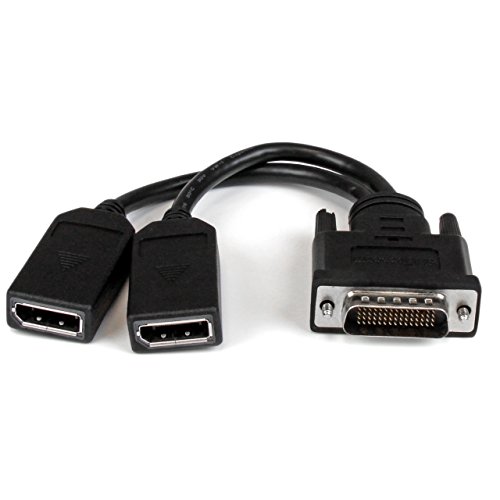
StarTech’s DMS-59 to DisplayPort adapter supports two DisplayPort outputs, enabling a dual-monitor setup with modern DP displays. This is ideal for users who need high-resolution DP connections from a single DMS-59 link, such as graphic design workstations or data analysis rigs. The kit is designed to be durable and easy to install, with a focus on reliable performance for demanding multi-monitor configurations.
Considerations include DP version compatibility, supported resolutions, and whether your DisplayPort monitors require dual streams from a single DMS-59 source. This cable is well-suited for professional environments seeking to maximize modern monitor capabilities without replacing the computer’s DMS-59 card.
cablecc DMS-59 to DVI 24+5 and VGA Splitter

This cable combines DVI and VGA outputs from a DMS-59 source, allowing simultaneous connection to both a DVI monitor and a VGA monitor. It’s useful for setups needing legacy VGA alongside digital DVI displays, such as training labs or multi-device workstations. The product emphasizes compatibility with all DMS-59 graphics cards and provides a practical pathway for older and newer displays in tandem.
Users should verify DVI and VGA monitor capabilities, ensuring the DMS-59 card supports dual-output per this splitter. This option can be a flexible, budget-conscious choice for mixed-display environments where both analog and digital screens are in use.
zdyCGTime DMS-59 to 2 DVI (24+1) Splitter Cable

This DMS-59 to dual DVI splitter provides two DVI outputs from a single DMS-59 connector, enabling high-resolution display support for dual DVI monitors. It’s suitable for workloads that demand high-quality digital outputs from legacy DMS-59-equipped cards, including CAD, video editing, and data visualization. The adapter aligns with AMD, Nvidia, and Matrox-based systems commonly found in business and academic settings.
Technical considerations include ensuring the monitors support DVI-D or DVI-I inputs and that the graphics card sources the DMS-59’s dual DVI capability. This model offers a strong balance of compatibility and performance for dual digital displays while leveraging existing DMS-59 hardware.
chenyang DVI 24+5 to LFH DMS-59 Pin Extension

This extension adapter connects a DMS-59 card to a standard DVI interface, expanding compatibility for PC graphics cards with DMS-59 outputs. It supports all DMS-59 video cards and is suited for users needing to connect DMS-59 devices to standard DVI displays. The device emphasizes broad compatibility with existing graphics cards and standard DVI-enabled displays, making it a practical choice for mixed-display environments.
Buying Guide: DMS-59 Adapter Cable Considerations
- Output type compatibility: Determine whether you need VGA, DVI, HDMI, or DisplayPort outputs and ensure the adapter matches both your monitor inputs and your graphics card’s DMS-59 signaling.
- Number of displays: Some adapters split into two outputs; others provide dual or mixed outputs. Plan for how many monitors you intend to drive and whether you require identical or different signal paths.
- Resolution and signal type: DMS-59 can carry digital or analog signals depending on the adapter. Verify the maximum supported resolutions and whether the path is digital-only or analog-capable.
- Card compatibility: Check if your graphics card supports DMS-59 and whether it supports dual outputs through the connector. Some professional GPUs (Matrox, Nvidia/NVLink variants) commonly use DMS-59.
- Display compatibility: Ensure displays support the chosen input types (VGA, DVI-D, HDMI, DisplayPort). Some older monitors may lack HDMI or DP, making VGA or DVI necessary.
- Cable length and rigidity: Shorter cables reduce signal loss and clutter. Consider the workspace layout and the need for cable management in desks, labs, or classrooms.
- Future-proofing: If planning upgrades, prioritize digital outputs (HDMI/DP) where possible to maximize compatibility with newer displays.
- Installation simplicity: Some adapters are plug-and-play; others may require driver updates or card configuration. Assess ease of setup in a classroom, office, or data-center environment.
Overall, the best pick depends on whether your priority is dual VGA for legacy monitors, digital paths to HDMI/DP displays, or a flexible mixed-output setup. Consider your current hardware, planned upgrades, and the display ecosystem to select the most reliable DMS-59 adapter cable for sustained performance.