Digitizing film negatives and slides preserves memories and makes sharing easy. This guide highlights five reliable options that balance image quality, ease of use, and value for American households. Below you’ll find a quick at-a-glance summary, followed by in-depth product details and a buying guide to help you choose the right scanner for your needs.
| Product | Type / Highlights | Resolution | Screen |
|---|---|---|---|
| KODAK Slide N SCAN | 5″ LCD, quick feed, 135/110/126 | 22 MP | Yes |
| Magnasonic All-in-One 24MP | 5″ display, built-in memory | 24 MP | Yes |
| Kodak Slide N Scan Max | 7″ LCD, easy-load, multiple adapters | 13/22 MP | Yes |
| DigitPro Film & Photo Scanner | 5″ LCD, 4-in-1 function | 8–22 MP equivalent | Yes |
| DigitConvert Digital Film & Slide Scanner | 5″ LCD, quick one-click scan | 22 MP | Yes |
KODAK Slide N SCAN Film & Slide Scanner
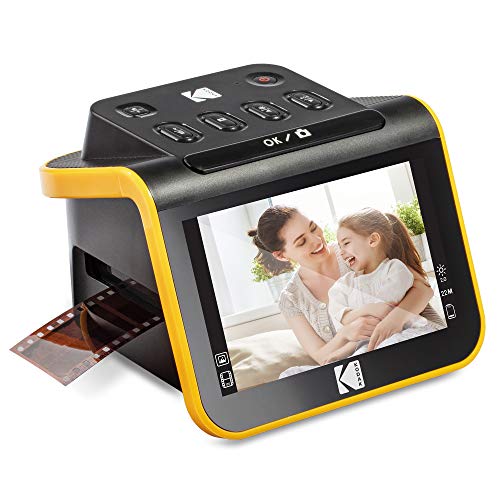
The Kodak Slide N SCAN model offers an all-in-one solution for converting old color and black-and-white negatives and slides into digital JPEG files. It supports 135, 110, and 126 formats and saves files directly to an SD card (not included). The 5-inch LCD provides a clear preview with a gallery mode for quick edits and sharing. Quick-load film inserts streamline continuous scanning, and included adapters support 50mm slides and various film formats. A built-in cleaning brush and USB/HDMI cables round out the package for straightforward digitization.
Magnasonic All-in-One 24MP Film Scanner
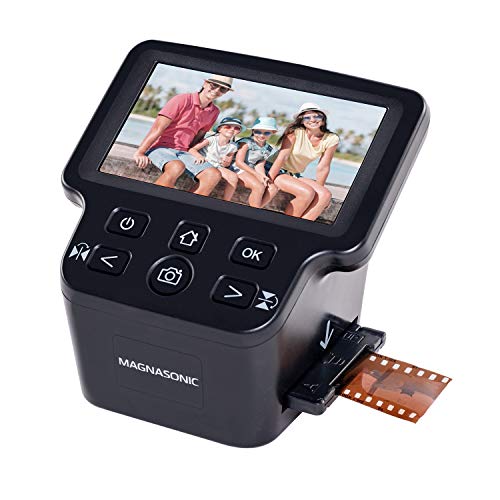
Magnasonic’s all-in-one scanner delivers 24 MP digital JPEGs from 35mm, 110, 126, and Super 8 film negatives as well as 135/126/110 slides. The built-in 5-inch LCD screen lets you view and edit directly on the device, with an HDMI output option for viewing on a larger display. A compact 128 MB internal memory plus an SD card slot (up to 128 GB) enables easy offline storage and archiving of a long history of photos in one place.
Kodak Slide N Scan Max Digital Film Slide Scanner

Kodak’s Slide N Scan Max expands on the original with a larger 7-inch LCD and an upgraded gallery mode for rapid preview and edit. It supports 13/22 MP capture and includes 50mm slide holders along with adapters for 135/110/126 films. The device emphasizes easy loading and fast scanning, making it suitable for hobbyists who want a larger built-in screen for a more tactile reviewing experience while preserving nostalgia in digital form.
Film & Photo Scanner With 5″ LCD Screen (DigitPro)

DigitPro combines a 5-inch LCD preview with a 4-in-1 scanning capability. It digitizes 35mm slides, 135/110 negatives, printed photos, and even business cards in a stand-alone device. The built-in 128 MB memory plus an included 8 GB SD card provides immediate storage, with one-touch scanning simplifying the workflow. This model emphasizes breadth of use, appealing to families seeking a single device for mixed media preservation.
DigitConvert Digital Film & Slide Scanner

DigitConvert focuses on a 22 MP digital film scanning experience with 5-inch LCD and a gallery mode for easy preview and editing. It supports color and black-and-white 135/110 negatives, 50 mm slides, and Super 8 slides. The scanner can save directly to its built-in memory or to an SD card (not included). Simple one-click scanning and a straightforward interface make it suitable for users who want fast results without software, while still delivering high-resolution JPEG outputs.
Buying Guide
When selecting a negative film scanner, consider these factors to align with your needs:
- Resolution and image quality: Higher MP yields crisper scans, especially for aging negatives. Look for 22 MP or above when possible.
- Screen size and workflow: A built-in LCD helps preview and edit without a computer. Larger screens aid review of detailed negatives and slides.
- Media compatibility: Ensure the device accepts your film formats (35mm, 126/110, 135, Super 8, slides, etc.).
- Storage options: Built-in memory plus SD card support provides flexible archiving options for large photo libraries.
- Ease of use: One-touch scanning, quick-load trays, and bundled adapters simplify the digitization process for families and hobbyists.
- Connectivity: USB or HDMI outputs allow direct transfer to a computer or display; some units include HDMI for viewing on a TV or monitor.
- Portability and setup: Foldable or compact designs suit desktop setups or travel use, while larger displays can improve precision at home.
- Price-to-performance: Compare features like LCD size, adapters, and scanning speed to ensure you get value for your needs.
Comparative considerations
For casual archiving, mid-range scanners with 22 MP and a 5-inch display typically strike a balance between convenience and image quality. If you have a lot of 7-inch or larger formats or want a dedicated gallery view, models with bigger screens and more robust adapters may be worth the investment. Built-in memory can be a practical feature when you want to scan away from a computer, while SD card expansion ensures long-term storage capacity. Finally, consider whether you prefer stand-alone operation or the flexibility of connecting to a computer or television for viewing and sharing.