For users seeking a straightforward way to digitize legacy audio with a 3.5mm or RCA line input, these digital recorders stand out. They capture, save, and playback recordings without a PC, offering convenient formats, memory options, and easy transfer to devices or cloud storage. This guide highlights five reliable options, each with line or auxiliary inputs, to help you choose the right device for meetings, lectures, music, and personal archives.
Summary of chosen products
| Product | Brand | Input Options | Storage / Memory | Key Benefit |
|---|---|---|---|---|
| Music Digitizer CD Recorder for Music Audio Capture | HopCentury | 3.5mm & RCA Line In | USB Flash Drive, SD Card (Max 32GB, FAT32) | Standalone MP3 capture from analog sources |
| Sony ICD-UX570 Digital Voice Recorder | Sony | Built-in mic, line input not primary | Internal memory (plus optional microSD) | Enhanced sound quality with compact design |
| DriverGenius AudioXfer Series USB Capture Card | DriverGenius | 3.5mm & RCA inputs | USB connection to PC; local audio formats WAV/MP3 | Plug-and-play capture to computer with editing software |
| Zerone Audio Capture Recorder | Zerone | 3.5mm & Line Input | SD Card / USB Flash Drive | Simple MP3 digitization of analog music |
| Tonfarb 64GB Digital Voice Recorder | Tonfarb | Line Input | 64GB TF card | Long battery life and high PCM quality |
Below are five detailed product sections to help compare capabilities, compatibility, and workflows for digitizing line-input sources.
HopCentury Music Digitizer: Standalone MP3 Recorder

The HopCentury device is designed to capture audio signals directly to MP3 files on USB flash drives, without requiring a computer. It accepts 3.5mm or RCA line outputs from a wide range of equipment, including phones, cassette players, DVD players, game consoles, and TV boxes. The unit records in 128 Kbps at 44.1 kHz, dual-mono MP3 format, making it easy to edit or share files. Users can monitor playback via the LINE OUT port and connect headphones. A microphone-free design targets straightforward digitization rather than professional DJ-grade processing. Memory support includes SD cards and USB flash drives, with FAT32 formatting recommended for compatibility. Maximum micro storage is 32GB on a single card; formatting is important to avoid errors. This is a practical solution for quick archiving of analog music or mixtapes to portable MP3s.
Sony ICD-UX570 Digital Voice Recorder

The Sony ICD-UX570 emphasizes compact design with improved sound capture through its built-in stereo microphones and voice-activated recording. While primarily a voice recorder, its improved mic array supports clear transcription-ready audio for on-the-go interviews, lectures, and personal notes. It integrates seamlessly with USB transfer and offers easy playback. For users who prioritize portable, reliable voice capture with reliable VOX features, the UX570 provides dependable performance with straightforward controls.
DriverGenius AudioXfer USB Capture Card

The DriverGenius AudioXfer series functions as a USB audio capture device that accepts both 3.5mm and RCA inputs. It enables real-time digitization of analog signals into PC-friendly formats such as MP3 and WAV. The device is designed for plug-and-play use with Windows, Mac, and Linux, and it includes professional capture software (Audacity), with a note about 64-bit Mac compatibility and the need to update LAME for certain configurations. This option suits users who want to edit, enhance, or distribute recordings on a computer or in a digital library.
Zerone Audio Capture Recorder

The Zerone model focuses on ease of use for converting analog music to MP3. It supports SD memory cards and USB flash drives, enabling flexible storage options. The device accepts 3.5mm and line inputs, delivering an accessible path to digitize tapes, records, or other line-output sources. The emphasis is on straightforward operation and quick results, suitable for hobbyists looking to archive music collections or personal audio projects without complex setup.
Tonfarb 64GB Digital Voice Recorder
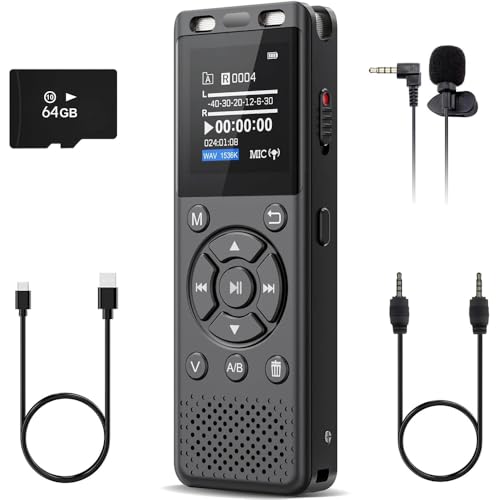
The Tonfarb model provides 64GB of memory via a TF card, combined with a line input for direct analog capture. It emphasizes long battery life and PCM recording at up to 1536kbps, suitable for lectures, interviews, and long field recordings. The device includes one-click recording and saving, ease of use, and a password-protected environment for privacy. It targets professionals and students who need reliable, high-quality audio capture with durable portable design.
Buying Guide: Key Purchase Considerations
Input compatibility and source versatility
– Ensure the device supports the line-level outputs you use (3.5mm and RCA). Some units emphasize line input more than microphone input, which matters for music playback versus field recording.
Storage options and file formats
– Look for devices offering USB flash drive or SD card storage, preferably with FAT32 compatibility. MP3 and WAV/PWM (PCM) formats are common; WAV/PCM offers higher quality at larger file sizes, while MP3 is widely compatible for sharing.
Playback and monitoring features
– A reliable LINE OUT or headphone jack helps verify recordings in real time. Built-in playback is convenient for quick checks before transferring files.
Power, battery life, and portability
– If you plan to digitize vintage media in various locations, battery life and portability are key. Some units provide long playback hours, while others rely on USB power or replaceable batteries.
Software compatibility and editing workflows
– For capture-to-PC workflows, consider devices that include or support standard editing software (e.g., Audacity). Ensure compatibility with your computer’s OS version and 64-bit support if needed.
Ease of use versus professional features
– Decide whether you need a simple plug-and-record solution or a device with advanced controls, noise reduction, and higher sample rates. For casual archiving, a basic model with straightforward operation often suffices; for interviews or lectures, consider noise reduction and VOX features.
Security, privacy, and data management
– Some devices offer password protection, which can be useful for sensitive recordings. Plan how you’ll organize and back up large archives, especially long-term storage on SD cards or USB drives.
Durability and build quality
– If you intend to transport the device regularly, look for robust construction, reliable switches, and comfortable ergonomics for one-handed operation during field work.
Price versus value
– The best device is often the one that meets your essential needs without overpaying for features you won’t use. Consider total cost of ownership, including memory cards, cables, and potential software purchases.
Notes and recommendations
– For best results with old tapes or vinyl, verify the device supports your exact input connections and test a short recording to confirm format, bit rate, and playback quality before digitizing a large library.