For many home theaters, transferring high-quality audio from a TV to a soundbar or receiver requires a reliable HDMI audio extractor. This guide highlights five top options, explaining how each converts HDMI audio to optical, coaxial, or analog formats. You’ll find practical details on setup, supported formats, and compatibility to help you choose the right extractor for your system.
Summary Table of Selected Products
- Unstincer 192KHz HDMI ARC to Optical Audio Converter
- VPFET HDMI Audio Extractor 4K HDMI To Optical + 3.5mm
- AMANKA HDMI ARC Adapter with Optical/Coaxial/3.5mm
- J-Tech Digital 1080P HDMI To HDMI + Audio (SPDIF + RCA)
- avedio links HDMI ARC Audio Extractor DAC
Unstincer 192KHz HDMI ARC to Optical Audio Converter

The Unstincer ARC to Optical Audio Converter is a plug-and-play device that bridges an ARC-enabled TV with an external sound system via an integrated optical SPDIF output. It supports 24-bit/192kHz audio, ensuring high-fidelity transmission from the TV to a soundbar or receiver. Note that the unit targets ARC-enabled TVs and is not designed for eARC or standard HDMI outputs without ARC. The form factor is compact, suitable for home theaters, meetings, and conference rooms where clean, direct audio is required.
VPFET HDMI Audio Extractor With Optical And 3.5mm Output

The VPFET extractor transfers audio from HDMI to optical or 3.5mm outputs. It features three modes: 2.0CH, 5.1CH, and PASS. It uses HDMI 1.4 for up to 4K@30Hz and supports HDCP1.4. Optical output supports DTS 5.1 while 3.5mm outputs PCM 2.0; however, it notes that 7.1-channel formats are not supported. This makes it a practical choice for older AV receivers and soundbars that rely on optical input, while maintaining compatibility with a range of HDMI sources. Requires correct mode selection for audio output.
AMANKA HDMI ARC Adapter With Digital Outputs

The AMANKA ARC adapter provides a convenient ARC audio path from the TV to optical, coaxial, and analog 3.5mm outputs. It supports 192kHz sampling, with 24-bit SPDIF bitstream on left and right channels. The device emphasizes plug-and-play operation with ARC-enabled TVs, simplifying connections when a TV lacks direct audio outputs. It is compatible with HDMI 1.4 cables and highlights ease of use with CEC support for synchronized control between devices.
J-Tech Digital Premium 1080P HDMI To HDMI + Audio
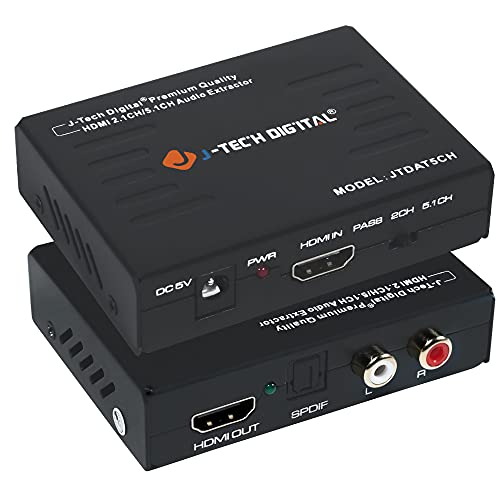
This J-Tech Digital model extracts digital audio from HDMI and outputs it through SPDIF or RCA stereo. It does not support ARC, but it handles up to 1080p video with 4K@30Hz support, 12-bit deep color, and HDCP compatibility. The device is straightforward to use with plug-and-play setup, making it a solid choice when ARC is not required or when a source lacks ARC functionality while still delivering reliable stereo or 5.1-channel audio output via separate receivers.
avedio links HDMI ARC Audio Extractor DAC

The avedio links ARC extractor provides ARC input with multiple outputs: optical, coaxial, and analog 3.5mm. It supports PCM/LPCM and offers simultaneous output across ports, letting users connect to a soundbar, amplifier, or headphones. It emphasizes compatibility with TVs featuring HDMI ARC or eARC and is designed to operate in PCM mode to ensure broad device support. Note the device’s configuration focuses on PCM audio formats, avoiding decoding of advanced surround formats.
Buying Guide
Key considerations when selecting an HDMI audio extractor:
- ARC vs. eARC compatibility: If your TV supports eARC, ensure the extractor can handle it or use a unit specifically marketed for ARC/eARC to avoid synchronization or format issues.
- Output formats: Determine whether you need optical (Toslink), coaxial, or analog (3.5mm/RCA) outputs, and confirm your receiver or soundbar accepts those inputs.
- Supported audio formats: Check for PCM/LPCM, DTS 5.1, and 24-bit/192kHz support if you aim for high-resolution audio. Some devices support multi-channel output while others are limited to stereo or 5.1.
- Video pass-through: If you still need HDMI video, verify whether the extractor supports 4K@30Hz or 1080p, and ensure HDCP compliance with your source material.
- Ease of use: Plug-and-play devices reduce setup time and complexity. Remote control, CEC support, and LED indicators can help with configuration and troubleshooting.
- Compatibility with TVs and devices: Some extractors mention compatibility constraints (eARC, specific HDMI versions). Read product notes to avoid non-working combinations with your gear.
- Build quality and cable length: Consider the length of the HDMI input cable and any included cables, plus power requirements if the unit uses external power.
In practice, the best option depends on your current setup. If your TV frequently issues ARC commands and you rely on a single soundbar or receiver, a dedicated ARC extractor with robust PCM and multi-output options provides flexibility. For systems without ARC or where you prefer ongoing control of channel outputs, devices offering multiple modes (2.0, 5.1, PASS) can simplify compatibility with various receivers. Always confirm the maximum video resolution supported by the source and the extractor to avoid bottlenecks that degrade the viewing or listening experience.
When installing, connect the TV’s HDMI ARC port to the extractor’s HDMI input, then connect the extractor’s optical or coaxial output to your audio device. If using a bass-heavy or subwoofer-enabled setup, verify that the 5.1 mode aligns with your receiver’s configuration. If your TV lacks ARC, you may still utilize optical or coaxial outputs, depending on the extractor’s design. Cable quality and length can influence signal integrity, so prefer shielded HDMI cables and appropriate length for your room layout.
For users prioritizing high-resolution audio, choose extractors that explicitly list 24-bit and 192kHz support. If you need to preserve lip-sync accuracy, look for devices with low-latency design and minimal processing delay. Finally, consider future-proofing by selecting a model that supports common formats and has positive reviews regarding compatibility with current TVs and sound systems.