Converting old photos and video stills into digital files helps preserve memories and makes them easy to share. This guide reviews five popular Amazon options for converting pictures, film, and tapes into JPG, MP4, MP3, or other widely usable formats. Each selection covers different needs—from standalone photo scanners that don’t require a computer to video capture devices that extract footage from VHS, camcorders, and gaming systems. Read on to compare features, inputs, storage options, and outputs to find the best fit for your archive project.
| Product | Brand | Best For | Output Formats | Notes |
|---|---|---|---|---|
| Portta VHS To Digital Converter | Portta | Analog video to digital without a PC | MP4, MP3 | Built-in LCD; USB/TF storage; various inputs |
| Digital Film & Photo Scanner — 22MP | DigitPro | 35mm slides, negatives, and photos | JPEG | Standalone with LCD; supports multiple print sizes |
| DIGITNOW! 135 Film Negative Scanner | DIGITNOW | Film negatives and slides | JPEG (to SD card) | No computer needed; simple feed system |
| ClearClick Video To Digital Converter 3.0 | ClearClick | VCR/VHS and camcorder to USB | MP4, WAV/MP3 | No computer required; requires working VCR/camcorder |
| ClearClick Video To Digital Converter 2.0 | ClearClick | Classic tapes and gaming systems | SD/USB formats | Second generation; standalone capture |
Portta VHS To Digital Converter Review

The Portta unit converts analog video and audio signals into digital formats without the need for a computer. It supports CVBS/R/L, S-Video, and AUX inputs, and records at up to 1080P 30Hz. This device acts as a converter, recorder, and capture box, providing direct USB or SD card storage. A built‑in 3.0″ LCD preview screen enables on‑the‑spot playback and snapshots. It is important to note that it cannot play tapes or DVDs independently; use it to digitize content by feeding it through the converter box and saving to USB/TF storage. Suitable for archiving old home video from VCRs, camcorders, or game consoles when a standalone capture is desired.
Key features include: flexible input options (CVBS/R/L, S‑Video, AUX), MP4 video and MP3 audio outputs, and broad compatibility with NTSC and PAL formats. The device emphasizes plug‑and‑play operation with minimal setup, though users should confirm their storage device capacity and power requirements for large libraries. If you plan to create high‑volume conversions, consider using a larger USB drive or an external power source for high‑capacity storage, as recommended by the manufacturer.
Digital Film & Photo Scanner — 22MP

The DigitPro scanner digitizes 35mm/135 slides and negatives, along with name cards and standard photo prints in sizes 3.5×5″, 4×6″, and 5×7″. Boasting a 22MP scanning capability, it converts physical media into high‑quality JPEG files ideal for digital archiving. A compact 2.4″ LCD preview screen provides real-time viewing and straightforward navigation before saving. This model is designed for ease of use, especially for beginners and casual hobbyists, with a focus on stand‑alone operation—no computer required. It’s a practical choice for families looking to convert a backlog of slides and printed photos into shareable digital copies.
Considerations include the need for SD cards or USB storage for saving files, and the device’s suitability for those who prefer a compact, all‑in‑one scanner without needing software installations. It supports a broad range of photo formats and sizes, making it a versatile option for mixed media archives.
DIGITNOW 135 Film Negative Scanner

The DIGITNOW stand-alone 135 film negative scanner digitizes 35mm film and slides into JPEGs saved on an SD card (up to 32GB). It supports 1800 DPI high resolution, enabling detailed preservation of negatives with simple, computer‑free operation. An adjustable rapid slide feeder expedites processing of multiple films, while the unit offers flexible output options for easy storage and sharing. This scanner is especially suitable for users who want a straightforward, low‑maintenance workflow without connecting to a PC or external software.
Users should consider film format compatibility, the size of the SD card, and the need for a power source for sustained scanning sessions. The device’s stand-alone approach helps minimize setup time and keeps the focus on preserving old film memories efficiently.
ClearClick Video To Digital Converter 3.0

The third‑generation ClearClick converter captures video and audio from VCRs, VHS, AV, RCA, Hi8, camcorders, DVDs, turntables, and cassette players. It records directly to a USB flash drive or MicroSD card (not included) in MP4 720×480 or 640×480 and WAV/MP3 audio formats. This model requires a working VCR/camcorder and tapes, as it does not play tapes by itself. The appeal lies in its simple, no‑software workflow, enabling direct digitization without a computer. It is well suited for users migrating entire collections of home videos and retro media to digital formats for archival and sharing.
Key considerations include ensuring you have functional playback devices, the appropriate USB storage, and the desired output resolution. For archival quality, verify that the recorded video meets your preferred bitrates and frame rates, and prepare for potential post‑processing if you need higher fidelity than the built‑in capture can provide.
ClearClick Video To Digital Converter 2.0
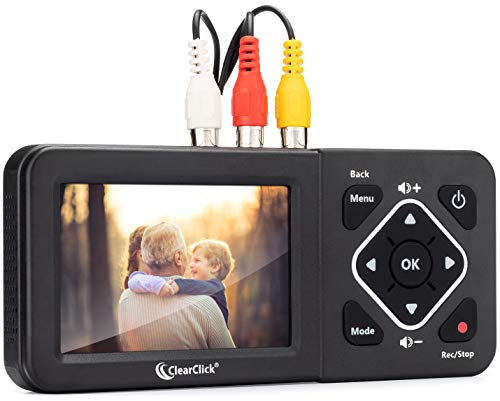
The 2.0 version of ClearClick focuses on recording video from VCRs, VHS tapes, AV, RCA, Hi8, camcorders, DVDs, and gaming systems. Like the 3.0 model, it requires a working VCR/camcorder and tapes and offers a PC‑less workflow by saving directly to USB drives or SD cards (up to 512 GB limit). Output resolutions are SD significantly, with 640×480 or 720×480 options. This model remains a practical option for consumers seeking a budget‑friendly way to digitize legacy media and preserve gameplay footage, family videos, and other analog sources.
Buying Guide: Key Purchase Considerations And Comparisons
- Media type compatibility: If you mainly have photos and slides, a dedicated photo/slide scanner (like DigitPro or DIGITNOW) is often the simplest option. For tapes and camcorders, a video grabber/converter (Portta or ClearClick) is more appropriate.
- Standalone vs. computer dependence: Standalone devices store to USB drives or SD cards, which can simplify workflows and reduce setup time. Computer‑dependent options may offer more editing flexibility but require software and a PC.
- Output formats and quality: Check that the device supports the desired outputs (MP4, JPEG, MP3, WAV) and the resolution you need (720p/1080p for video; high DPI for film photos). Consider whether you need uncompressed audio or stereo LPCM support.
- Storage considerations: Ready access to sufficient USB drives or SD cards is essential, especially for large archives. Some devices require external power for high‑capacity drives during long sessions.
- Input flexibility: A broad range of inputs (CVBS, R/L, S‑Video, AUX) ensures flexibility when dealing with older media players, camcorders, or gaming systems.
- Ease of use vs. control: Standalone scanners emphasize simplicity, while PC‑connected solutions may offer more refined controls, color correction, and batch processing. Balance convenience with desired image quality and workflow needs.
- Preservation and formats: JPEGs are universally shareable, but consider RAW or TIFF options if your workflow demands higher fidelity and future editing flexibility. For video, MP4 with standard codecs provides wide compatibility.
- Future proofing: Choose devices with reliable support, accessible replacement parts, and ability to handle a variety of media types as catalogs grow over time.
- Cost of ownership: Beyond the initial device price, factor in the cost of storage media, potential need for adapters, and the time investment required to digitize large collections.
- Security and updates: Look for devices from reputable brands with updated firmware and clear instructions for safe file handling and data transfer.