Growing devices that need a reliable wired connection—like printers, smart TVs, game consoles, and DVRs—benefit from a plug‑and‑play wireless to Ethernet bridge. The following picks offer simple setup, strong compatibility, and solid performance across homes and small offices. Each product converts a WiFi signal into a stable Ethernet link, so non‑WiFi devices can enjoy internet access without running long cables.
Summary at a glance: this table highlights five adapters chosen for broad compatibility, dual‑band speed, and ease of use. Click the product name to jump to the official Amazon listing.
| Product | Brand | Key Feature | Amazon Link |
|---|---|---|---|
| BrosTrend AC1200 WiFi to Ethernet Adapter | BrosTrend | AC1200 dual‑band with WPS setup | View |
| VONETS VAP11G-300 WiFi Bridge | Vonets | 2.4GHz bridge with multiple modes | View |
| BrosTrend Dual Band 1200Mbps Bridge | BrosTrend | RJ45 port with external antennas | View |
| IOGEAR Universal Ethernet to Wi‑Fi Adapter GWU637 | IOGEAR | Easy WPS setup, 300Mbps max on 2.4GHz | View |
| ioGiant AC1200 WiFi To Ethernet Adapter | IOGIANT | AC1200 speeds, no driver needed | View |
BrosTrend AC1200 WiFi To Ethernet Adapter
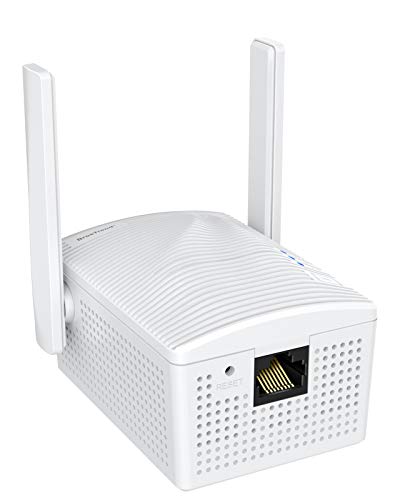
The BrosTrend AC1200 adapter enables Ethernet‑enabled devices to access the internet through a wired or wireless network connection. It plugs into a wall outlet and delivers AC1200 wireless speed, supporting up to 867Mbps on 5GHz and 300Mbps on 2.4GHz. This dual‑band capability helps reduce interference in busy homes and supports smooth streaming, gaming, and fast data transfers for devices like smart TVs, Blu‑ray players, game consoles, and printers. No driver installation is required, making setup quick and straightforward for everyday users.
Compatibility covers a wide range of Ethernet‑enabled devices, including printers, TVs, game consoles, streaming boxes, and network switches. The wireless bridge design focuses on reliability and ease of use, allowing a non‑WiFi device to operate as if it were connected directly to a router. While the product emphasizes performance with AC1200 speeds, actual results can vary with router capabilities and home network congestion.
VONETS VAP11G-300 WiFi Bridge

The VONETS VAP11G-300 offers a compact 2.4GHz WiFi bridge that converts wireless to wired, making it a versatile choice for IP cameras, printers, and PLC devices. With up to 300Mbps on the 2.4GHz band, it can act as a wireless repeater, a bridge, or a point‑to‑point link, depending on configuration. Internal 2×1.5dBi antennas aim to provide stable coverage over moderate distances, and the device supports multiple applications, including smart bridging, wireless to wired, and wired to wireless setups.
Its ability to function as a point‑to‑point transmitter makes it suitable for monitoring or small office networks where a wired device must be placed far from the router. The trade‑offs include potential interference on the 2.4GHz band and a lower overall throughput compared with dual‑band AC devices. Users should ensure the device sits within reasonable range of the router and consider placement for the best signal propagation.
BrosTrend Dual Band 1200Mbps WiFi Bridge
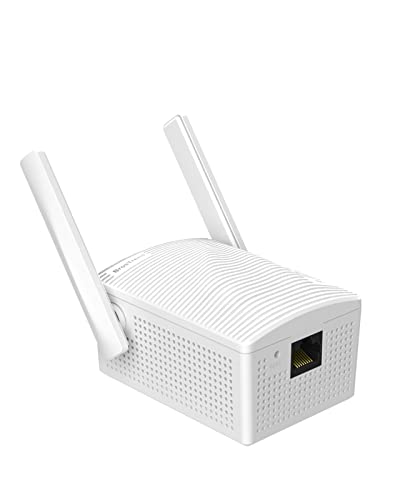
This BrosTrend model converts wired devices to wireless networks with dual‑band 1200Mbps capability and an RJ45 LAN port. The design emphasizes convenient deployment: it allows printers, smart TVs, game consoles, cameras, and other Ethernet‑only devices to connect to a WiFi network without cable clutter. The device relies on external antennas to improve reception and stability, which can translate into more reliable streaming and gaming experiences in typical home layouts.
With a focus on universal compatibility, the adapter targets a wide array of wired devices—from PCs and consoles to network switches and Raspberry Pi units. While the setup is user‑friendly, users should verify router compatibility and ensure the device is positioned to receive a strong signal, especially in larger homes with multiple walls or floors between the router and the bridge.
IOGEAR Universal Ethernet To Wi‑Fi GWU637

The IOGEAR GWU637 adapter enables any Ethernet device to connect to a Wi‑Fi network. It uses dual antennas to provide up to 300Mbps on the 2.4GHz band, delivering a reliable path for file transfers, streaming, and online gaming. The device is designed for straightforward pairing with a wireless router and supports a range of encryption standards to help secure your network traffic. It is not intended to create its own hotspot or mesh network, aligning with a direct router connection approach.
Potential limitations include its exclusion from enterprise authentication or mesh setups, which may affect users with complex networks. For most home users, the GWU637 offers a compact, plug‑and‑play solution that blends smoothly with existing Wi‑Fi infrastructure, particularly for printers, TVs, and desktops that benefit from a stable wired link to a router.
ioGiant AC1200 WiFi To Ethernet Adapter

The ioGiant adapter focuses on high‑speed wireless bridging with AC1200 performance to power a wired device through a standard RJ45 port. It maintains a driver‑free setup, simplifying installation for a broad range of devices, including smart TVs, printers, Blu‑ray players, and DVRs. With a stated emphasis on 867Mbps over 5GHz and 300Mbps over 2.4GHz, the adapter aims to balance range and throughput for media streaming and gaming on devices that lack built‑in Wi‑Fi.
Placement and environmental factors influence performance significantly. A strong line of sight and proximity to the router can maximize the benefit of dual‑band operation. This model is compatible with a wide spectrum of devices, but users should ensure their router supports 5GHz, as the 5GHz bandwidth often delivers the best results for high‑bandwidth tasks when the device is within range.
Buying Guide: Key Purchase Considerations
- Band support and speed: For modern home networks, dual‑band devices (5GHz and 2.4GHz) typically provide better performance and flexibility. Look for speeds that match your router’s capabilities, with 600–1200Mbps class devices offering ample headroom for streaming and gaming.
- Device compatibility: Ensure the adapter supports your target devices (smart TVs, game consoles, printers, DVRs, etc.). Check the presence of a RJ45 Ethernet port and confirm compatibility with your router’s security settings.
- Setup and administration: Drivers aren’t always required, but some adapters offer WPS for quick setup. If you prefer a hands‑off approach, choose models marketed as plug‑and‑play with simple LED indicators for status checks.
- Security features: Prefer adapters that support WPA/WPA2 encryption and provide secure pairing options. Avoid devices that lack basic security considerations for home networks.
- Placement and range: The location of the adapter relative to the router affects performance. If your device sits far from the router, consider models with external antennas or recommended placement guidelines to maximize signal strength.
- Use case and mode flexibility: Some adapters offer multiple modes (bridge, repeater, AP) suitable for different scenarios. Identify your primary use case—one‑to‑one device bridging or broader network extension—to choose the right mode.
- Power and installation footprint: Since many units plug into a wall outlet, verify the physical size and whether the device will obstruct adjacent outlets. Some units require an external power adapter instead of a direct plug‑in.
- Reliability and support: Look for brands with clear documentation, updated firmware, and solid customer support. A longer warranty window can also indicate confidence in product longevity.
In sum, converting a wired device to operate over a wireless network can simplify home setups, reduce cable clutter, and extend internet access to legacy equipment. The selections above are designed to cover a range of budgets, devices, and network environments, helping users achieve stable wired connections through wireless bridges or adapters.