Preserving old memories from VHS, Hi8, MiniDV, and other analog formats often means digitizing them for modern playback. This guide highlights reliable tools and simple approaches to convert small video tapes into DVDs or digital files. Below you’ll find five top-rated devices, a quick product snapshot, and a practical buying guide to help you choose the right option for your setup and timeline.
| Product | Brand | Format Support | Notes |
|---|---|---|---|
| Portta VHS to Digital Converter | Portta | AV/RCA, S-Video, AUX; up to 1080P | Standalone capture with LCD preview |
| Capture Card, USB Video Capture Card Device | VIXLW | RCA to USB; HD 720P | PC/Mac compatible; driverless setup |
| Roxio Easy VHS to DVD 3 Plus | Corel | VHS/Hi8 to DVD or digital | Software suite with editing features |
| VHS TO Digital Converter, USB Video Capture Card | VIXLW | VHS/VCR/Hi8/Mini DV to USB | Plug & Play, universal formats |
| ClearClick Video to Digital Converter 2.0 | ClearClick | VHS/VCR/DVD/Hi8 to USB | Direct-to-USB/SD without computer |
Note: All products listed are designed to digitize analog video sources. If you want a direct-to-DVD workflow without computer steps, look for devices that support direct recording to USB drives or SD cards, along with a built-in preview or playback option.
Portta VHS to Digital Converter

The Portta unit functions as a converter/recorder and captures analog signals into digital formats without a computer. It supports CVBS/R/L and S-Video inputs, plus AUX, with recording resolution up to 1080P at 30 Hz. A built-in 3.0″ LCD offers live preview and playback, though it does not play tapes standalone. Recordings save as MP4 video or MP3 audio, and can be stored on USB drives or TF cards. A power supply is recommended for high-capacity storage devices.
Key features include plug-and-play operation, no software or driver requirements, and a direct-to-storage workflow. This is ideal for users who want a simple, on-device conversion path from older tapes to digital formats. Consider power needs and storage capacity when digitizing longer collections.
Capture Card, USB Video Capture Card Device

This USB capture card is designed to digitize from VHS, VCR, Hi8, and DV tapes to a PC or Mac. It converts analog RCA composite input into HD 720P USB output and captures audio without requiring a dedicated sound card. It emphasizes a driverless, plug-and-play setup for quick digitization, making it a solid option for computer-based workflows and editing in post-production software.
Strengths include straightforward operation and compatibility with common capture software. Users should ensure their capture workflow aligns with 720p output and verify whether additional software is preferred for editing after capture.
Roxio Easy VHS to DVD 3 Plus

Roxio Easy VHS to DVD 3 Plus combines analog-to-digital conversion with built-in editing features. Users can capture from VHS or Hi8 directly to DVD or digital formats, and apply trims, color enhancements, transitions, and noise reduction to restore older footage. The solution is well-suited for home movie projects that require quick editing without external software.
Consider whether you primarily want a DVD authoring flow or broader digital distribution. The software suite supports quick enhancements but may not substitute full-featured video editors for complex projects.
VHS TO Digital Converter, USB Video Capture Card

This VIXLW model emphasizes automatic NTSC/PAL detection and captures to MP4 or other digital formats suitable for editing. It is designed for seamless operation with minimal software requirements, and suggests OBS, PotPlayer, or QuickTime as compatible players or editors. The product highlights a “driveless” setup, appealing to users seeking a simple digitization workflow on Windows or Mac.
Key considerations include compatibility with your operating system, the desired final format, and whether the capture software will be used for more advanced editing or streaming tasks later on.
Oassuose VHS to Digital Converter
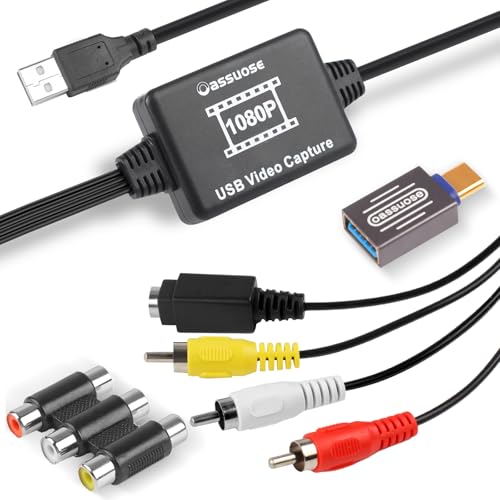
The Oassuose converter supports USB-A and USB-C outputs for 1080P/30fps digitization of analog sources via RCA or S-Video. It emphasizes a plug-and-play setup that requires no drivers, though it notes the need for compatible acquisition software to complete the workflow. It is suitable for users who want a straightforward path from analog inputs to digital storage on a PC or Mac.
When evaluating this option, consider whether you prefer USB-C devices, the capacity of your USB drive, and your chosen software for final editing or sharing with friends and family.
ClearClick Video to Digital Converter 2.0
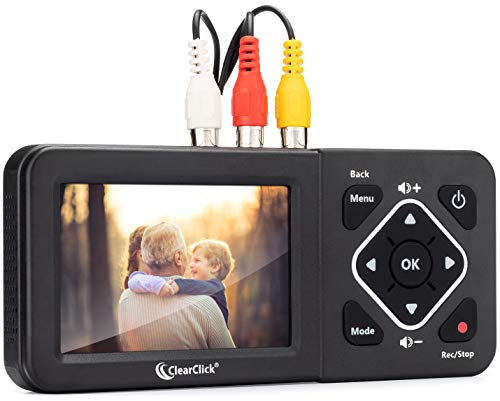
The ClearClick 2.0 is a standalone recording device designed to convert from VCRs, VHS tapes, camcorders, and other analog sources directly to USB flash drives or SD cards. It requires a working VCR/camcorder and tapes, and records at SD resolutions (640×480 or 720×480). No computer or software is required, making it a compelling option for those seeking a simple, all-in-one conversion solution.
Consider the trade-off between standalone operation and the flexibility of adding editing on a computer. This model is best for straightforward preservation projects where you want to minimize additional equipment and steps.
Buying Guide: Key Purchase Considerations And Comparisons
When choosing a device to convert small video tapes to DVD or digital formats, several factors influence suitability and long-term satisfaction. Here are the main considerations from multiple perspectives:
- Output format and quality: Decide if you want high-definition digital files (720P/1080P) or direct-to-DVD. Some devices offer MP4/MP3 outputs, while others burn to DVD or provide SD recording options. Consider future-proofing for playback on modern devices.
- Ease of use: For quick digitization, plug-and-play capture devices with built-in previews are ideal. If you prefer editing, a device that integrates with or supports popular editing software can save time.
- Storage and media needs: Devices with large internal storage or robust USB/SD options reduce the need for constant file transfers. Ensure your USB drives or SD cards have sufficient capacity and power supply for sustained transfers.
- Compatibility: Check whether the device supports NTSC/PAL formats, as well as your computer’s operating system (Windows, macOS). Driverless setups simplify installation, but some configurations require additional software.
- Direct-to-DVD versus digital archives: Some products can burn to DVDs directly; others require separate software or a computer workflow. Identify your preferred final format early.
- Equipment pairing: If you already own a VCR, camcorder, or other analog source devices, ensure the device provides compatible inputs (RCA, S-Video, or AV). Some units require working tapes and may not play tapes independently.
- Budget and collection size: For large tape libraries, a robust, computer-based workflow with reliable software may be more economical and scalable. Standalone devices can be quicker for smaller collections but may limit future editing options.
- Warranty and support: Since these devices operate with aging media, choose models with solid customer support and warranties to handle potential hardware issues over time.
Across the selections, you’ll find a mix of standalone recorders and PC-connected capture cards. If your goal is a simple, one-taper project with minimal setup, consider devices like ClearClick or Portta that emphasize direct recording or preview. If you expect to edit and share across devices, a capture card paired with editing software or a dedicated DVD authoring tool can provide greater flexibility. For archival-grade preservation, test a few inputs with representative tapes to understand color fidelity and audio capture, and plan backups to multiple formats.