Converting an internal CD/DVD drive to an external USB device is a practical upgrade for laptops and desktops lacking optical drives. This guide highlights reliable external enclosures and adapters that support USB 3.0 and USB-C, plus easy plug-and-play use. The selections below emphasize compatibility, power delivery, and broad OS support, helping you access discs, create backups, or install software with minimal setup.
| Product | Brand | Key Benefit |
|---|---|---|
| Amicool External DVD Drive | Amicool | Dual USB interfaces (USB 3.0 + Type-C) for fast, flexible data transfer |
| NexStar DX2 USB 3.0 External Enclosure | Vantec | 5.25″ enclosure with universal drive depth support and low-noise aluminum shell |
| Rioddas External CD/DVD Drive | Rioddas | Plug & play with a dedicated eject button and copper mesh for stable transmission |
| ROOFULL External CD/DVD Drive (USB 3.0) | ROOFULL | All-in-one reading/writing with USB 3.0, burn/rip capabilities, broad OS support |
| ROOFULL External CD/DVD Drive (USB 3.0 & USB-C) | ROOFULL | Dual USB-C/USB-A connectivity with SD/TF card reader, portable and versatile |
Amicool External DVD Drive With USB-C

The Amicool drive is a plug-and-play external optical solution compatible with Windows, macOS, Linux, and more. It includes both USB 3.0 and USB Type-C interfaces, delivering up to 5 Gbps data transmission for DVD and CD formats. For best performance, connect directly to a desktop rear USB port to provide stable power and minimize connection issues. It supports common formats such as DVD+R, DVD-R, CD-R, and CD-RW, with read/write speeds up to 8x for DVDs and 24x for CDs. Note that DVD-RAM, Blu-ray, and some proprietary formats are not supported. This model targets general computer users who want a portable, compatible solution without installing drivers.
NexStar DX2 USB 3.0 External Enclosure

The NexStar DX2 is a versatile 5.25″ enclosure designed to fit Blu-ray, CD, and DVD drives with adjustable depth up to 185mm. It comes with a 12V, 3A power adapter to ensure reliable operation, and its aluminum alloy housing reduces noise and vibration. USB 3.0 delivers up to 5 Gbps, with hot-swappable convenience for systems with USB ports. The enclosure supports adding a 3.5″ or 2.5″ HDD/SSD through a separate mount bracket, turning a drive into a broader storage device when needed. Ideal for users seeking a robust, expandable external optical solution.
Rioddas External CD/DVD Drive
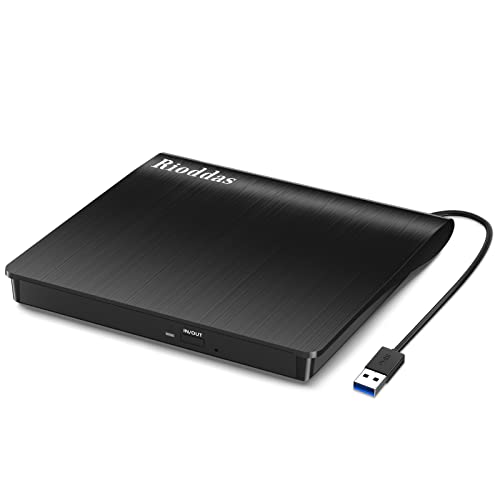
The Rioddas model emphasizes true plug-and-play capability with no driver or external power supply required. It works across Windows, macOS, Linux, and most desktop setups, with USB 3.0 compatibility (backwards compatible with USB 2.0). A back-of-desktop USB port is recommended for stable power and performance, especially on machines with limited power output. The device includes a physical eject button for convenient media management and features copper mesh to improve data integrity during reads and burns. It’s suitable for general multimedia playback, software installation, and disc backups.
JKNJX External CD/DVD Drive

JKNJX offers a portable external CD/DVD option with USB 3.0 and Type-C interfaces. It emphasizes high-speed data transfer up to 5 Gbps, compatibility with Windows, Mac, and Linux, and a broad range of disc formats including CD-ROM, DVD-ROM, and various rewritable formats. It is designed for quick setup—no extra drivers—and works well for users who need a lightweight drive for travel or home use. Note that some external media types or platforms may require specific software configurations for optimal playback or burning.
ROOFULL External CD DVD Drive With USB Hub

This ROOFULL model adds a USB hub and SD/TF card reader alongside standard CD/DVD read/write capabilities. It provides USB 3.0 connectivity and dual connectors for flexibility in powering and operating the drive on laptops or desktops. It supports a wide range of disc formats (CD-R, CD-RW, DVD±R/RW, DVD-RAM) and works with Windows, macOS, and Linux. It’s presented as a comprehensive option for users who want an external drive plus extra peripheral ports in one compact package, useful for data transfer, disc creation, and OS installation scenarios.
ROOFULL External CD/DVD Drive With USB-C And Card Reader

This ROOFULL variant combines USB-C and USB-A connections with a built-in SD and microSD card reader. It supports reading and writing CD/DVD formats, offering 5 Gbps USB 3.0 speeds and compatibility across Windows, macOS, and Linux. The dual-connector design ensures broad compatibility with modern laptops that favor USB-C for power and data. The included carry case makes it portable and suitable for on-the-go disc handling, backups, or OS installation tasks that require an optical drive.
Buying Guide: Key Purchase Considerations
- Interface and power: USB 3.0 is standard for fast transfers; USB-C may offer better compatibility with newer laptops. Some drives require direct connection to a PC’s USB port (not a hub) to ensure sufficient power.
- Drive compatibility: Check supported formats (CD-R, CD-RW, DVD±R/RW, DVD-ROM, etc.). Blu-ray and certain Blu-ray-protected discs are usually not supported by external drives.
- OS and software needs: Most drives are plug-and-play, but some may require optional burning or playback software on Windows, macOS, or Linux.
- Portability vs. features: If you want extra ports or a snug carrying case, consider a model with USB hubs or additional card readers, like the ROOFULL 8-in-1 variant.
- Depth and mounting: For 5.25″ enclosures, ensure your drive depth is compatible (some enclosures accommodate a wide range of depths up to 185mm).
- Build quality and noise: Aluminum housings help reduce vibration and noise. A sturdy enclosure improves long-term reliability for frequent travel use.
- Power considerations: Desktop setups may benefit from rear USB ports with higher power delivery; laptops might require external power adaptors for certain drives.
- Boot and OS utilities: Some drives can be used to create bootable discs or rescue media, which can be valuable for maintenance or OS installations.
When selecting an external drive, align the enclosure’s features with your typical use: media playback, disc burning, OS installation, or data backups. The options above cover common needs, from compact plug-and-play models to feature-rich hubs with SD card readers and enhanced cooling. Always verify current OS compatibility and drive depth before purchasing to ensure seamless integration with your computer setup.