For photographers and collectors, turning old film into sharp digital images is easier than ever with affordable adapters and LED backlights. This article explores practical film digitizing solutions you can use with a DSLR or mirrorless camera, focusing on 35mm and 120 format film. We’ll compare five top kits that convert negatives and slides into high-quality digital files, helping you preserve memories without specialized scanners. Each option works with common camera brands and macro lenses, offering varying light, distance, and adaptability to suit different workflows.
| Product | Brand | Main Benefit |
|---|---|---|
| JJC Negative Film Digitizer for 35mm 120 Format Film | JJC | Bright backlight and adjustable rail for precise focus |
| JJC Slide and Film Digitizing Adapter Kit | JJC | Multi-lens compatibility for versatile setups |
| Upgraded 35mm Film Digitizing Adapter | JJC | Longer reach and adjustable brightness |
| JJC ES-2 Film Digitizing Adapter Set Kit | Kiorafoto | Macro-lens compatibility with multiple adapters |
| Film Digitizing Adapter Set with LED Light | Kiorafoto | LED lighting with five rings for soft illumination |
Introduction to the topic: To digitize film effectively, you generally align a camera with a film holder, illuminate the film, and capture the image with a macro lens. The five products below offer different balance points of ease of use, versatility, and light control. They are designed to work with entry-level to professional cameras, enabling a non-destructive workflow that preserves original film while producing high-resolution digital files suitable for sharing or archiving.
JJC Negative Film Digitizer For 35mm 120 Film

The JJC digitizer is designed to convert 35mm and 120 format negatives into digital files using an existing DSLR or mirrorless camera and lens. It features a slide rail for precise front-to-back adjustment with shooting distances between 10.4 inches and 18.5 inches (265–470 mm). A 10-level brightness LED backlight supports brightness control, and the setup includes a macro lens recommendation for improved focus. This option emphasizes a straightforward workflow with adjustable focus and distance to optimize image quality.
JJC Slide And Film Digitizing Adapter Kit

This adapter kit is built for re-photographing 35mm negatives and slides with select macro lenses, replacing Nikon ES-2 and ES-1 adapters. It includes seven different lens adapters to fit Canon, Nikon, and Sony macro lenses. The kit recommends using a natural light source or a high-CRI fluorescent light for digitizing film and suggests pairing with a dedicated LED backlight. It offers broad compatibility and flexibility for users with multiple camera brands.
Upgraded 35mm Film Digitizing Adapter
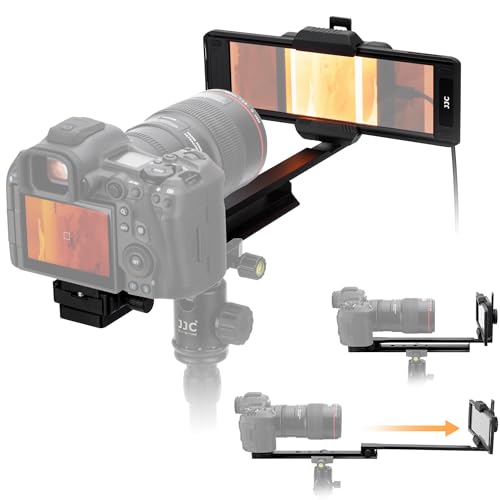
The upgraded adapter supports 35mm and 120 format film with a durable aluminum slide for flexible distance adjustment from 10.4” to 18.5” (265–470 mm). It includes a locking knob to secure positioning and precise image capture. The backlight supports 11 brightness levels via a Type-C power supply and 1/4” threaded compatibility for mounting to the rail. This option emphasizes robust construction and adjustable lighting for consistent results across sessions.
JJC ES-2 Film Digitizing Adapter Kit
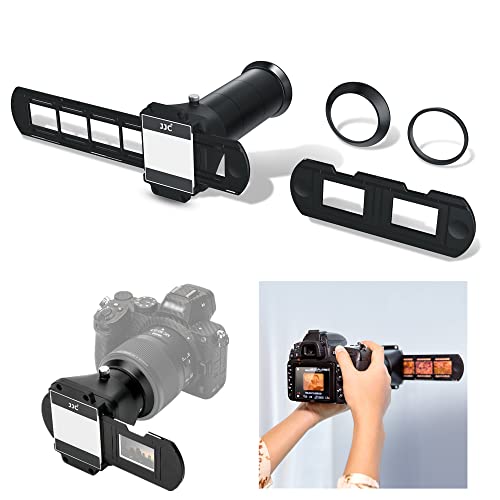
The JJC ES-2 kit is designed specifically for negative copying and converts 35mm film and slides to digital files. It includes five adapter rings to fit different camera macro lenses, enabling compatibility with Canon, Nikon, and Sony systems. The kit emphasizes straightforward setup with a simplified insert-and-shoot workflow, allowing users to digitize negatives and slides directly. It is particularly suitable for users who already own compatible macro lenses and want a compact solution.
Film Digitizing Adapter Set With LED Light

This set includes an LED backlight with 42 built-in LEDs and a soft diffusion cover to reduce glare and color shifts. The color rendering index (CRI) is designed to present vivid details at a 6500K color temperature, paired with five adapter rings to fit various macro lenses. It is compatible with Canon, Nikon, and Sony systems and emphasizes consistent, bright illumination for precise digitization of both negatives and slides.
VHS To Digital Converter 2.0

While primarily focused on converting analog video to digital, this device demonstrates the broader trend toward simple-to-use digitization workflows. It supports AV/RCA and S-Video inputs and outputs up to 1080P. The built-in 3.5-inch preview screen and simple, one-touch controls illustrate how digitization can be accessible without a computer or software. This option complements film digitizers by highlighting how different media formats can be preserved digitally using standalone devices.
Buying Guide
- Format compatibility: Choose a kit that supports 35mm and 120 format film if you have a mixed collection. Some adapters specifically target slides or certain film sizes, so verify format coverage before purchase.
- Lens compatibility: Consider macro lens compatibility and the number of adapter rings included. Kits with multiple lens adapters allow use with Canon, Nikon, and Sony systems, expanding future options.
- Lighting quality: Backlighting is essential for even illumination. Look for adjustable brightness levels and diffusion to minimize hotspots and color shifts on scans or photos.
- Distance and focus control: A slide rail or adjustable distance helps achieve accurate focus. Locks or tightening knobs ensure stable positioning during shooting, reducing the need to recompose.
- Portability and setup: If you digitize in multiple locations, lighter kits with simple assembly offer more flexibility. Heavier, sturdier rails may improve accuracy for long sessions.
- Output quality: Evaluate the resolution and color accuracy of the resulting digital files. Some kits rely on your camera’s native resolution, so pairing with a capable macro lens is advantageous.
- Power and connectivity: Backlights powered by USB-C and standard connectors simplify setup. Ensure your camera supports the required macro focal range for best results.
- Usage scenario: For large volumes of slides, a dedicated scanner might be faster; for limited projects and variety, a camera-based digitizing rig offers versatility and high control over exposure and color.
Overall, the best option depends on your current camera system, the types of film you own (35mm vs. 120), and how much you value adjustable light and precise distance control. The five products above provide a spectrum of approaches—from compact, Nikon/Canon/Sony-compatible kits to more robust rails with adjustable brightness—so you can select a setup that aligns with your workflow and archival goals.