Converting old analog tapes to digital formats helps preserve memories and makes them easy to share. The following five devices are designed to capture VHS, Hi8, Mini DV, and other tape formats and store them as MP4, MP3, or similar digital files. Each option emphasizes simple, PC-free recording or easy transfer to a computer. Use this guide to compare features, input options, storage support, and output quality to pick the right converter for your collection.
| Product | Brand | Key Format Support | Storage Options | Notable Feature |
|---|---|---|---|---|
| Portta VHS to Digital Converter | Portta | VHS, Hi8, Mini DV, DVD inputs via AV/S-Video | USB/TF card (no capacity limit stated) | Built-in 3.0″ LCD preview |
| Roxio Easy VHS to DVD 3 Plus | Corel | VHS, Hi8, V8 to DVD or digital | Direct DVD burning and digital formats | Video trimming, color enhancement, transitions |
| Oassuose VHS to Digital Converter | Oassuose | VHS/VCR, Hi8, Mini DV via RCA/S-Video | USB/USB-C output to PC/Mac | Plug-and-play with no driver |
| ClearClick Video to Digital Converter 2.0 | ClearClick | VHS/VCR, AV/RC, Hi8, Camcorder, DVD, Gaming | USB flash drive or SD card (not included) | No computer needed; direct recording |
| DigitPro VHS to Digital Converter 2.0 | DigitPro | VHS/VCR, DVD, Hi8, Camcorder inputs | USB/TF card up to 512GB | One-touch conversion with HDMI output option |
Portta VHS To Digital Converter

Portta’s device handles analog video and audio signals and converts them to digital formats up to 1080P/30Hz. It accepts CVBS+R/L, S-Video, and AUX inputs, enabling easy capture from VHS, VCR, DVR, and DVD players. It does not play tapes itself but acts as a converter/recorder, suitable for direct storage to USB drives or TF cards. The built-in 3.0″ LCD and speaker allow preview and playback without a PC. This model emphasizes a simple, plug-and-play workflow with straightforward settings for input volume and capture direction.
Roxio Easy VHS To DVD 3 Plus

Roxio Easy VHS to DVD 3 Plus focuses on converting analog tapes to DVD or digital formats with direct capture from a camcorder or VCR. It supports burning to DVD and converting to digital formats to share across devices. The software bundle enables basic video editing features like trimming, color enhancement, and noise reduction, helping restore and modernize aging footage while preserving original content for easy distribution.
Oassuose VHS To Digital Converter
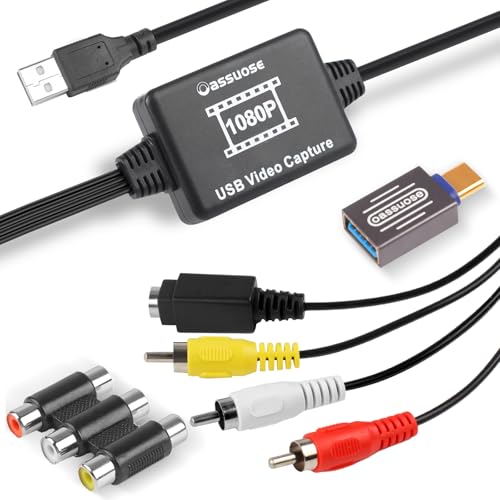
The Oassuose converter emphasizes compatibility with RCA or S-Video interfaces and offers 1080P/30fps output via USB-A or USB-C. It supports direct capture from VHS, VCR, DVD, Hi8, DV tapes, camcorders, and other sources to a PC or Mac without requiring drivers. It is designed for straightforward plug-and-play use, with emphasis on preserving memories by digitizing and saving them on a computer for easy sharing and archiving.
ClearClick Video To Digital Converter 2.0
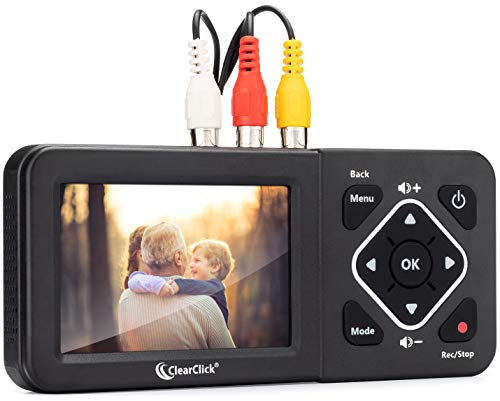
ClearClick’s second-generation model records directly from VCRs, VHS tapes, AV/RCA inputs, Hi8, camcorders, DVDs, and gaming systems. A working VCR/camcorder and tapes are required. It does not upscale to HD and does not record from modern HDMI sources. Recording goes directly to USB flash drives or SD cards, with no computer or software required. The device is designed for simple one-touch operation with SD/USB storage as the primary destination.
DigitPro VHS To Digital Converter 2.0

DigitPro’s 2.0 model offers one-touch digital conversion from various analog sources, with support for AV/RCA and S-Video inputs. It records up to 1080P/30Hz and can store on USB/TF cards up to 512GB. It emphasizes a direct, computer-free workflow, while also providing an HDMI output option for real-time viewing on a larger display. The inclusion of scheduling and auto pause/resume features adds convenience for longer tapes or home videos with interruptions.
Buying Guide
Key purchase considerations help users pick a device that fits their setup and goals. Consider input formats and compatibility with your tapes (VHS, Hi8, Mini DV, etc.) and whether you need analog-to-digital capture with or without a PC. Storage options vary, from USB drives to SD/TF cards; check capacity limits and whether power adapters are required for larger drives. Output formats matter: MP4 and MP3 are common for easy sharing, while DVD burning is available on some models. Preview displays, built-in editors, and automated features (auto-pause, time stamping) can save time on long tapes. Finally, ensure the device supports NTSC/PAL formats if you have international tapes, and verify that any required software or drivers are either included or clearly not needed.
Depth of features varies by model. If you want simple, plug-and-play recording with a direct USB/SD path, models like ClearClick and DigitPro prioritize that flow. If you prefer additional editing tools and direct DVD burning, Roxio Easy VHS to DVD 3 Plus provides broader software capabilities. For hands-off archiving with a preview screen, Portta’s unit adds live monitoring via its built-in LCD. Assess whether you need HDMI output for live playback on a larger screen or direct USB capture for computer-based editing. Aligning these aspects with your tape library will yield the best archival results.